OpenClaw Configuration: The 4 Decisions You Make Once
OpenClaw configuration sits in your state directory, by default at ~/.openclaw/. The official documentation points at openclaw.json as the config file, and I would treat that as authoritative. Environment variables sit alongside it and take precedence over what the file says.
Before you open anything, there is a problem with this topic that cost me an hour and will cost you longer.
Two Formats Are Documented, and Only One Is Official
When I searched for OpenClaw configuration, I found two completely different schemas presented with equal confidence.
The official configuration reference describes a JSON5 file with top level blocks called gateway, models, agents and hooks.
A widely indexed community documentation site describes something else entirely: a YAML file at ~/.openclaw/config.yml, with blocks called brain, hands, heartbeat and memory.
Those are not two views of the same thing. Different filename, different format, different section names.
I would follow the official docs. The community version also lists a default model that belongs to a previous Claude generation, which suggests it has not been updated in a while, and editing a file the Gateway never reads is the most frustrating way to spend an evening.
If you have been editing config.yml and nothing has changed, that is almost certainly why.
Decision One: Where the Gateway Listens
This is the most consequential setting in the whole file, and it is a security decision dressed up as a networking one.
The Gateway binds to an address and a port. The default port is 18789, and the default bind address is 127.0.0.1, which is loopback. I read that as meaning only the machine itself can reach it.
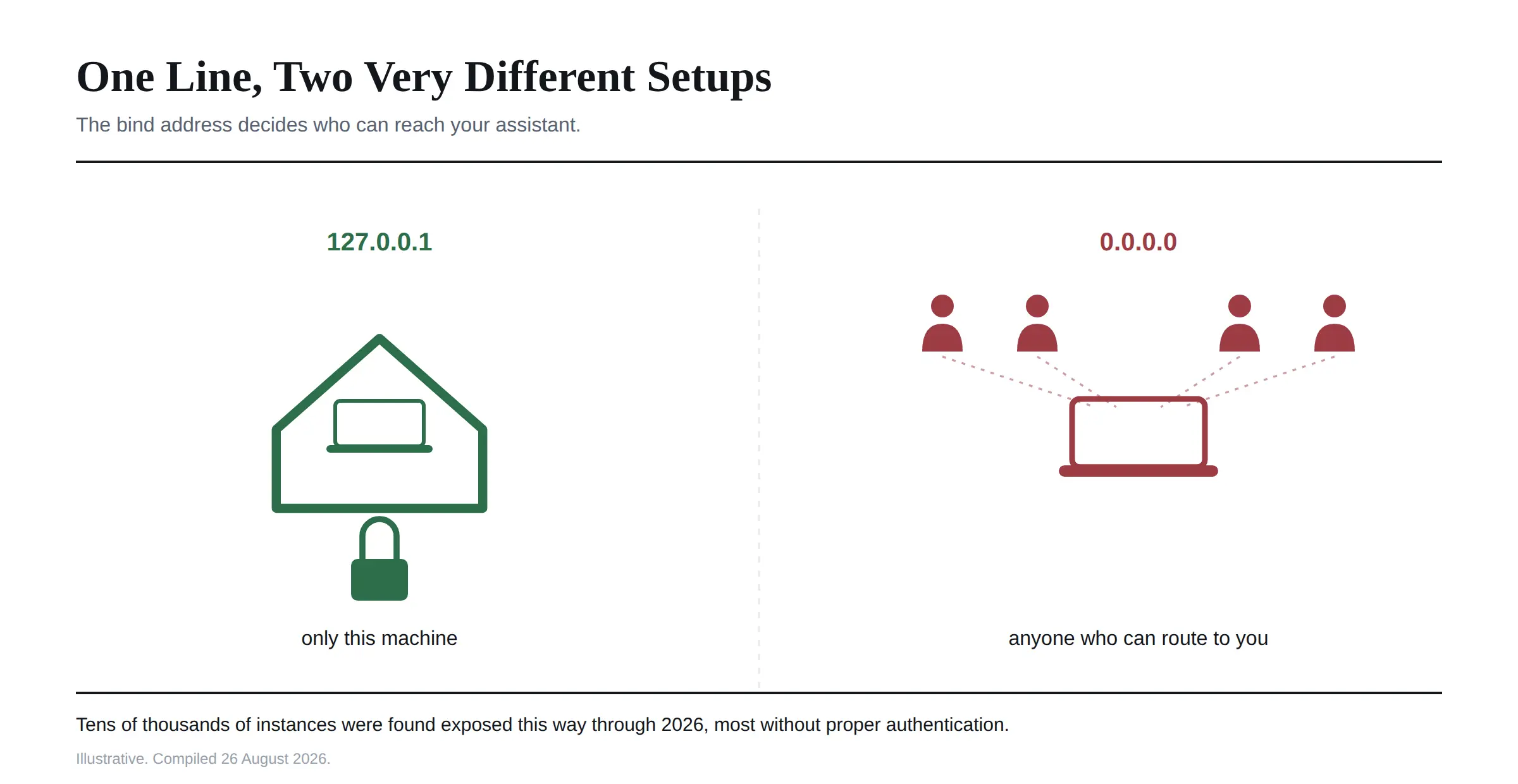 Changing that to
 0.0.0.0 binds to every network interface, which makes the Gateway reachable from anywhere that can route to your machine.
People do this to reach their assistant from a phone or another computer, and it is the single change most likely to get you into trouble. Exposure counts published through 2026 found tens of thousands of OpenClaw instances reachable on the public internet, a majority of them running without proper authentication.
Leave it on loopback unless you have a specific reason not to. If you genuinely need remote access, do it through a tunnel or a VPN rather than by opening the bind address, and read our piece on whether OpenClaw is safe first, because the vulnerability history here is directly relevant to that choice.
Decision Two: How Your Keys Get In
This trips people up more than any other part of OpenClaw configuration. There are five places an environment variable can come from, and I did not expect them to behave the way they do.
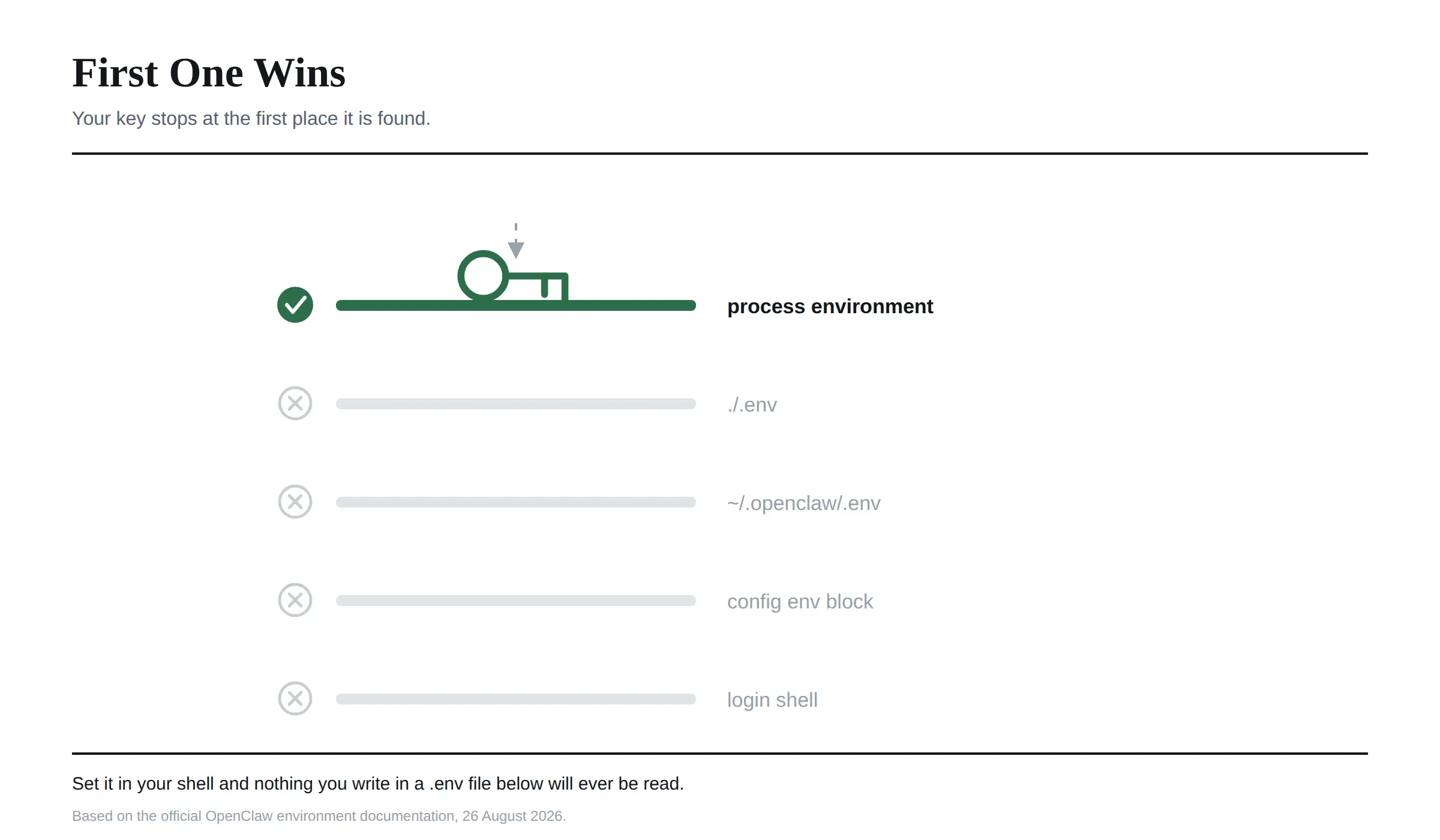 The governing rule is that OpenClaw never overrides a value that is already set. Not "last one wins". First one wins.
In order of precedence, highest first: the process environment the Gateway inherited from whatever launched it, then a .env in the current working directory, then a global .env at ~/.openclaw/.env, then an env block inside the config file itself, and finally an optional import from your login shell.
That order explains the most common confusion I found. If a key is already set in the shell that started the Gateway, editing your .env file does nothing at all. The file is lower priority, and the existing value wins.
Two further details worth knowing. Workspace .env files are treated as a lower trust source, and OpenClaw deliberately ignores provider credentials coming from them before applying precedence. And you can reference an environment variable directly inside a config string using ${VAR_NAME} syntax, which is how you keep an API key out of a file you might share.
Decision Three: Which Model It Runs On
OpenClaw is model agnostic, which is genuinely one of its better qualities, and the configuration reflects that.
Providers are configured under a models block, each with its own credentials. I would always supply an API key as an environment reference rather than writing it in plainly.
The environment variable names follow the pattern you would expect from each vendor, ANTHROPIC_API_KEY for Claude, OPENAI_API_KEY for GPT models, XAI_API_KEY for Grok. Local models are supported too, pointed at a local endpoint, which is the route to take if you want nothing leaving your machine.
Two settings here are worth more thought than people give them.
A fallback provider means the assistant keeps working when your primary provider has an outage or you hit a rate limit. Cheap insurance.
And if your setup runs scheduled background activity, consider pointing that at a smaller, cheaper model than your main one. Background work is repetitive and rarely needs frontier reasoning, and an agent quietly running a heavy model on a schedule is the fastest way to a surprising bill.
Decision Four: What It Is Allowed to Touch
This is where configuration stops being administrative and starts being about consequences.
The execution settings control whether shell access is enabled, whether browser automation is available, which filesystem paths can be written to, and which are blocked outright. I would treat this block as the one worth reading twice. Sensitive directories such as ~/.ssh are the obvious candidates for the blocked list.
Sandboxing is the setting I would look at hardest, because tools run on your host by default unless you turn it on.
I said in our install guide that an install is the start of the setup rather than the end of it. This section is what I meant. A default configuration is a working configuration, not a safe one, and the gap between those two is entirely made of settings in this block.
Making OpenClaw Configuration Changes Take Effect
A few practical notes that saved me time.
The Gateway has a reload capability, so not every change requires a full restart, though restarting is the reliable option when something is not behaving.
The state directory can be moved by setting OPENCLAW_STATE_DIR, which matters if you run more than one instance on the same machine and want them properly isolated from each other.
And if a change appears to do nothing, I would work down the precedence order from the top rather than editing the same file repeatedly. Every time this caught me out, something higher up the chain had already set that value.
Frequently Asked Questions
Where is the OpenClaw configuration file?
In the state directory, ~/.openclaw/ by default. The official documentation points at openclaw.json. You can relocate the whole directory with the OPENCLAW_STATE_DIR environment variable.
Why is my OpenClaw configuration not working?
Most often because something higher in the precedence order already set that value. The process environment beats a .env file, which beats the config file's own env block. Check from the top down. The other common cause is editing a config.yml described in unofficial documentation rather than the file the Gateway actually reads.
What port does the OpenClaw Gateway use?
Port 18789 by default, bound to 127.0.0.1. Both are configurable in the gateway block or through environment variables.
Should I change the OpenClaw bind address to 0.0.0.0?
I would not. That exposes the Gateway to every network interface, and published scans through 2026 found tens of thousands of instances exposed this way, most without proper authentication. Use a VPN or tunnel for remote access instead.
How do I set my API key in OpenClaw?
Through an environment variable such as ANTHROPIC_API_KEY or OPENAI_API_KEY, referenced in the config with ${VAR_NAME} syntax rather than pasted in as a literal string.
How do I change which model OpenClaw uses?
In the models block, by setting the provider and model identifier. It supports Claude, GPT, Grok and local models, and you can configure a fallback provider for outages.
Can OpenClaw use a local model instead of an API?
Yes. Point it at a local endpoint, which is the configuration to use if you want prompts never leaving your machine.
Do I need to restart OpenClaw after changing the config?
Not always, since the Gateway supports reloading. Restarting is the reliable choice when a change does not appear to take effect.
How do I stop OpenClaw accessing sensitive folders?
Through the filesystem settings, by listing blocked paths such as ~/.ssh and limiting writable paths to directories you have chosen deliberately. Enable sandboxing as well, since tools run on the host by default.
Your First Twenty Minutes
If you have just finished installing OpenClaw, do these four in order.
Confirm the bind address is still loopback. Move your API key into an environment variable rather than the config file. Set a fallback provider. Then decide, deliberately rather than by default, what the agent is allowed to reach on your machine.
Everything else in the configuration reference is tuning. I would argue those four are the only ones that decide whether this thing is useful and whether it is safe, and they are worth twenty minutes now rather than an incident later.
Configuration details were checked against the official OpenClaw documentation on 26 August 2026. This project ships frequently and configuration keys do change between versions, so treat the official reference as authoritative over any guide, including this one.