10 Best AI Logo Generators in 2026: I Tested Them on One Brief
The best AI logo generator for most small businesses is Brandmark. It showed me finished logos in about 10 seconds without an account, used my slogan, and its $35 one-time Basic package includes both PNG and vector files with full copyright. If you want a more custom, creative logo, Ideogram followed my brief best and spelled every word right. If you want a full brand kit, Looka is the strongest, but it was not even available in my country.
I gave the same brief to all 10 tools: a logo for "Lumen Bakery", slogan "Baked Fresh Every Morning", warm colors, a rising sun and a bread icon. Here is the quick version:
AI logo maker | Best for | Saw a logo without signing up? | Cheapest way to get vector files |
|---|---|---|---|
Brandmark | Best overall value | Yes, in about 10 seconds | $35 one-time |
Ideogram | Creative, custom logo concepts | Needs a free account | Vector app, uses credits |
Looka | Complete brand kit | Blocked in my country | $72 one-time |
Recraft | Vector icons and illustrations | Needs a free account | Paid plan for commercial use |
Canva | Editing a logo yourself | Needs a free account | Pro plan |
Design.com | Quick template ideas | Yes, but email to download | Not shown publicly |
LogoAI | Logo plus brand videos | No, sign-in first | $10 trial, then $20/month |
Tailor Brands | Logo plus business setup | No, 8 screens then sign-up | Shown after sign-up |
Adobe Express | Adobe users | Needs a free account | Not tested |
Wixel (Wix) | Wix website owners | No, account first | Shown after sign-up |
What Is an AI Logo Generator?
An AI logo generator is a tool that uses artificial intelligence to design a logo for you. You may also see it called an AI logo maker, AI logo creator or AI logo design tool. This kind of automated logo creation is part of AI-powered graphic design. You type your business name, maybe a slogan and a few words about your brand, and it creates logo concepts in seconds. You can then change the colors, fonts and icon until it fits your brand identity and visual identity.
There are really two kinds of AI logo makers, and knowing the difference saves a lot of money:
Dedicated logo platforms like Brandmark, Looka, LogoAI and Tailor Brands. They mix AI with designer-made logo templates, icons and font pairings. You get editable logo files, logo variations, logo mockups and often a brand kit.
AI image generators like Ideogram, Recraft and ChatGPT. They use text-to-image generation to draw a brand-new logo from your prompt. The results can be far more original, but you usually get an image, not a full set of brand assets.
Neither kind is "better." A small business that needs business cards and social media branding next week is better off with a logo platform. A creator who wants a unique mascot logo or abstract logo may prefer an image generator.
How Do AI Logo Generators Work?
Most AI logo makers follow the same steps:
You give a brief. Your business name, slogan, industry and a few style words.
The AI picks the pieces. Logo platforms choose an icon, font selection and color palette from huge libraries and arrange them into layouts. Image generators build the whole logo from scratch with generative AI design.
You customize. You change brand colors, custom typography, icon selection and layout until it looks right.
You pay to download. This is where the real differences show up: some tools give you one PNG, others give you SVG, EPS and PDF files with transparent backgrounds.
The logo types you will see are the same ones designers use: a wordmark (just the name), a lettermark (initials), an abstract logo (a symbol), a mascot logo (a character) and a combination mark (icon plus text). For my test, I asked every tool for a combination mark.
How I Tested These AI Logo Makers
On 16 November 2026, I went through all 10 tools in Chrome on Windows. I used the same brief everywhere, as close as each tool allowed:
Name: Lumen Bakery
Slogan: Baked Fresh Every Morning
Keywords: bakery, bread, sunrise
Style: warm colors, simple and modern, icon plus text
For each tool, I recorded four things:
Could I see a logo before creating an account?
Did it follow the brief, including the slogan and the sun and bread idea?
What does the first payment buy, and in which file formats?
What do its terms say about commercial use and ownership?
I did not buy anything. Prices come from each official pricing page on the same day.
Test 1: Same Brief, Real Results
Three tools showed me logos I could compare side by side:
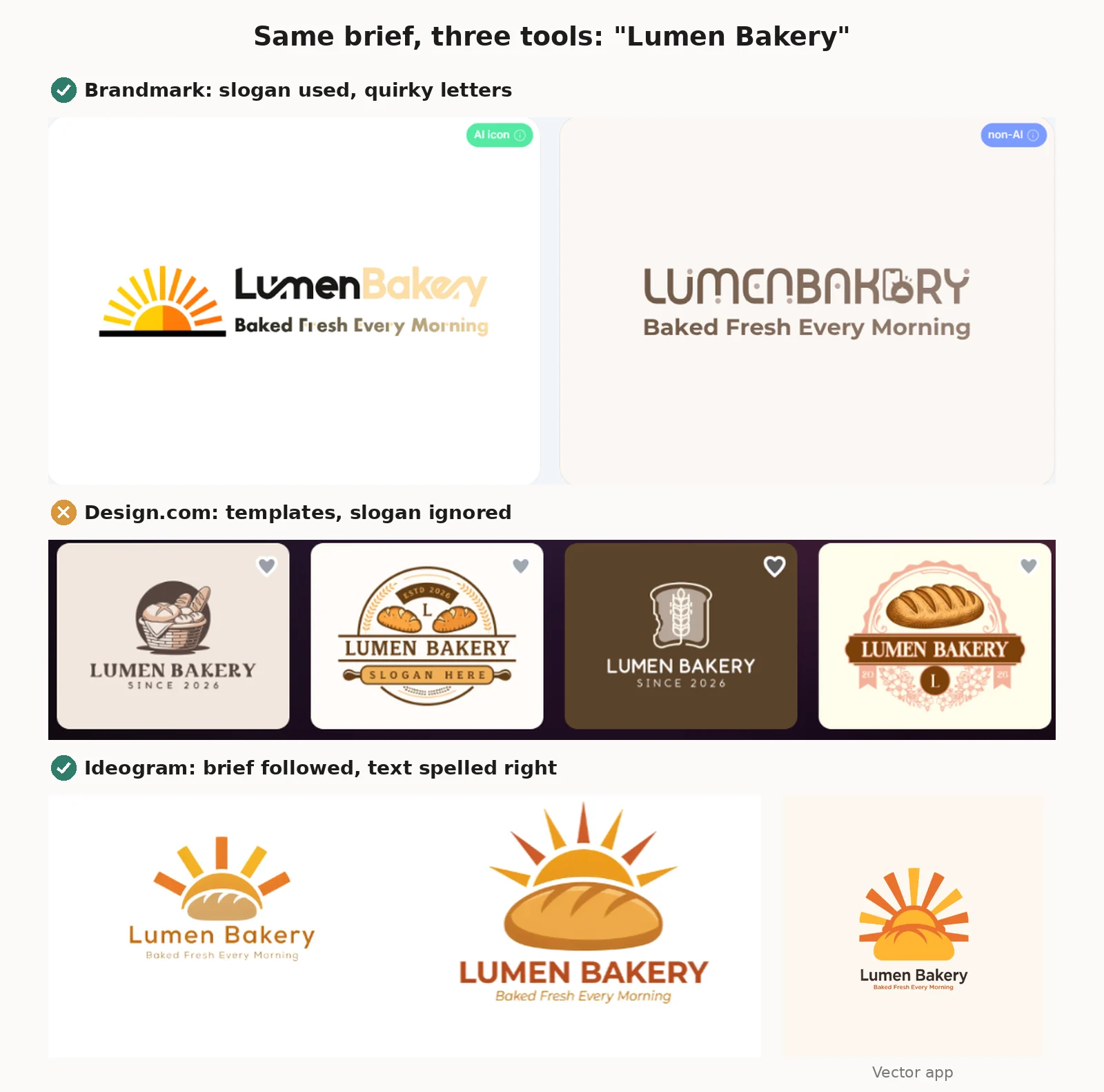 Brandmark filled a page with logos in about 10 seconds. It used my name and slogan, and one design even had a sunrise icon. But some of its display fonts were a bit too quirky. In one logo, the "F" in "Fresh" was hard to read, and another swapped the "E" in "BAKERY" for a little toaster icon.
Design.com filled the screen with polished bakery logos almost instantly. But they were clearly templates with my name dropped in. It ignored my slogan, adding "SINCE 2026" instead, and one logo even said "SLOGAN HERE". It also skipped the sun.
Ideogram followed my brief most closely. Both images had a sun rising behind a loaf of bread, with "Lumen Bakery" and "Baked Fresh Every Morning" spelled perfectly. Its Generate Vector app made a third version as SVG artwork.
So the image generator was the most creative and accurate, while the logo platforms were faster but more generic. All three leaned toward a minimalist, modern logo design, which suits a professional brand identity.
Test 2: Can You See Your Logo Before Signing Up?
Many "free AI logo generator" sites are only free until you want to see or download the result. Here is what happened when I tried each one as a new visitor:
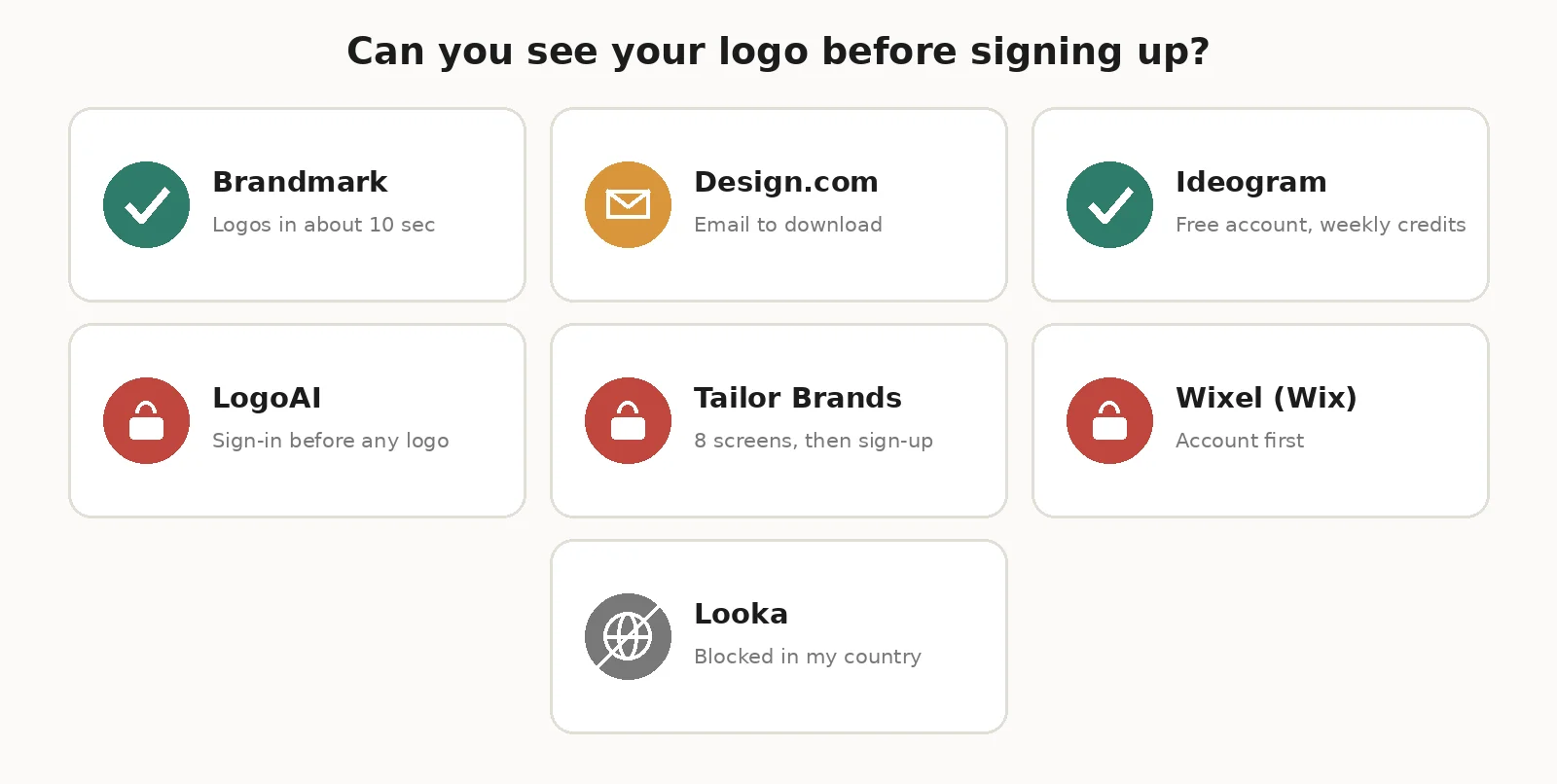 Brandmark: logos in about 10 seconds, no account needed
Design.com: logos shown right away, but editing or downloading needs your email
Ideogram: a free account gets weekly credits, and my account had 30
LogoAI: asked me to sign in before showing a single logo
Tailor Brands: took me through 8 question screens, then showed a "Sign up for free to see your logo options" wall
Wixel (Wix's logo maker): asked me to create a Wix account first
Looka: showed "Location Not Available" and would not let me start at all from my country
For Canva, Adobe Express and Recraft, you need a free account before you can design anything, which most people expect.
Test 3: What Your First Payment Really Buys
This is the part that surprised me most. The same price can buy very different things.
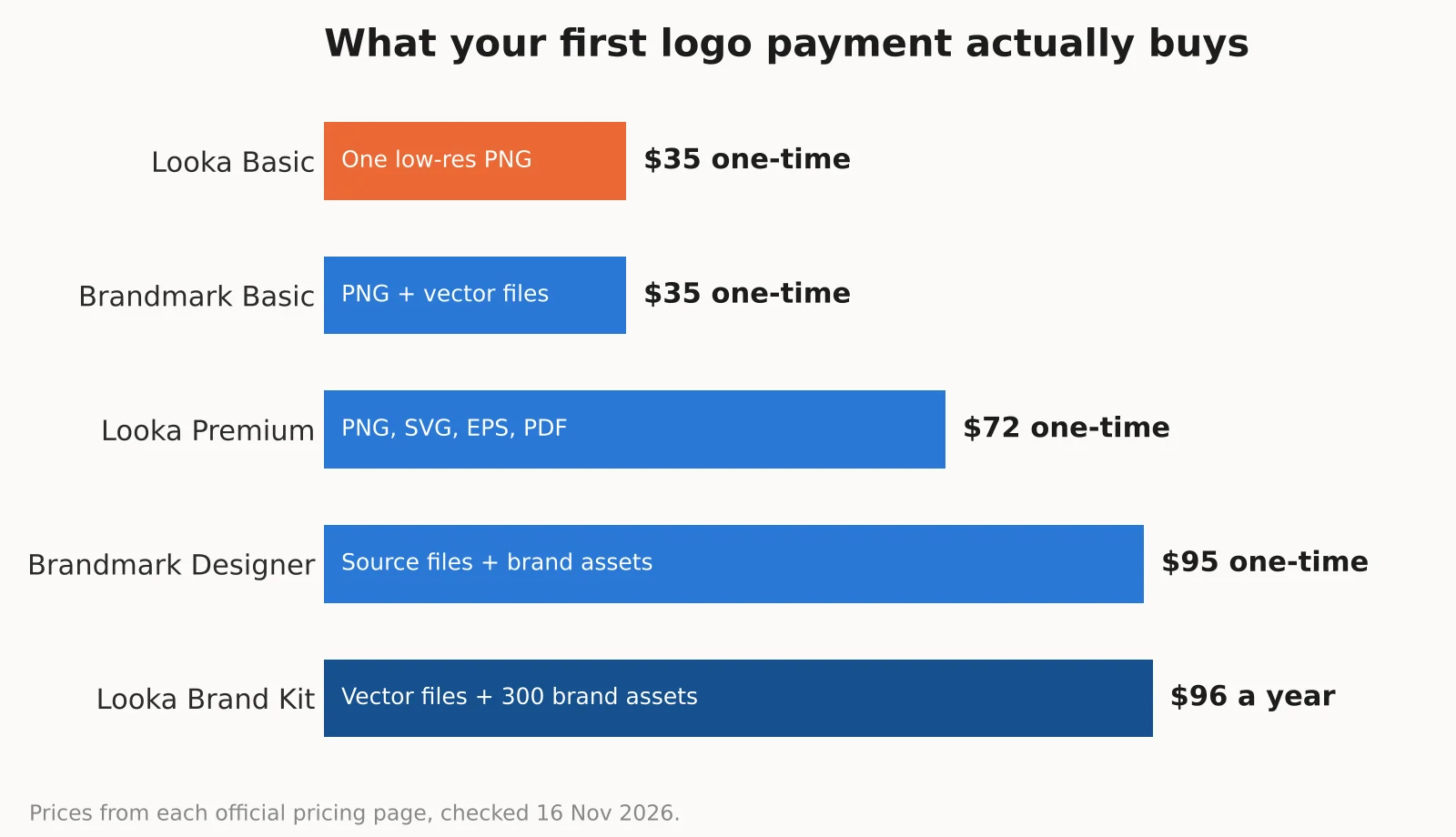 Looka Basic, $35: one low-res PNG file
Brandmark Basic, $35: PNG and vector logo files, with full copyright
Looka Premium, $72: PNG, SVG, EPS and PDF files, color variations and transparent backgrounds
Brandmark Designer, $95: logo source files, brand guidelines, business cards and social media designs
Looka Brand Kit, $96 a year: vector files plus 300+ branded assets
I also noticed that the prices in several popular "best AI logo generator" lists are out of date. Some still say Looka's Basic package is $20 and Brandmark's is $25. On the day I checked, both were $35. And LogoAI, which many lists show as a one-time purchase, now runs on a $10 7-day trial that renews at $20 a month unless you cancel.
The 10 Best AI Logo Generators in 2026
1. Brandmark: Best Overall Value
How I tested it: full brief, no account, logos generated
Brandmark was the most pleasant surprise. No sign-up, no long quiz. I typed my name, slogan and three keywords, picked a color style, and had a page full of logos in seconds. It labels each design as "AI icon," "AI Gen" or "non-AI," which is a nice touch.
Pricing (one-time): Basic $35 for PNG and vector files, Designer $95 for source files and brand assets, Enterprise $195 with hand-made concepts.
Pros: no account needed, one-time payment, vector files on the cheapest plan, "full copyright included"
Cons: some fonts are too decorative, so check every letter before you buy
2. Ideogram: Best for Creative, Custom Logos
How I tested it: full brief on Ideogram 4.5 and its vector app, free account
Ideogram is an AI image generator, not a logo platform, but it was the only tool that drew exactly what I described: a sunrise, a loaf of bread and my exact words. Its Generate Vector app creates SVG artwork, which is what you want for a print-ready logo. I tested its text skills in depth in my Ideogram AI image generator review.
Pricing: free weekly credits; Plus from $15 a month billed yearly. My two Low quality images cost 6 credits, and one vector logo cost 16 credits.
Pros: the most original results, accurate text, SVG generation
Cons: no brand kit or business cards, and free plan images are public
3. Looka: Best for a Complete Brand Kit
How I tested it: pricing and files checked; the logo maker was blocked in my country
Looka is one of the best-known AI logo makers, and its Premium and Brand Kit packages are complete. But when I opened its logo maker, I got "Location Not Available." If you live outside its supported countries, check this before you plan around it.
Pricing: Basic $35 one-time (one low-res PNG), Premium $72 one-time (PNG, SVG, EPS, PDF), Brand Kit $96 a year, Brand Kit Web $129 a year.
Pros: strong brand kit with 300+ branded assets, full ownership even after the subscription ends
Cons: the $35 Basic package is only one low-res PNG, and it is not available everywhere
4. Recraft: Best for Vector Icons and Illustrations
How I tested it: pricing and terms checked
Recraft is an AI design tool known for vector graphics, and it now has a Logo Maker in beta. It is a good pick if you want a custom icon or illustration style for your brand.
Pricing: Free plan for personal use; Basic $10 a month billed yearly; Pro $16 a month billed yearly.
Watch out: Recraft's free plan says "No commercial use," and its help page says images made on the free plan are owned by Recraft and stay public. You need a paid plan to own your logo and use it commercially.
5. Canva: Best for Editing a Logo Yourself
How I tested it: plans checked
Canva is not the smartest AI logo maker, but it is the easiest place to edit a logo by hand and then use it everywhere: social media posts, business cards, flyers and presentations. Its free plan includes one Brand Kit with up to 3 colors, and Pro unlocks more templates, elements and AI features. Canva showed me prices in my local currency, so check the price for your country.
Best for: people who want full control over layout customization and already design in Canva
6. Design.com: Best for Quick Template Ideas
How I tested it: full brief, no account until download
Design.com was the fastest to show polished logos, but they felt like templates, not custom designs. It ignored my slogan and left a "SLOGAN HERE" placeholder in one logo. Its pricing page returned a "404 Page not found" error when I checked, and downloading needs your email.
Best for: browsing logo ideas quickly before you design your own
7. LogoAI: Best for Logo Plus Brand Videos
How I tested it: brief entered; sign-in required before results; pricing checked
LogoAI has moved from one-time packages to a subscription. Its 7-day trial costs $10 and includes 200 AI credits, then renews at $20 a month with 500 credits unless you cancel. It adds logo animations, brand videos and a design studio.
Watch out: its FAQ says paid plans include commercial use, but "commercial use does not guarantee exclusivity or trademark registration." Set a reminder to cancel the trial if you only need one logo.
8. Tailor Brands: Best for Logo Plus Business Setup
How I tested it: full brief through the wizard; sign-up wall before results
Tailor Brands is more than a logo maker. It also helps you form an LLC and set up a website. Its wizard asked how I found the site, what I sell, my industry, my logo type, my icon and three font styles before showing me anything. Then it asked me to sign up to see my logo options.
Best for: new business owners in the US who want logo design and business setup in one place
9. Adobe Express: Best for Adobe Users
How I tested it: not tested hands-on; account needed
Adobe Express has a logo maker built on Adobe's templates and its Firefly AI models, which Adobe says are designed to be safe for commercial use. It makes the most sense if you already use Photoshop or Illustrator and want your logo in the same Creative Cloud library.
10. Wixel by Wix: Best for Wix Website Owners
How I tested it: account required before starting
The old Wix Logo Maker now runs under Wixel, Wix's AI design tool. Clicking "Create a Logo" took me straight to a Wix sign-up page. If your website is on Wix, it keeps your logo and website branding in one account.
Key Features to Look for in an AI Logo Maker
Logo Customization and Editing
A good online AI logo maker lets you change everything: the font, brand colors, icon, spacing and layout. Some also include background removal, so you can drop your logo onto photos and product images. Look for tools that let you edit after you pay, too. Looka and Brandmark both offer post-purchase changes.
High-Resolution and Vector Downloads
This is the most important feature, and the one most people forget to check. A PNG file is made of pixels. It looks fine on a website but goes blurry when you print it on a banner. An SVG file or EPS file is a vector logo, which stays sharp at any size. For a print-ready logo, you want vector files, plus a PNG with a transparent background for the web. Before you pay, look at the download formats listed for each package.
Brand Kits and Design Assets
A brand kit gives you your logo, colors and fonts, plus ready-made marketing materials like business cards, social media templates, email signatures and brand guidelines. It helps with brand consistency, visual branding and brand recognition. Looka's Brand Kit also says you can make unlimited changes to your logo. Looka's Brand Kit and Brandmark's Designer package are the strongest here.
Commercial Usage and Ownership
Commercial usage rights and logo ownership are not the same in every tool. Read what each one promises. In my test:
Brandmark says "full copyright included" and the license covers commercial use.
Looka says you get full ownership of your logo, even after a Brand Kit subscription ends.
LogoAI allows commercial use on paid plans, but does not guarantee exclusivity or trademark registration.
Recraft does not allow commercial use of free plan images.
Are AI-Generated Logos Copyright-Free?
This is where many AI logo articles stay vague, so here is what we know.
In the US, the Copyright Office says that material generated purely by AI, without enough human creative control, cannot be protected by copyright. Writing a prompt alone usually is not enough. But the human parts can be protected, like your own edits, your choice and arrangement of elements, or a logo you redraw yourself. The Copyright Office's AI page has its full reports.
Trademark is a separate thing. A logo can still work as a trademark if it is distinctive and you use it in business, but no AI tool can promise you that. AI logo makers reuse common icons and fonts, so your logo may look like someone else's.
My advice before you put an AI logo on signs and packaging:
Change it. Edit the icon, colors and layout so it becomes your own work.
Search for look-alikes. Run a reverse image search and check your country's trademark database.
Talk to a trademark attorney if the brand matters a lot to your business.
I am not a lawyer, so treat this as a starting point, not legal advice.
Free vs Paid AI Logo Generators
A truly free AI logo maker with a high-quality, watermark-free logo is rare. If you search for an AI logo generator without watermark, expect to pay for the final files. Here is what free usually means:
Free to design, pay to download. Brandmark, Looka and Design.com let you create for free, then charge for files.
Free but low resolution. Some tools give a free low-res file, which is fine for a social media profile but not for print.
Free plan with limits. Canva, Ideogram and Recraft have real free plans, but with limits on credits, public images or commercial use.
If you need a logo for a real business, plan to spend between $35 and $100 for proper files. That is still far cheaper than hiring a designer.
AI Logo Generator vs Professional Logo Designer
Choose an AI logo generator if you are testing a new business idea, need a logo this week, or have a small budget. It is perfect for startup branding, YouTube channels, ecommerce stores, side projects and small business branding. That is why so many people look for an AI logo generator for small businesses or for startups first.
Hire a professional logo designer if your brand will be on products, stores or a big ad budget. A designer researches your market, creates truly original work, gives you a full corporate identity and hands over clean source files. It costs much more, but you get something unique and easier to protect.
A smart middle path is to use an AI logo maker for creative logo concepts, then pay a designer to refine the best one.
How to Choose the Best AI Logo Generator
For the best value: Brandmark, because $35 gets you PNG and vector files with no subscription.
For a unique, creative logo: Ideogram, then clean it up in a vector tool.
For a full brand kit: Looka, if it is available in your country.
For vector icons: Recraft, on a paid plan.
For editing yourself: Canva.
For beginners: Brandmark or Canva, because they are the simplest to use.
Whatever you choose, check three things before you pay: the file formats, the commercial rights and whether the price is one-time or a subscription.
Frequently Asked Questions
What is an AI logo generator?
An AI logo generator is an online tool that uses artificial intelligence to create logo designs from your business name, slogan and style preferences. Most let you customize the result and download logo files.
Which is the best AI logo generator?
In my test, Brandmark was the best AI logo generator for most small businesses. It showed logos without an account, used my slogan, and its $35 one-time package includes PNG and vector files. Ideogram was best for creative, custom designs.
Are AI logo generators free?
Most are free to try but charge to download. In my test, Brandmark and Design.com showed logos free, while Canva, Ideogram and Recraft have free plans with limits. A watermark-free, high-resolution logo usually costs $35 or more.
How does an AI logo maker work?
You enter your business name and style. The AI either combines icons, fonts and colors from a library or generates a new image with text-to-image generation. You then edit the design and download it.
Can AI generate professional business logos?
Yes. Brandmark, Looka and Ideogram all produced logos in my test that looked professional enough for a small business. Check the details, though, because some fonts and icons can make letters hard to read.
Can I create a logo with ChatGPT?
Yes. ChatGPT's image tool can create logo concepts from a prompt. You usually get a PNG image, not vector files or a brand kit, so you may need another tool to turn it into a print-ready logo.
Are AI-generated logos copyright-free?
Not exactly. In the US, the Copyright Office says purely AI-generated material cannot be copyrighted, but your own human edits and arrangement can be. Some AI tools also have their own license terms, so read them.
Can I trademark an AI-generated logo?
A logo can work as a trademark if it is distinctive and used in business. But no AI logo maker can guarantee registration. LogoAI's FAQ says so directly. Check for look-alike logos and speak to a trademark attorney.
Which AI logo generators provide SVG files?
In my research, Brandmark includes vector files on its $35 Basic package, Looka includes SVG, EPS and PDF files on its $72 Premium package, and Ideogram has a Generate Vector app for SVG artwork.
Can I use AI-generated logos commercially?
Usually yes on paid plans. Brandmark, Looka and LogoAI all allow commercial use of paid logos. Recraft's free plan does not allow commercial use.
What is the difference between PNG and SVG logos?
A PNG logo is made of pixels, so it gets blurry when you make it bigger. An SVG logo is a vector file made of shapes, so it stays sharp at any size, from a business card to a billboard.
Is an AI logo generator better than hiring a designer?
It is faster and much cheaper, which makes it great for new businesses and side projects. A professional designer is still better for unique, protectable branding when your business is bigger.
Can AI create a unique logo for my business?
AI image generators like Ideogram can create original designs. Template-based logo makers often reuse common icons and layouts, so your logo may look similar to others. Editing the design yourself makes it more unique.
Which AI logo maker is best for beginners?
Brandmark and Canva are the easiest for beginners. Brandmark needs no account and shows logos in seconds, and Canva makes it simple to edit your logo by hand.