DeepSwap AI Review 2026: I Signed Up and Tested It Myself
In short, my DeepSwap AI review found a real, working face swap tool with no free face swaps. DeepSwap AI swaps faces in photos, videos and GIFs, and it can handle up to 6 faces in one video. But when I created a new account, it had 0.00 credits, and my very first upload got an "Insufficient credits!" message. Paid access starts at $9.99 for the first month, which buys 20 credits, or about 5 minutes of face-swapped video. It is fine for short, fun clips with your own face. I would not use it for anything sensitive, because its privacy and refund rules do not line up across its own pages.
Here is my quick verdict:
DeepSwap AI | |
|---|---|
What it does | AI face swap for photos, videos and GIFs, plus a video generator |
Free face swap | None. New accounts start with 0 credits |
Free extras | One try each of the background remover and cartoonizer |
Price | $9.99 first month, then $19.99. $49.99 first year, then $99.99 |
What 20 credits buy | 5 min of video, 200 photos or 20 GIFs |
Trustpilot | 1.6 out of 5 from 361 reviews |
Best for | Short, fun face swaps with your own face or with clear consent |
Avoid if | You need a free trial, strong privacy terms or client work |
What Is DeepSwap AI?
DeepSwap AI is an online face swap tool at deepswap.ai. You upload a photo, video or GIF, pick a face, and DeepSwap replaces it with another face you upload. It runs in the browser, so there is nothing to install, and there are also mobile apps on Google Play and the Apple App Store.
Over time, DeepSwap has grown past face swapping. Its menu now has three parts:
Face Swap: video face swap, photo face swap, GIF face swap and VR face swap
Video Generator: image to video, text to video, video extend and a new prompt-based video edit feature
AI Tools: enhance images, erase background and cartoonize images
It also sells an API for developers and runs an affiliate program.
A quick note: there are several look-alike sites with "DeepSwap" in the name. This review covers deepswap.ai only.
How Does DeepSwap AI Work?
DeepSwap uses face swapping technology that is often called deepfake technology. In plain words, it does four things:
Face detection. It finds every face in your photo or video.
Facial mapping. It maps the key points of each face, like the eyes, nose, mouth and jaw.
Face alignment and replacement. It lines up the new face with the old one and blends it in, trying to keep the original lighting, angle and facial expression.
Face tracking. For video, it repeats this frame by frame, so the new face follows head turns and expressions.
This is different from facial recognition, which tries to work out who a person is. A face swap tool only needs to find and copy faces, not identify them.
DeepSwap claims a face swap similarity of over 90%, which it says is 20% higher than open-source models. It also says a 1-minute video takes about 10 seconds to process with GPU acceleration. These are DeepSwap's own numbers, and I could not check them, as you will see below.
Its own help center gives honest tips. It says the face should be clear, unblocked and facing the camera. Side angles and fast movement can cause flickering in the result. In other words, identity consistency drops when the face turns away.
My Hands-On Test: What a New DeepSwap Account Can Do
I wanted to test DeepSwap the way a new user would. So on 11 November 2026, I signed in with a fresh account in Chrome.
For test images, I did not use any real person's face. I used two AI-generated faces from thispersondoesnotexist.com, which creates faces of people who do not exist. I think every DeepSwap review should do this. It is the simplest way to test a face swap tool without using someone's likeness without consent.
Here is what happened:
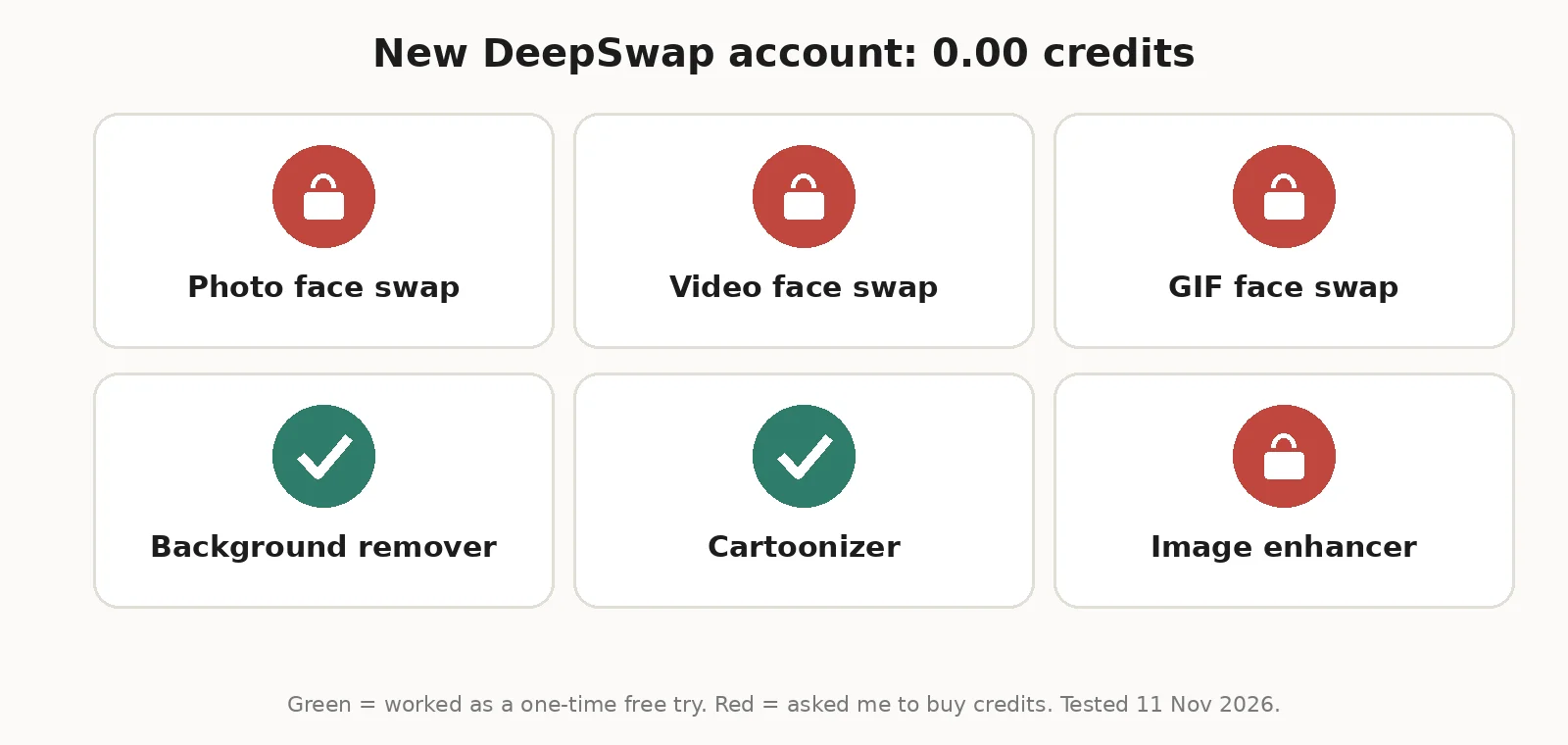 The account balance was 0.00 credits. There were no welcome credits.
Photo face swap: I uploaded my first test face, and DeepSwap showed "Insufficient credits! Please purchase more credits." It would not even accept the upload.
Video and GIF face swap: Same credit wall. Both cost more than a photo, so there was no way in.
Background remover: Worked once as a "Free Trial."
Cartoonizer: Worked once as a free try.
Image enhancer: By the third tool, the button showed "0.1 credits" and the upload failed with a strange message: "Equity not enough."
So a new account gets a couple of free tries on the side tools, and nothing on the main product. Most competitor reviews skip this, but it matters. You have to pay before you can see a single face swap result.
I also noticed something on the pricing page. A "CHOOSE YOUR PLAN, up to 50% off" banner shows a countdown timer starting at about 59 minutes. Every time I reloaded the page or opened another page, the timer started again from 59 minutes. It is not a real deadline, so do not rush to buy because of it.
DeepSwap AI Features
Even though I could not run a paid swap, I went through every feature page and the in-app options. Here is what each feature does and what to watch for.
AI Photo Face Swapping
You upload a photo, DeepSwap detects the faces, and you choose a new face for each one. A photo face swap costs 0.1 credit, so 20 credits covers about 200 photos. Photos can be up to 20 MB, and you can upload up to 5 files at a time, which works as light batch photo editing.
AI Video Face Swapping
This is DeepSwap's main feature. It does video face replacement on uploaded clips, with face tracking across frames. The upload box allows videos up to 45 minutes and 1.5 GB. But the pricing page says the maximum face swap is 30 minutes of video, so expect the lower number to apply.
Video costs 1 credit per 15 seconds, and any part of 15 seconds counts as a full 15 seconds. A 16-second clip costs 2 credits. Paid plans also get priority processing, which DeepSwap says speeds up video rendering.
GIF Face Swapping
DeepSwap works as a GIF editor too. You can swap faces in GIFs up to 20 MB, at 1 credit per GIF. That is the same as 15 seconds of video, so short GIFs are not a bargain.
Multiple Face Swapping
DeepSwap says it can swap up to 6 faces in one video. Its help center adds one warning. If the model cannot tell that all the detected faces belong to the same person, it may split one person into several face selections. You then need to select and swap all of them, or some frames will keep the old face.
Image Enhancement and Background Removal
The AI tools section has three tools: enhance images, erase background and cartoonize images. Each costs 0.1 credit after the free tries. I ran the two free tries on my AI-generated test faces:
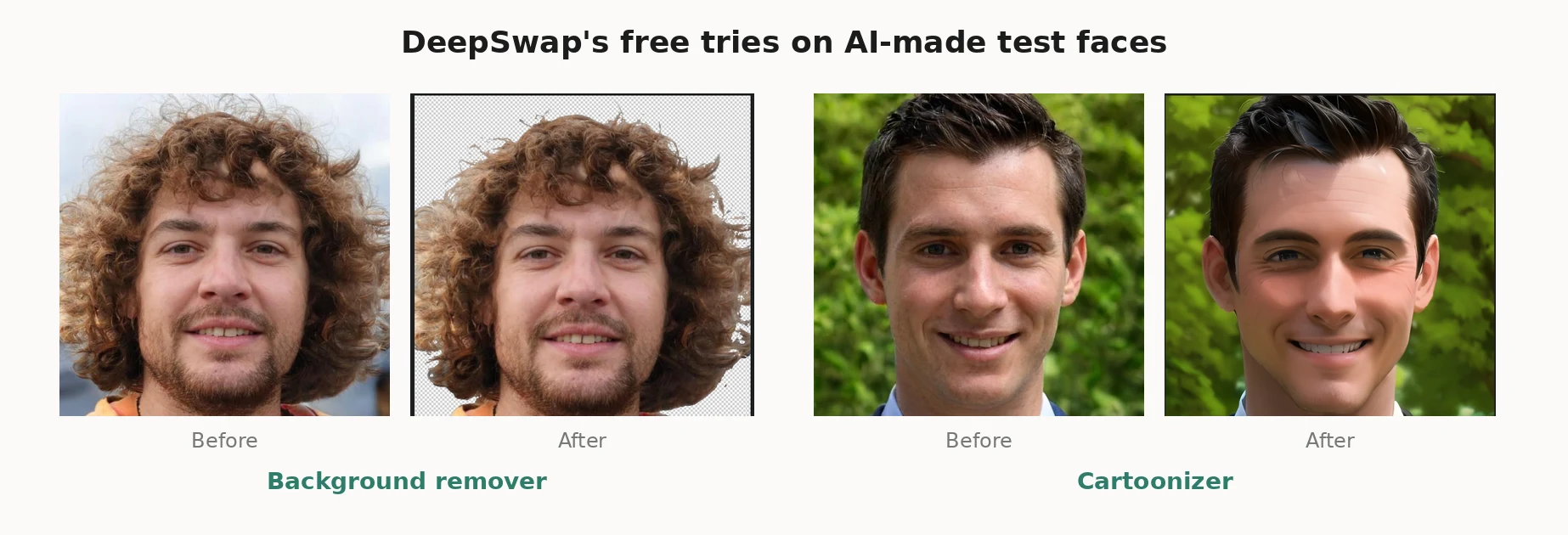 Background removal was good. It cut out a face with big curly hair cleanly, though a few of the thinnest hair tips at the edges were cut off.
The cartoonizer did not give a flat cartoon. It gave a smooth, glossy 3D look, and the face shape changed a little, with a sharper jaw and smoother skin. It still looked like the same man, but not exactly.
HD Face Swap and 4K Claims
DeepSwap's homepage advertises "4K HD Face Swap." But the section it links to says 1080p output is supported and 4K is "coming soon." So I would treat DeepSwap as a 1080p tool for now. The "HD Face Swap" option is listed as a paid benefit.
Video Generator and VR Face Swap
DeepSwap now has its own video models, called DeepVid 3.0 and DeepEcho 2.0, for image to video, text to video, video extend and video edit. These cost much more than face swaps. For example, DeepEcho 2.0 Fast costs 4.5 credits per 5 seconds at 1080p. VR face swap costs 2 or 6 credits per 15 seconds.
If you are more interested in creating new AI images than swapping faces, our Frosting AI review covers a free image generator I tested.
How to Use DeepSwap AI
Here is the process, based on DeepSwap's own steps and what I saw in the app:
Go to deepswap.ai and sign up with Google or email.
Buy a plan or credit pack. Without credits, uploads to the face swap tool are blocked.
Open Face Swap and upload your video, photo or GIF.
Let DeepSwap detect the faces, then choose which face to replace.
Upload the new face, or pick one saved in My Faces.
Choose a model and the HD Face option if you want it, then start the swap.
Download your result. DeepSwap keeps creations for about a week, so save them soon.
If a task fails, DeepSwap says it refunds the credits automatically. You can check this in your Credits history.
DeepSwap AI Pricing: What You Really Pay
DeepSwap has one paid plan, called Full Access or PRO Access. You pick how long you want it:
Plan | First payment | Regular price | Credits |
|---|---|---|---|
1-Month Access | $9.99 | $19.99 | 20 a month |
12-Month Access | $49.99 | $99.99 | 20 a month (240 total) |
The plan includes 20 credits a month, a credit package discount, video generation, priority processing, HD face swap, a 30-minute video limit and multitasking.
Here is how DeepSwap charges credits:
Feature | Credit charge |
|---|---|
Video face swap | 1 credit per 15 seconds |
Photo face swap | 0.1 credit |
GIF face swap | 1 credit |
AI tools (enhance, background, cartoon) | 0.1 credit per photo |
AI character | 0.2 credit per photo |
VR face swap | 2 or 6 credits per 15 seconds |
The credit math is the part most reviews leave out. Since 20 credits equals 5 minutes of video, here is what one minute of face-swapped video costs on each option:
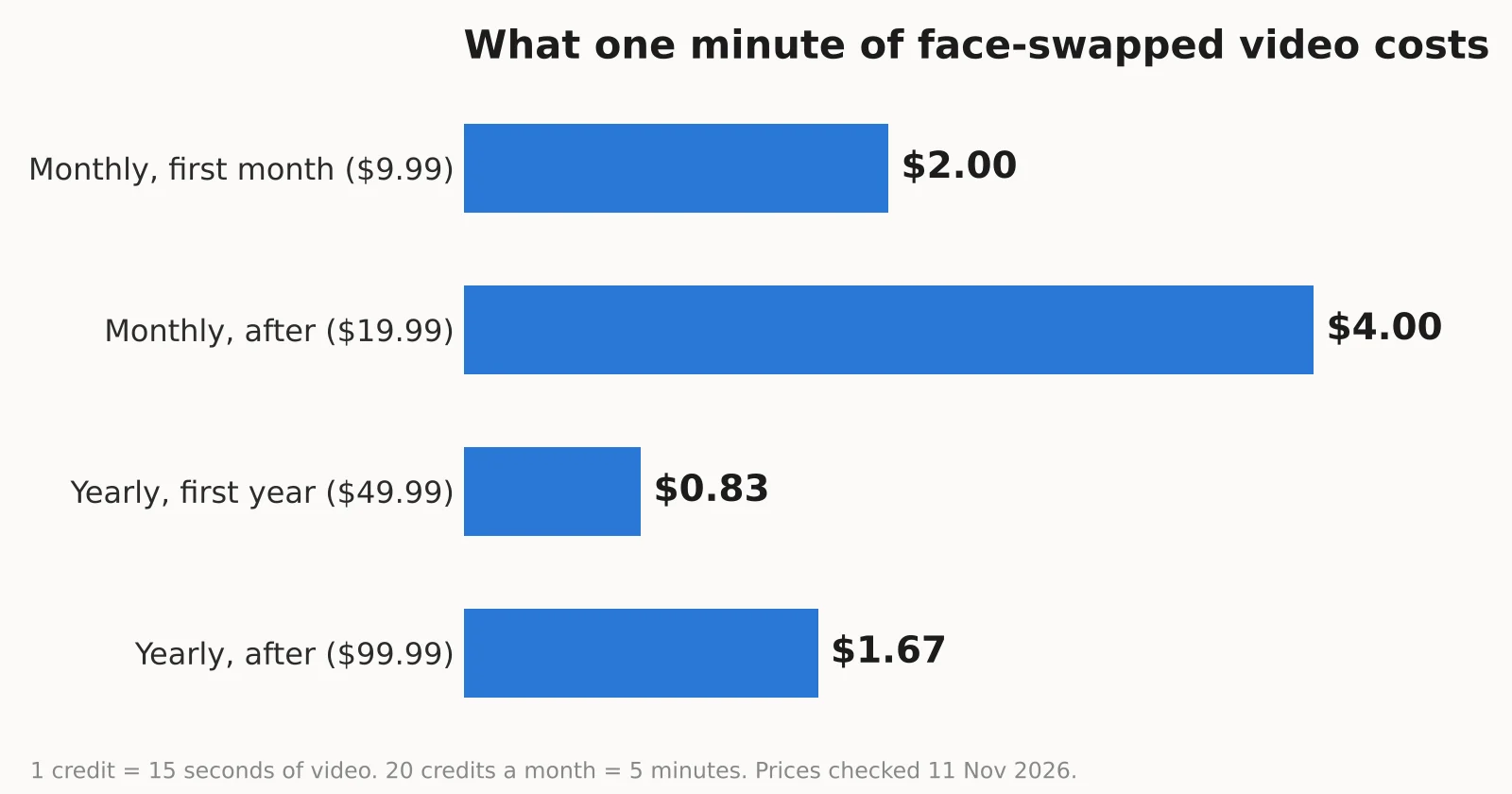 $2.00 a minute on the $9.99 first month
$4.00 a minute once the monthly plan goes to $19.99
$0.83 a minute on the $49.99 first year, if you use all 240 credits
$1.67 a minute on the $99.99 yearly price
Two more things I noticed at checkout:
The 12-month plan says "One-time, No Auto-renewal." DeepSwap's help center also says not all payment methods support auto-renewal. That is good news if you hate surprise renewals.
On my account, the checkout offered "Pay with Local Wallet" and "Direct Crypto Payment." The options may differ by country.
Refunds: DeepSwap's terms say you can get a refund within 14 days, but only if you have not used any credits since your last payment. Once you run even one swap, the plan is not refundable. Some other reviewers found a 7-day window on a separate refund page, so I would treat the shorter one as the safe rule.
Is DeepSwap AI Safe and Legit?
DeepSwap is a real service. It takes payments, gives credits and produces results. But I found several things that made me careful with it.
Who runs it is unclear. The terms and privacy policy only say "DeepSwap" or "DeepSwap AI." I could not find a legal company name or address. Support is by email and a contact form.
The privacy rules do not match. The data retention rules are the weakest part. The privacy policy says uploaded media is stored on remote servers in Ireland, creations are kept for 7 days, and photos with faces are deleted after your new video is made. But the help center says uploads are kept for 30 days by default, and that the timer resets each time you use a file in a swap. Both pages cannot be right.
Face data is "not biometric," according to DeepSwap. The privacy policy says it collects facial feature data but that this "is not biometric data." That is DeepSwap's own label, not a legal fact. In many places, face data is treated as sensitive personal data.
The policies look old. Both the terms and the privacy policy show a date of 11/11/2021, and the site footer still says © 2024.
User reviews are poor. DeepSwap has a TrustScore of 1.6 out of 5 from 361 reviews on Trustpilot. The common complaints are about credits not showing up after payment, slow or missing support replies, and output quality. Trustpilot also notes that DeepSwap has not replied to negative reviews.
Consent and the law. DeepSwap's terms ban pornographic content and content that breaks someone's privacy or publicity rights, and they say you need consent to share another person's private information. That puts the responsibility on you. Using someone's face without permission is digital impersonation, and deepfake detection tools are getting better at spotting it. And the law has teeth now. In the US, the Take It Down Act makes it a crime to share sexual deepfakes of a real person without consent, and platforms must remove reported ones within 48 hours. PetaPixel covers what the law requires, and other countries have their own deepfake rules.
My own rules for using any face swap tool:
Only use your own face, or faces of people who clearly agreed
Never upload photos of children
Do not upload private or work footage
Delete your uploads and creations from your account when you are done
Label face-swapped content when you share it, so nobody mistakes it for real
DeepSwap AI Pros and Cons
Pros:
Swaps faces in photos, videos and GIFs in one place
Up to 6 faces in one video
Simple browser-based face swapping, plus mobile apps
Photo swaps are cheap at 0.1 credit each
Failed swaps refund credits automatically
The yearly plan does not auto-renew
Good free background remover try
Cons:
No free face swap at all. New accounts start with 0 credits
Video gets expensive, up to $4.00 a minute after the first month
4K is advertised but listed as "coming soon"
Upload limit (45 minutes) and swap limit (30 minutes) do not match
Privacy and refund rules conflict across official pages
No named company behind the service
A fake countdown timer on the pricing page
1.6 out of 5 on Trustpilot
Best DeepSwap AI Alternatives
If DeepSwap's paywall or privacy gaps put you off, these are the face swap tools I would look at next. Prices and free limits change often, so check each one before you pay.
Reface. A popular mobile app for quick face swaps into ready-made video and GIF templates. Better for fun clips than for your own footage.
FaceFusion. A free, open-source face swapping tool that runs on your own computer. It needs a decent graphics card and some setup, but your face data never leaves your machine. That is the biggest privacy win on this list.
Akool. A business-focused platform with face swap, AI avatars and video translation. Better suited to marketing teams than casual users.
Remaker AI. A web tool for photo and video face swaps with simple credit-based pricing. Good for quick photo swaps.
Vidnoz AI. An AI video platform with a face swap tool alongside talking avatars and video templates.
Magic Hour. An AI video editor with face swap, video to video and image tools in one place.
Other names you will see in this space are FaceMagic and Swapface for quick swaps, DeepFaceLab for advanced users who want full control on their own computer, and HeyGen for AI avatar videos. If you want an all-around AI image and photo editor rather than a face swapper, FaceApp and CapCut also have face effects built in.
DeepSwap AI Review Verdict: Is It Worth Paying For?
For most people, I would say only if you want to make a few short, fun clips with your own face, and only on the $9.99 first month. That gives you 5 minutes of video and 200 photo swaps to see if the quality is good enough for you. Do not run a swap until you are sure you want to keep the plan, since a used plan cannot be refunded.
I would skip it for client work, private footage or anything where privacy matters. The missing company name, the conflicting storage rules and the poor Trustpilot score are too many warning signs for sensitive media. For that, an offline tool like FaceFusion is the safer choice.
And whatever you use, keep it consensual. Face swapping is fun until it uses someone who did not say yes.
Frequently Asked Questions
What is DeepSwap AI?
DeepSwap AI is an online AI face swap tool. It swaps faces in photos, videos and GIFs, and it also has an AI video generator, an image enhancer, a background remover and a cartoonizer.
Is DeepSwap AI free?
No, not for face swaps. My new account started with 0.00 credits, and the face swap tool blocked my first upload with "Insufficient credits!" Only the background remover and the cartoonizer gave me one free try each.
How much does DeepSwap AI cost?
DeepSwap costs $9.99 for the first month, then $19.99 a month. The 12-month plan costs $49.99 for the first year, then $99.99. Both include 20 credits a month.
Can DeepSwap AI swap faces in videos?
Yes. Video face swap is its main feature. It costs 1 credit per 15 seconds, so 20 credits covers about 5 minutes. The pricing page lists a 30-minute limit per video.
Does DeepSwap AI support GIFs?
Yes. You can swap faces in GIFs up to 20 MB. Each GIF costs 1 credit.
Can DeepSwap AI swap multiple faces at once?
Yes. DeepSwap says it can swap up to 6 faces in one video. If it splits the same person into several faces, you need to select and swap each one.
Does DeepSwap AI support 4K face swapping?
Not yet. The homepage advertises 4K, but its own feature section says 1080p is supported and 4K is coming soon.
Is DeepSwap AI safe to use?
DeepSwap is a working, legitimate service, but I would not upload anything sensitive. It names no legal company, its privacy policy and help center give different storage times, and it has a 1.6 out of 5 rating on Trustpilot.
Does DeepSwap AI store uploaded images and videos?
Yes, for a while. The privacy policy says creations are kept for 7 days on servers in Ireland. The help center says uploads are kept for 30 days by default. You can delete uploads, creations and saved faces from your account.
Does DeepSwap AI have a mobile app?
Yes. DeepSwap has apps on Google Play and the Apple App Store, and its help center explains how to cancel subscriptions made through each store.
How realistic are DeepSwap AI results?
DeepSwap claims over 90% face similarity. Results depend heavily on your source video. Its help center says front-facing, clear faces work best, while side angles and fast movement can cause flickering.
What are the best DeepSwap AI alternatives?
Good DeepSwap alternatives include Reface for template-based fun, FaceFusion for private offline swaps, Akool for business video, and Remaker AI, Vidnoz AI and Magic Hour for web-based face swapping.