Tailscale Review 2026: I Set It Up and Tested It Myself
In this Tailscale review, my short answer is yes: Tailscale is the easiest way I know to connect your own devices into one private, encrypted network. It is a mesh VPN built on WireGuard. Instead of routing everything through one VPN server, it links your PC, phone, home server or cloud machines directly to each other, without port forwarding. I went from the sign-in page to a connected Windows PC in about 6 minutes on the free Personal plan, which covers up to 6 users and unlimited personal devices. Business plans start at $8 per user a month.
One thing to know before you start: Tailscale is not a privacy VPN like NordVPN or Proton VPN. It will not make you anonymous or unblock streaming sites. It is built for reaching your own devices and services securely from anywhere.
Here is my verdict at a glance:
Tailscale | |
|---|---|
What it is | A mesh VPN and secure device connectivity platform |
Built on | WireGuard protocol |
Free plan | Personal: up to 6 users, unlimited user devices, non-commercial use |
Paid plans | Standard $8/user/month, Premium $18/user/month, Enterprise custom |
My setup time | About 6 minutes to a connected Windows PC |
Works on | Windows, macOS, Linux, iOS, Android and more |
Best for | Homelabs, remote access, small teams, developers |
Not for | Anonymous browsing or unblocking streaming services |
What Is Tailscale?
Tailscale is a networking tool that builds a private network between your devices, called a tailnet. Every device you sign in with your account joins your tailnet and gets its own Tailscale IP address. My Windows PC got a private IP address starting with 100, and an IPv6 address starting with fd7a:115c. This gives you remote network access to all your devices with simple network routing handled for you.
From then on, your devices can talk to each other as if they were on the same home Wi-Fi, even when one is at home, one is on mobile data and one is a cloud server in another country. All of the traffic between them is encrypted.
Tailscale is made by a Toronto-based company of the same name. It uses the open-source WireGuard protocol for encryption and adds the hard parts on top: key management, NAT traversal, user logins and access rules. Technically, it is an overlay network: a private network that sits on top of the internet you already use.
What Is Tailscale Used For?
These are the most common uses I see:
Remote access to a home computer or NAS without opening ports on your router
Homelab networking for a Raspberry Pi, Plex, Home Assistant or other self-hosted applications
Remote server access and SSH access to cloud infrastructure without public IP addresses, which DevOps teams use for infrastructure management and private cloud networking
Remote development, so your laptop can reach a dev server or Docker containers at home
Small team networks, as a simpler replacement for an old office VPN
Self-hosted AI tools. If you run an AI agent or a local model at home, Tailscale is a safe way to reach it from your phone. For example, when you install OpenClaw, the safest choice is to keep its gateway on your own machine, and Tailscale lets you reach it remotely without exposing it to the internet.
Who Should Use Tailscale?
I would recommend it to anyone who has more than one device and wants them to talk to each other safely: home users, students with a homelab, developers, IT admins and small businesses. You do not need to be a network engineer. If you can install an app and sign in with Google, you can use Tailscale.
How Does Tailscale Work?
 Understanding the Tailnet
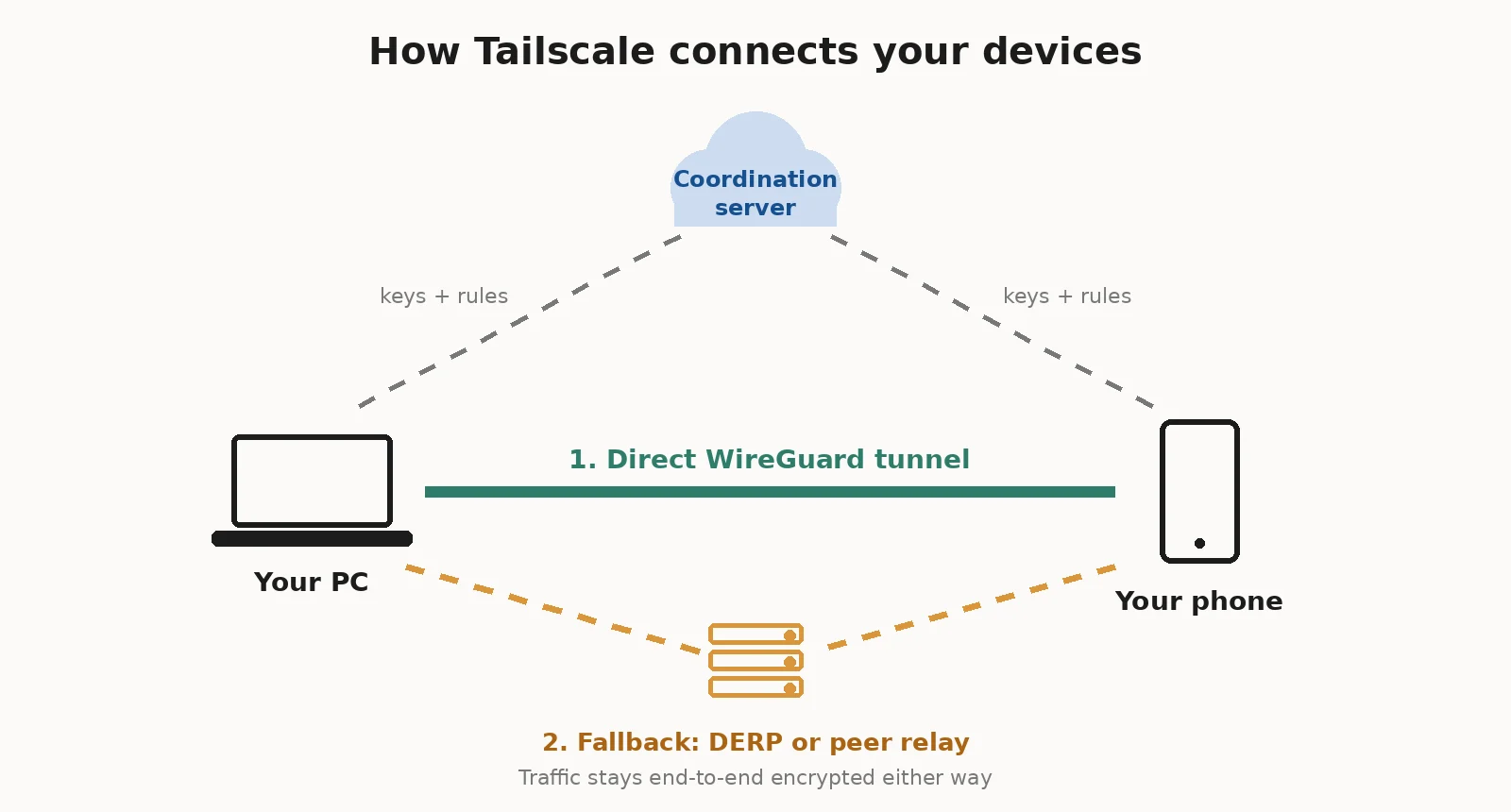
When you sign in, Tailscale's coordination server gives each device the public keys of your other devices and the access rules you set. That is all it does. It does not carry your data. Your private encryption keys never leave your devices.
Your tailnet also gets its own domain name ending in ts.net, which is used for device names and HTTPS certificates.
How WireGuard Encryption Works
Every connection inside your tailnet is a WireGuard encrypted tunnel. WireGuard is a modern, fast VPN protocol with strong cryptography. Tailscale gives you end-to-end encryption between devices, so even Tailscale cannot read your traffic.
Peer-to-Peer Connections and NAT Traversal
This is Tailscale's real magic. Most home routers and mobile networks hide devices behind NAT, which normally blocks incoming connections. Tailscale uses NAT traversal over UDP connections to punch through, so your devices can connect directly to each other in a peer-to-peer network. In most cases, you never touch a firewall rule or set up port forwarding.
How Tailscale Connects Devices Behind Firewalls
Sometimes a direct path is impossible, for example on strict office or hotel networks. Tailscale then has two fallbacks:
DERP relay servers. These are Tailscale-run relays around the world. Every connection starts through DERP, then Tailscale tries to upgrade it to a direct link.
Peer relays. Since early 2026, you can also make one of your own devices a relay for your other devices. This is usually faster than a distant DERP server.
Relayed traffic is still end-to-end encrypted, so the difference is speed, not security. Tailscale explains how to check which path you are on in its guide to connection types.
My Hands-On Tailscale Test
Most Tailscale reviews I read either have no test at all or quote old plans. ITPro's review is from 2023 and lists a free plan of 3 users and 100 devices. PrivacySavvy's 2026 review mixes up several plan details. So I set it up myself.
My setup, on 19 November 2026:
A new Tailscale account, signed in with Google
A Windows 10 22H2 PC on a home internet connection in Pakistan
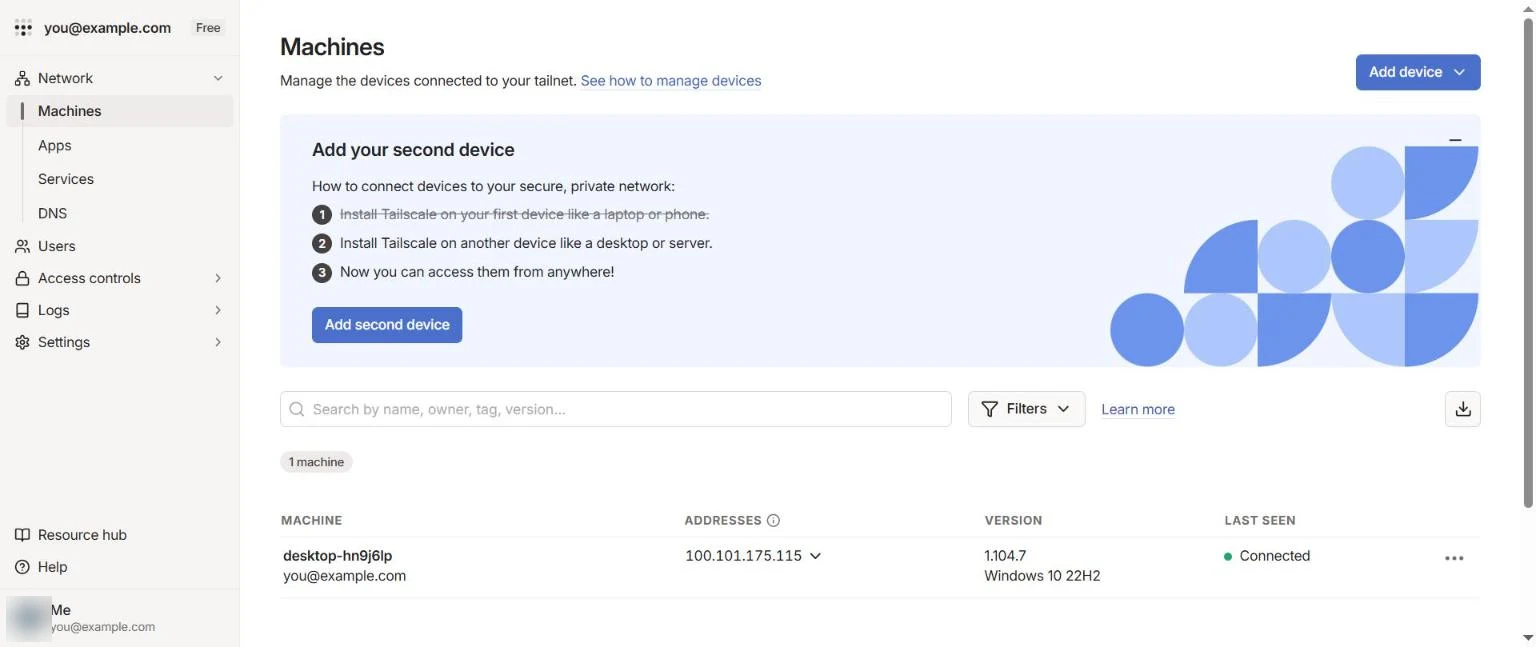
Tailscale for Windows version 1.104.7
The free Personal plan
 What I found:
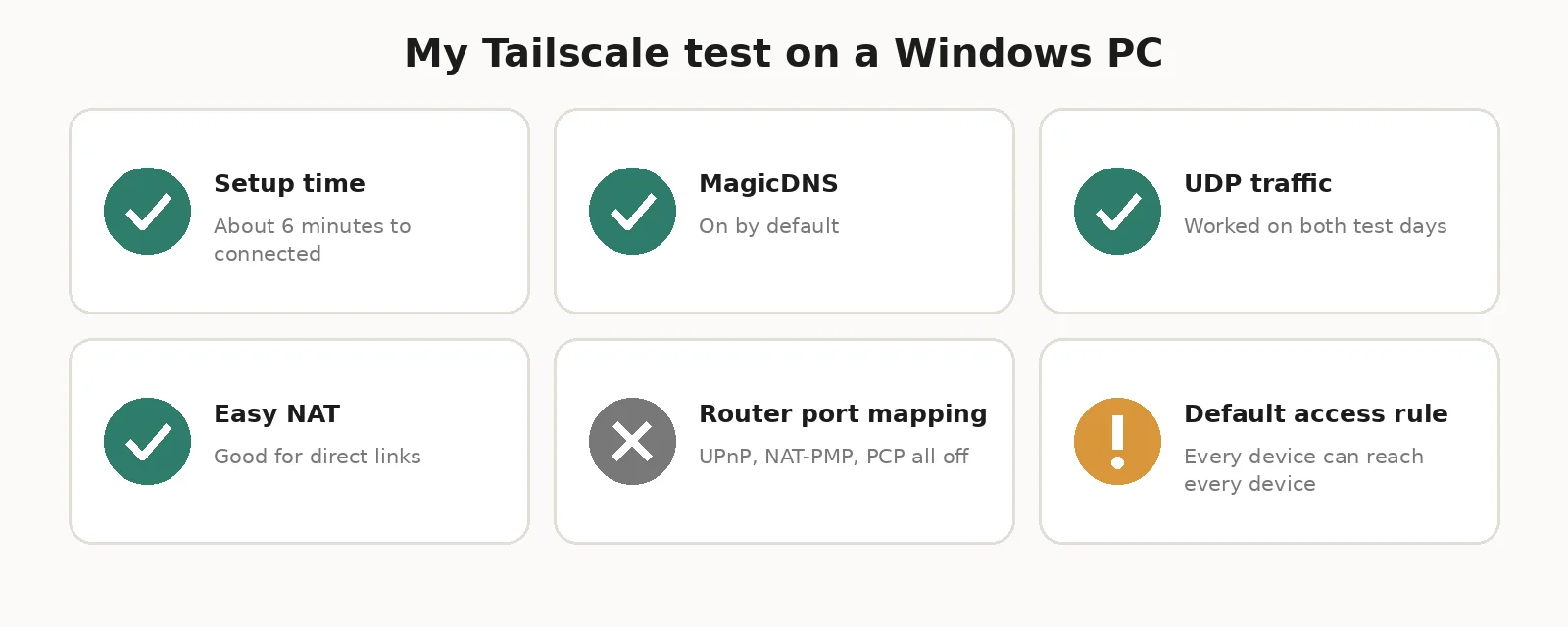
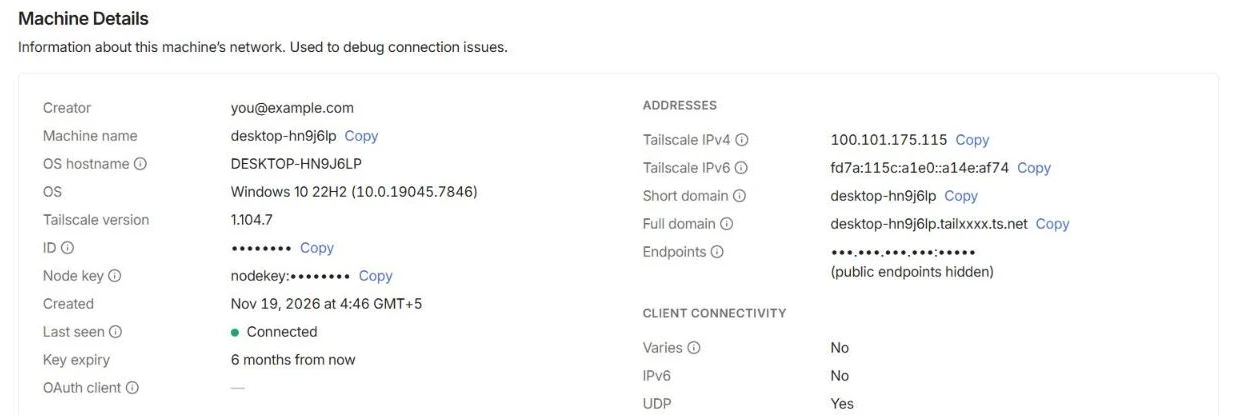 Setup took about 6 minutes. That was from opening the sign-in page to seeing my PC as "Connected" in the admin console, including downloading the installer.
Tailscale set safe defaults. Automatic updates were on, and the device key was set to expire in 6 months, which forces a fresh sign-in.
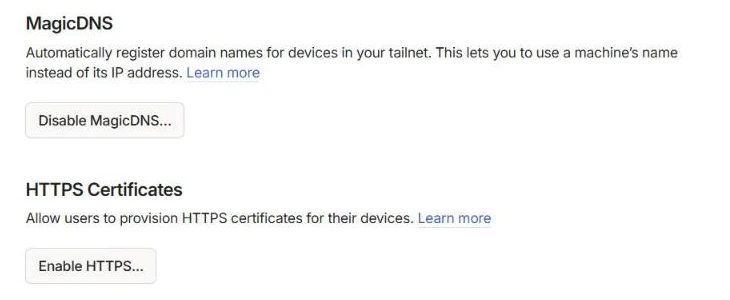
MagicDNS was on by default. My PC got a short name and a full name ending in .ts.net, so I could reach it by name instead of a number.
My network was a good fit for direct connections. The machine details page showed that UDP worked and that my router's NAT mapping did not vary. That is the "easy" kind of NAT, which makes direct peer-to-peer links likely. IPv6 showed "Yes" on my first day and "No" on my second, after my PC's public address changed.
My router had no port mapping helpers. UPnP, NAT-PMP and PCP were all off. Tailscale still worked fine, but turning UPnP on can help direct connections on tricky networks.
The default access rule allows everything. A new tailnet's policy file lets every device reach every other device. That is fine for one person, but if you share your tailnet, you should tighten it.
Configuration logs are on, even for free. The Logs page keeps 90 days of configuration changes. Streaming those logs to another tool is a Premium feature.
The Relay Test
The most useful data was the DERP relay latency list on my PC's details page. It measured my distance to 27 Tailscale relays around the world.
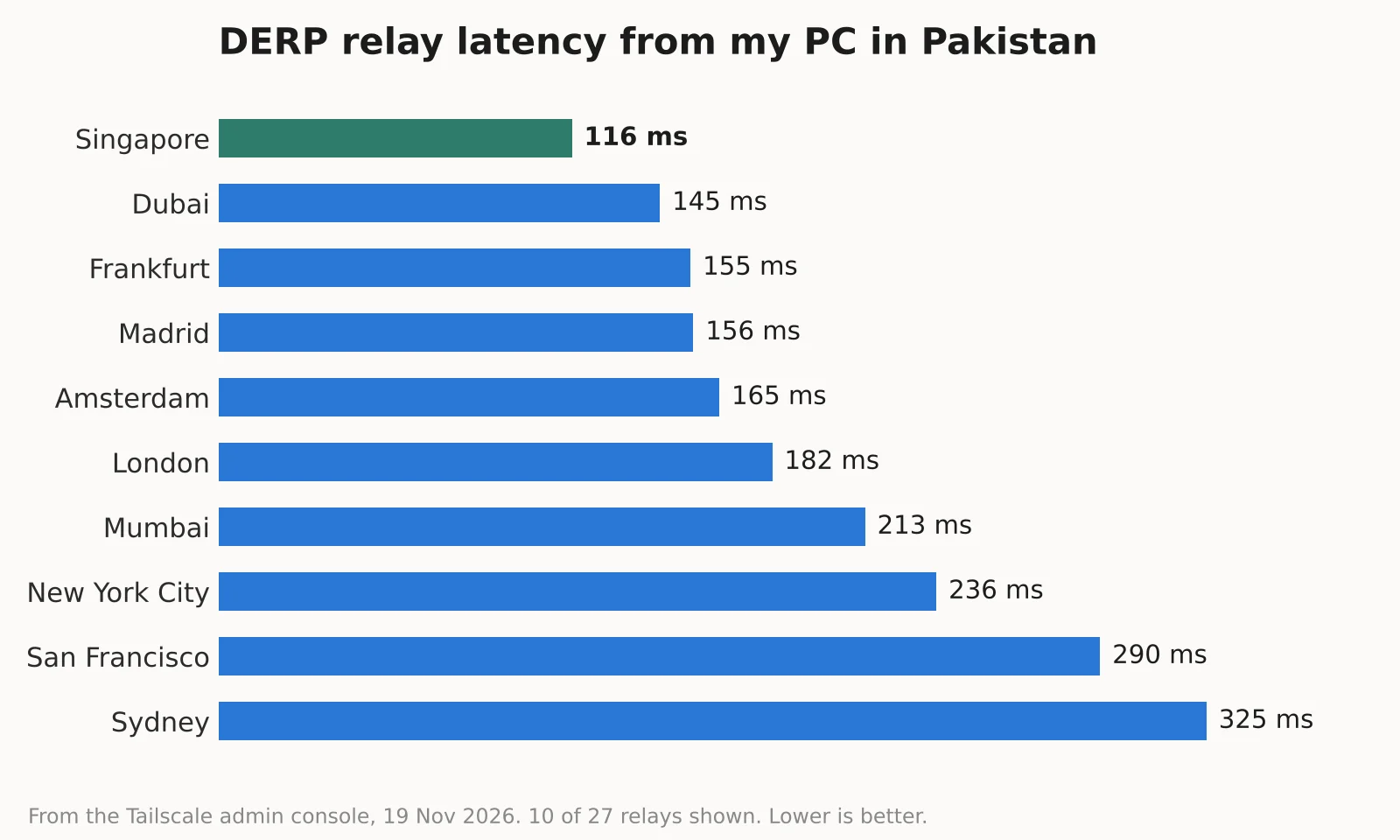 My closest relay was Singapore at 116 ms, then Dubai at 145 ms and Frankfurt at 155 ms. Mumbai, which is much closer on a map, was 213 ms. This shows why direct connections matter. If my PC ever had to fall back to a relay, every packet would travel through Singapore. On a direct connection, it goes straight to the other device.
I checked again the next day, and the picture changed. On 20 November, my PC's public address was different, and the details page only listed my three nearest relays: Madrid at 148 ms, Paris at 151 ms and Amsterdam at 157 ms, with Paris marked as my home relay. Singapore was not on the list at all.
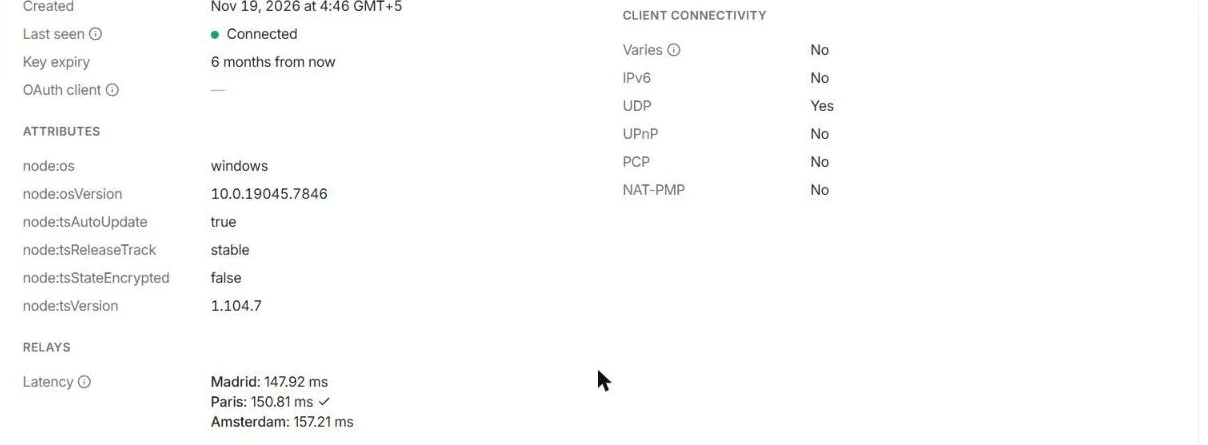 This is a useful lesson. Your nearest relay depends on your internet route on that day, not on the map. So do not judge Tailscale's speed from one relay number. Check whether your devices connect directly.
I only connected one device, so I could not run a device-to-device speed test. If you add two devices, run tailscale ping with the other device's name. Each reply tells you whether it went direct or through a relay.
Key Tailscale Features
Mesh VPN Networking
Every device can talk to every other device directly, unlike a traditional virtual private network where all traffic goes through one central server. That means less lag and no single bottleneck. By default, Tailscale also uses split tunneling: only traffic to your tailnet goes through Tailscale, and your normal browsing goes straight to the internet. That is why people often call it a Tailscale VPN even though it works differently from a classic one.
MagicDNS
MagicDNS gives every device a name. Instead of remembering an IP address, you can type my-nas or raspberrypi in your browser or SSH client. It runs on Tailscale's own DNS address, 100.100.100.100, and was turned on automatically in my test.
 Subnet Routers and Exit Nodes
A subnet router lets your tailnet reach devices that cannot run Tailscale, like a printer, camera or IoT device on your home network. An exit node sends all your internet traffic through one chosen device, for example your home PC when you are on public Wi-Fi abroad. In my admin console, my PC was "Not Allowed" to act as an exit node until I approve it, which is a sensible default. Tailscale also offers Mullvad VPN exit nodes as a paid add-on, which is the closest it gets to a privacy VPN.
Tailscale Funnel and Serve
Tailscale Serve shares a local app, like a dashboard or a web server, with other devices inside your tailnet. Tailscale Funnel goes one step further and shares it with the public internet over HTTPS, with a real certificate. Funnel is great for showing a demo or receiving a webhook without a cloud server.
Taildrop and Tailscale SSH
Taildrop sends files between your own devices, a bit like AirDrop but across Windows, Android, Mac and Linux. Tailscale SSH lets you SSH into machines using your Tailscale identity instead of managing SSH keys. Basic Tailscale SSH is on every plan.
Access Control and Device Approval
Access control lists (ACLs), now written as "grants" in the policy file, decide which users and devices can reach which others. You can set least-privilege access, for example letting your phone reach only your NAS. Device approval makes an admin approve new devices before they join, and authentication keys let servers and CI/CD pipelines join without a person signing in. Together, these network access policies and security policies give you remote device management from one admin console.
Aperture: Tailscale for AI Tools
Tailscale has also added Aperture, which matters for anyone using AI at work. Its gateway holds your OpenAI, Anthropic or Gemini API keys in one place and routes requests through each person's Tailscale identity, so developers do not need their own keys. It logs which user called which model and how many tokens they used, and admins can set spending limits. Tailscale says it is still actively developing it.
Tailscale Setup: How to Install It
Here is the exact process I followed.
Create a Tailscale Account
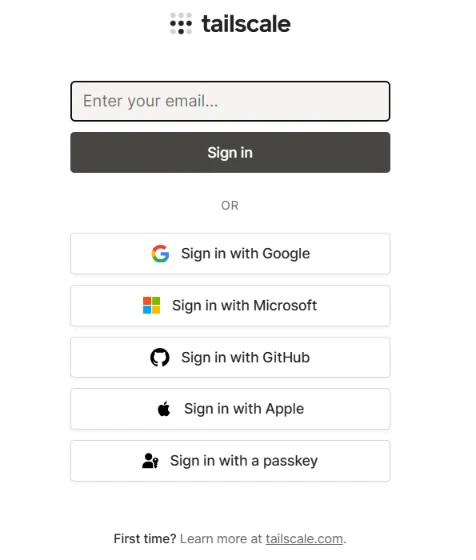
Go to tailscale.com and click Get started. Sign in with Google, Microsoft, GitHub, Apple or another identity provider. Tailscale signs you in through an identity provider or a passkey instead of a separate Tailscale password, so your provider's multi-factor authentication (MFA) protects your account. Your tailnet is created right away.
 Install Tailscale on Your Devices
Download Tailscale from tailscale.com/download for Windows, macOS or Linux, or get the app from the App Store or Google Play. On Linux, it is a one-line install script. Run the installer and sign in with the same account.
Connect Devices to Your Tailnet
Each device appears in the Machines page of the admin console as soon as you sign in. Mine showed "Connected" with its Tailscale IP address and version. Add a second device the same way, and they can reach each other by name.
 Configure Access Permissions
Open Access controls in the admin console. The default rule lets all devices talk to each other. In the JSON editor, it is the line {"src": ["*"], "dst": ["*"], "ip": ["*"]}.
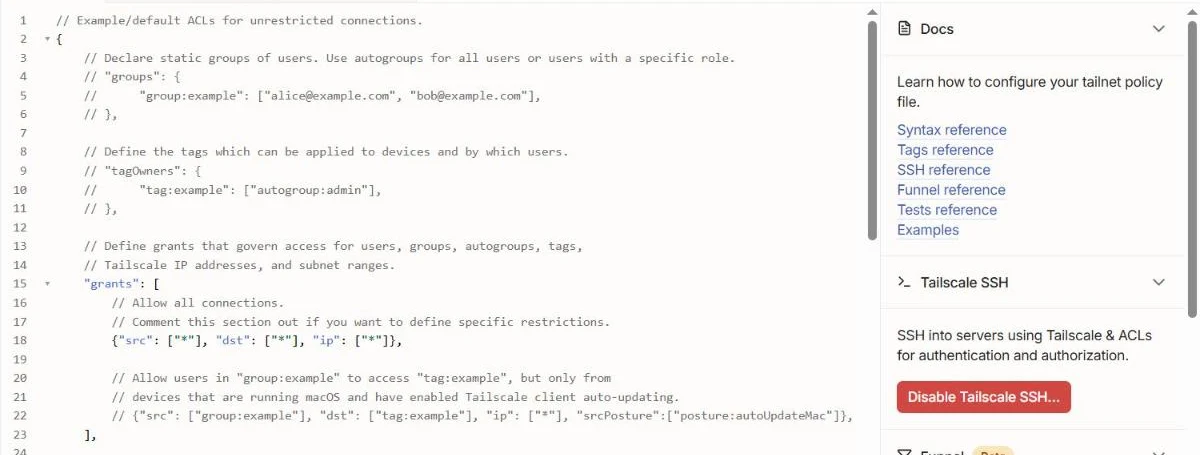 If you share your tailnet with family or a team, replace it with specific rules. Turn on device approval under Settings if you want to approve every new device.
Tailscale Security and Privacy
Tailscale gives you secure remote connections with a strong security model:
End-to-end encryption with WireGuard between every pair of devices
Private keys stay on your devices, never on Tailscale's servers
Identity-based access and device authentication through single sign-on (SSO) with your existing identity provider (IdP)
Zero Trust security, where every connection is checked against your rules, instead of trusting everything on the network
Key expiry, which made my device re-authenticate after 6 months by default
Audit logs of configuration changes, kept for 90 days on my free account
But there are limits you should know:
Tailscale is a company in the middle. Its coordination server sees metadata, like which devices are in your tailnet and when they connect. It cannot see the content of your traffic.
It does not hide your IP address from websites unless you use an exit node, and even then, your exit node's IP shows instead.
If Tailscale's coordination server goes down, devices that are already connected generally keep working, but new devices and changes have to wait.
If you do not want any third party involved, Headscale is an open-source, self-hosted coordination server that works with Tailscale's apps. It takes more work to run.
Tailscale Pricing and Plans
Here are the plans from Tailscale's pricing page in November 2026:
Plan | Price | Users | Who it is for |
|---|---|---|---|
Personal | Free forever | Up to 6 users, unlimited user devices | Personal, non-commercial use |
Standard | $8 per user/month | Unlimited users and devices | Small businesses and teams |
Premium | $18 per user/month | Unlimited users and devices | Advanced security and SSH needs |
Enterprise | Custom | Custom limits | Large companies |
What paid plans add: Standard adds SCIM user provisioning, MDM configuration, device posture checks and more user roles. Premium adds just-in-time access, advanced Tailscale SSH, network flow logs, log streaming and regional routing.
Things I noticed:
The Tailscale free plan is generous. It includes nearly all features, including Tailscale SSH and Kubernetes support, 50 tagged resources and 3 ACL groups.
Business tailnets get a trial. If you sign up with a custom company domain, Tailscale starts a 14-day Enterprise trial, then asks you to pick a plan.
You only pay for active users. A user only takes a paid seat once they log in or connect a device.
The free plan is for non-commercial use. If you use Tailscale for your business, you should be on a paid plan.
Tailscale Pros and Cons
Pros:
Very fast setup, about 6 minutes in my test
Works through NAT and firewalls without port forwarding
Strong WireGuard encryption, with private keys on your devices
Free plan for up to 6 users with unlimited devices
MagicDNS, Taildrop, SSH, Serve and Funnel built in
Apps for every major platform, with automatic updates
Clear admin console with device details and relay latency
Cons:
The default policy lets every device reach every other device
Depends on Tailscale's coordination server, unless you self-host Headscale
Not a privacy or streaming VPN
Relayed connections can be slow if your nearest relay is far away, like Singapore for me
Advanced logging and access features need Premium
Tailscale vs Other VPN Solutions
Tool | Type | Best for | Self-hosting |
|---|---|---|---|
Tailscale | Mesh VPN on WireGuard | Easiest setup for people and small teams | Control server via Headscale |
WireGuard | VPN protocol | Full control, if you can manage keys and ports | Yes, fully |
ZeroTier | Mesh virtual network | Layer 2 networking and custom setups | Yes |
NetBird | Open-source mesh VPN on WireGuard | Teams who want a fully open-source option | Yes |
Twingate | Zero Trust access | Company access to private apps | No |
Cloudflare Zero Trust | Zero Trust platform | Companies already on Cloudflare | No |
OpenVPN | Traditional VPN | Classic hub-and-spoke VPN servers | Yes |
Tailscale vs WireGuard
WireGuard is the protocol. Tailscale is a full product built on it. With plain WireGuard, you create keys, set up a server, open a port and edit config files on every device. With Tailscale, all of that happens when you sign in. If you want total control and no company in the middle, use WireGuard. If you want it to just work, use Tailscale.
Tailscale vs ZeroTier
ZeroTier is the closest rival. It creates a virtual network that works more like a real network switch, which some advanced users like for games or older software. Tailscale is easier to set up and has more built-in tools, like MagicDNS, Taildrop and Tailscale SSH. For most people, I would pick Tailscale. For unusual network needs, ZeroTier is worth a look.
Best Tailscale Alternatives
NetBird: an open-source mesh VPN built on WireGuard, with a self-hostable control plane. The closest like-for-like Tailscale alternative.
Headscale: not a separate app but a self-hosted replacement for Tailscale's coordination server, so you keep using the Tailscale apps.
ZeroTier: a mature mesh networking tool with Layer 2 features.
Twingate: a Zero Trust access product for companies that want to replace an old office VPN.
Cloudflare Zero Trust: a bigger security platform with tunnels, access rules and a secure web gateway.
Perimeter 81: a business network security service, now part of Check Point.
OpenVPN: the classic VPN server, if you need a traditional setup.
Tailscale Review Verdict: Is It Worth Using?
For personal use, I think Tailscale is a no-brainer. The free Personal plan gives you a secure private network for up to 6 people and all your devices, and setup took me about 6 minutes. It is the simplest way I know to reach your home PC, NAS, Raspberry Pi or self-hosted AI tools from anywhere.
For businesses, the Standard plan at $8 per user is good value compared with running your own VPN server, and Premium adds the security controls bigger teams need.
Before you rely on it, I would do three things: replace the default "allow all" access rule, turn on device approval, and add a second device to check with tailscale ping that your connections go direct, not through a far-away relay.
Skip Tailscale only if you want a privacy VPN for anonymous browsing, or if you cannot accept any third party in your network. In that case, look at plain WireGuard, NetBird or Headscale.
Frequently Asked Questions
What is Tailscale used for?
Tailscale is used to connect your own devices into one private, encrypted network. People use it for remote access to home computers and NAS drives, homelabs, SSH access to servers, remote development and small team networks.
Is Tailscale a VPN?
Yes, but a different kind. Tailscale is a mesh VPN that connects your devices directly to each other. It is not a consumer privacy VPN that hides your browsing behind a shared server, unless you set up an exit node.
How does Tailscale work?
Tailscale's coordination server shares public keys and access rules between your devices. The devices then build direct WireGuard tunnels to each other using NAT traversal. If a direct path is blocked, traffic goes through an encrypted DERP relay or a peer relay.
Is Tailscale free for personal use?
Yes. The Personal plan is free forever for up to 6 users with unlimited user devices. It is meant for non-commercial use.
Is Tailscale safe and secure?
Yes. Traffic is end-to-end encrypted with WireGuard, private keys stay on your devices, and logins go through your identity provider. You should still tighten the default access rule, which allows every device to reach every other device.
Does Tailscale hide your IP address?
Not by default. Tailscale only changes your public IP address when you route your traffic through an exit node, and then websites see the exit node's IP. It is not built for anonymity.
Can Tailscale access devices remotely?
Yes. Once a device is in your tailnet, you can reach it from any other device in the tailnet, from anywhere. Subnet routers also let you reach devices that cannot run Tailscale.
Does Tailscale require port forwarding?
No. Tailscale uses NAT traversal, so it normally works without port forwarding. In my test, it worked even though UPnP, NAT-PMP and PCP were all off on my router.
What is a tailnet?
A tailnet is your private Tailscale network: all the users and devices that are signed in to your Tailscale account. Each tailnet has its own ts.net domain name.
What is the difference between Tailscale and WireGuard?
WireGuard is the encryption protocol. Tailscale is a service built on WireGuard that handles keys, logins, NAT traversal, DNS and access rules for you, so you do not have to set up a VPN server yourself.
Can Tailscale replace a traditional VPN?
For many small businesses and home users, yes. It can replace an office VPN for reaching private servers and apps. It does not replace a consumer privacy VPN for anonymous browsing.
Does Tailscale work on Windows, macOS, Linux, Android and iOS?
Yes. Tailscale has apps for all five, plus support for many other platforms. I tested it on Windows 10 with version 1.104.7.
What are Tailscale exit nodes?
An exit node is a device in your tailnet that routes all of your internet traffic. It is useful on public Wi-Fi, or when you want your traffic to come from your home connection. Exit nodes have to be allowed in the admin console first.
What is Tailscale Funnel used for?
Tailscale Funnel shares a service running on your device with the public internet over HTTPS. It is useful for demos, webhooks and small personal sites, without renting a server.
What are the best alternatives to Tailscale?
The best Tailscale alternatives are NetBird, Headscale, ZeroTier, plain WireGuard, Twingate and Cloudflare Zero Trust. NetBird and Headscale are the best picks if you want to self-host.