Ideogram AI Image Generator Review 2026: 10 Images, 92 Words, 1 Slip
The Ideogram AI image generator is the best AI tool I have tested for putting real, readable text into images. I asked Ideogram 4.5 for a logo, a poster, a YouTube thumbnail, a t-shirt design and a cafe menu, two images each. All 10 images spelled every word correctly, 92 words and numbers in total. The only flaw was one extra gap inside a word. A free account gave me 30 credits, enough for exactly those 10 images at Low quality. Paid plans start at $15 a month billed yearly ($20 monthly). If your images need words, like logos, posters, thumbnails or social media graphics, Ideogram is worth it. If you only want pure art with no text, Midjourney is still a strong rival.
Here is my test scorecard:
Test | What I asked for | Words requested | Result (2 images each) |
|---|---|---|---|
Logo | "Brew Haven" + "Roasted Fresh Daily" | 5 | 2 of 2 perfect |
Poster | Headline, subtext, date and place | 14 | 2 of 2 perfect |
YouTube thumbnail | "I QUIT MY PHONE FOR 30 DAYS" | 7 | 1 perfect, 1 spacing slip |
T-shirt | "Stay Pawsitive" + "Est. 2026 Skate Club" | 6 | 2 of 2 perfect |
Cafe menu | A title plus 4 items with prices | 14 | 2 of 2 perfect |
Total | 46 per round, 92 in all | 9 of 10 images flawless |
What Is Ideogram AI?
Ideogram AI is a generative AI tool that turns text prompts into images. It is made by Ideogram, a Toronto startup founded by former Google Brain researchers, and it became known for one thing other AI art generators kept failing at: text rendering. Where older tools gave you melted, made-up letters, Ideogram writes the words you ask for.
That makes its AI-generated images useful for real visual content creation, not just digital artwork to look at. Today it is much more than a text-to-image tool. When I signed in on 14 November 2026, the left menu had Image, Video, Agent and Custom Models, plus an Apps page with a full graphic design toolkit. The newest model is Ideogram 4.5, which Ideogram pitches as its most precise editing model.
There is also an Ideogram app for iPhone, and an API for developers.
How Does Ideogram AI Work?
Ideogram works like other modern AI image generators. You type a text-to-image prompt, and its diffusion models build the picture step by step, starting from noise and turning it into a clear image that matches your words. Image synthesis like this is what every major AI image creation tool uses.
What makes Ideogram different is how much training it puts into typography. It treats the words inside quotation marks as text that must be drawn letter by letter, in a font that fits the style you asked for.
Two settings change how this works in practice:
Magic Prompt. This is on by default. It rewrites your short prompt into a longer, more detailed one before generating. I turned it off for my tests, because I wanted to see if Ideogram would follow my exact words.
Auto aspect ratio. If you leave the aspect ratio on Auto, Ideogram picks one for you. It chose a square 1:1 for my logo, t-shirt and menu, and a wide 16:9 for my poster and thumbnail, which were good choices.
My Hands-On Test: How Good Is Ideogram at Text?
Most reviews I read say Ideogram is "great at text" but never count anything. So I did.
My setup:
A brand-new free account, signed in with Google
Model: Ideogram 4.5
Quality: Low, the default, which cost 3 credits per image
Images per prompt: 2
Magic Prompt: off
Every text item in quotation marks, so I could check them word by word
I counted every requested word and number in every image. A word only counted as correct if every letter was right.
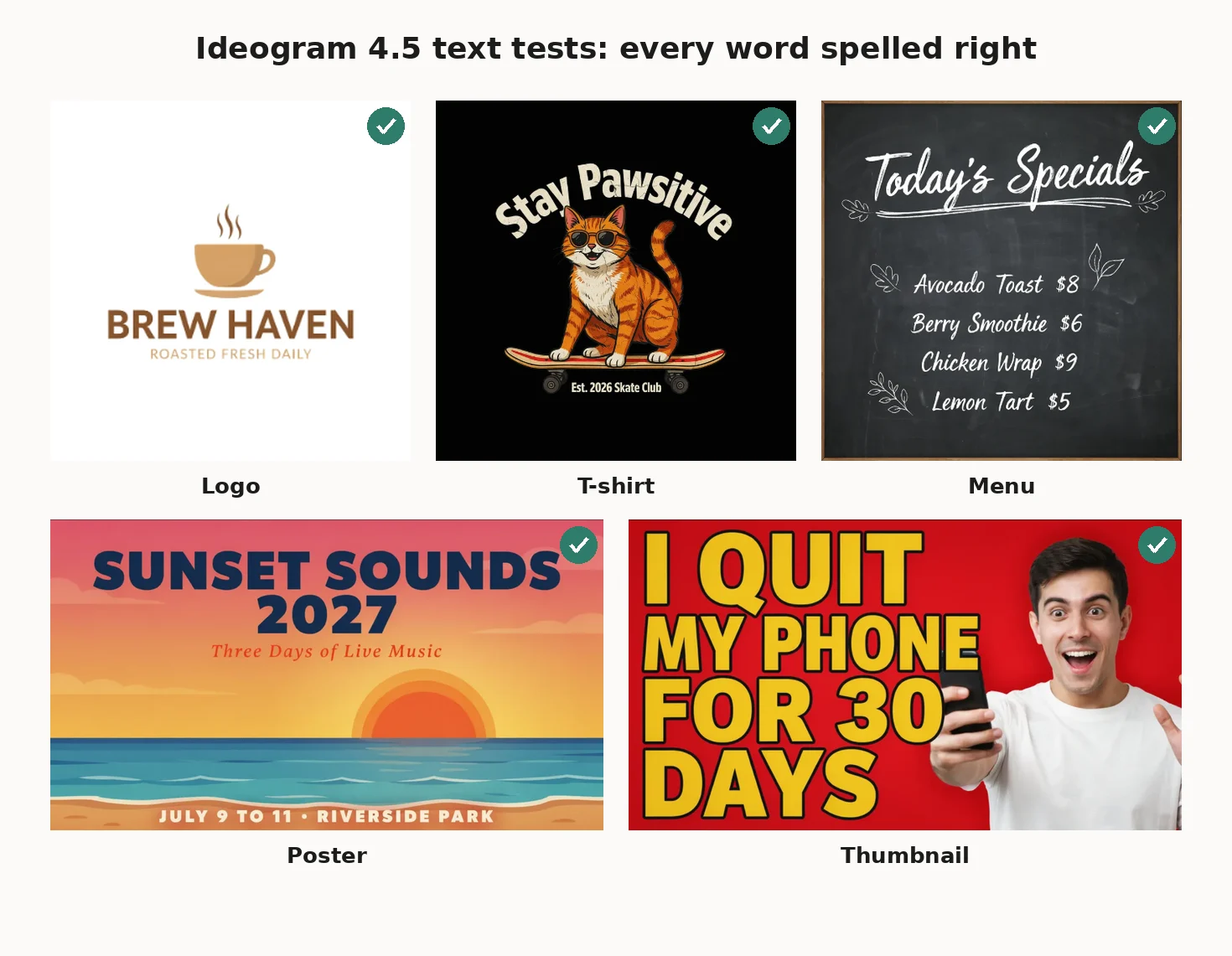 The results were the best I have seen from any AI image generator.
Logo. Both versions wrote "BREW HAVEN" and "ROASTED FRESH DAILY" perfectly, with a clean coffee cup icon. They looked like real brand identity drafts.
Poster. This was a harder test, with 14 words and numbers across three lines. Both posters got "SUNSET SOUNDS 2027", "Three Days of Live Music" and "JULY 9 TO 11 • RIVERSIDE PARK" exactly right. Ideogram swapped my comma for a neat dot, which actually looks better.
T-shirt. Both designs had "Stay Pawsitive" curved over a skateboarding cat, with the tiny "Est. 2026 Skate Club" text spelled right. That small text is where most AI tools fail.
Cafe menu. I expected errors here. Four menu items, four prices and a title in chalk handwriting. Both menus were perfect, and every price matched the right item.
YouTube thumbnail. One image was perfect. The other spelled every letter right but put a visible gap inside "QUIT", so it read like "QU IT".
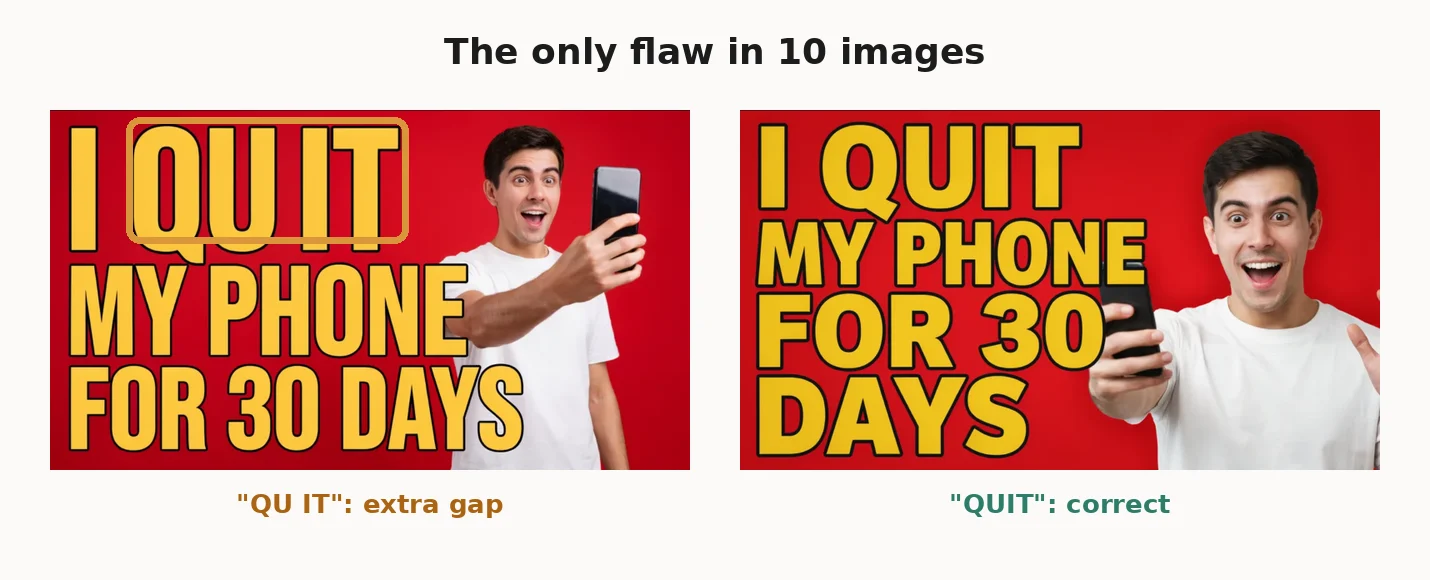 That one spacing slip was the only flaw across all 10 images. In my book, that is a 91 out of 92 word score.
Speed: My first two images came back in under 10 seconds. After that, the free account showed "Waiting in the queue..." and each pair took roughly 40 to 55 seconds. Paid plans get a larger queue.
Free credits: My account started with 30 credits. Ten Low quality images used all of them. When I clicked Generate again at 0 credits, an "Upgrade to create" window opened. There was no free slow queue to fall back on.
Ideogram AI Features
Ideogram has grown into a full AI graphic design tool. Here are the features I found in the app, and what each one is good for.
AI Image Generation
The core Generate Image tool creates high-resolution images from text prompts. It does photorealistic images, digital illustrations, 3D renders and flat graphics. The app tagged my Low quality results as 2K images.
Ideogram also lets you pick other companies' models inside the same app. The model list included Ideogram 4.5, 4.0, 3.0 and 2.0, plus Seedream 5.5, GPT Image 2.6 and Nano Banana Pro. That is handy if you want to compare models without leaving Ideogram.
Accurate Text and Typography
This is the main reason to use Ideogram. It handles headlines, taglines, small print, curved text and handwritten styles. My test showed it holds up even with 14 words in one image. For logo creation, poster design and social media graphics, it saves a lot of fixing time in Canva or Photoshop.
Image Editing and Remixing
The Apps page has a long list of image editing tools:
Precise Edit: paint over part of an image and describe the change. It works like the Magic Fill tool many older reviews mention.
Remix: create image variations of an existing image with a new prompt.
Object Remover: paint over something and remove it.
Upscale Image: image upscaling and image enhancement to a higher resolution.
Colorways and Material Swap: change a product's color or material, which is great for e-commerce product images.
Face Swap: replace a face with one from another photo. If face swapping is what you need most, I tested a dedicated tool in my DeepSwap AI review.
One limit to know: AI editing features need priority credits, so they do not work in the slow queue.
Background Replacement and Image Reframe
Background Remover gives you transparent backgrounds with clean edges. Reframe changes an image to a new aspect ratio by filling in the extra space, so one design can become a square post, a story and a banner. There is also an Ad Resizer that fits one ad into several exact ad sizes, which is useful for advertising creatives.
If you want a transparent background from the start, the Ideogram 4.0 Transparent model generates one directly.
Character Consistency
Ideogram has a 3.0 Character model that keeps the same character across many images. This is useful for book covers, comics, mascots and brand content. Paid plans list "unlimited character consistency" as a feature.
Vectors, Video and More
Two newer apps stood out for designers. Generate Vector creates SVG artwork from a prompt, and Vectorizer turns an image into an SVG. That makes logo design and t-shirt designs much easier to print at any size. Ideogram also now has Generate Video and Edit Video, an Agent, and Custom Models trained on your own visual style.
How to Use the Ideogram AI Image Generator
Here is how I made my test images, step by step:
Go to ideogram.ai and sign up with Google, Apple or Microsoft. These sign-in options are what get you free weekly credits.
If a plan picker appears, click Skip for now.
Click Image in the left menu.
Pick a model. I used Ideogram 4.5.
Type your prompt. Put any words you want in the image inside quotation marks.
Choose Magic Prompt on or off, the aspect ratio, the quality and the number of images. The Generate button shows the credit cost before you click it.
Click Generate, then download or edit your favorite result.
My Tips for Better Text in Images
Always use quotation marks around your text. That is how Ideogram knows what to spell.
Keep each text block short. Split long copy into a headline, subtext and footer.
Say where the text goes. "Curved text above", "small text below" and "footer" all worked in my test.
Name a style. Words like "hand-lettered chalk", "bold yellow with black outline" or "flat vector" changed the font in a useful way.
Make 2 images, not 1. One of my two thumbnails had a spacing slip, and the other was perfect. A second try is cheap insurance.
Turn Magic Prompt off when the exact wording matters, and on when you want more creative scenes.
Ideogram AI Pricing and Plans
Ideogram uses credit-based pricing. Here are the plans from its pricing page on 14 November 2026:
Plan | Monthly billing | Annual billing | Priority credits |
|---|---|---|---|
Free | $0 | $0 | Weekly free credits (30 on my account) |
Pay as you go | 1¢ per credit | No | Buy as needed |
Plus | $20/month | $15/month ($180/year) | 2,400 a month |
Pro | $60/month | $42/month ($504/year) | 7,500 a month |
Team | $30/user/month | $20/user/month ($240/year) | 3,600 per user a month |
Enterprise | Custom | Custom | Custom |
What paid plans add: private image generation, unlimited slow credits, unlimited character consistency, a larger generation queue, quality export and the option to top up credits. Pro also adds batch generation and the best cost per credit.
Things I found in the small print:
Free images are public. On free plans, your images go into the public community gallery. Only paid plans give private generation. Ideogram's own FAQ explains how publishing and private images work.
Unused credits expire. Subscription credits reset at the end of each billing cycle. Top-up credits roll over.
No free trials or discounts on subscription plans, other than the yearly billing discount.
No refund promise. The pricing page FAQ covers cancelling, payment methods and credits, but I did not see a refund policy there, so read the terms before you pay.
The discount label changes. The pricing page says "up to 33% off" yearly, while the upgrade pop-up in the app said "Yearly, 25% off" for Plus. Both are true for different plans.
So what does one image really cost? My Low quality images used 3 credits each. Ideogram's rate card lists Medium at 6 credits and High at 10 credits for Ideogram 4.5.
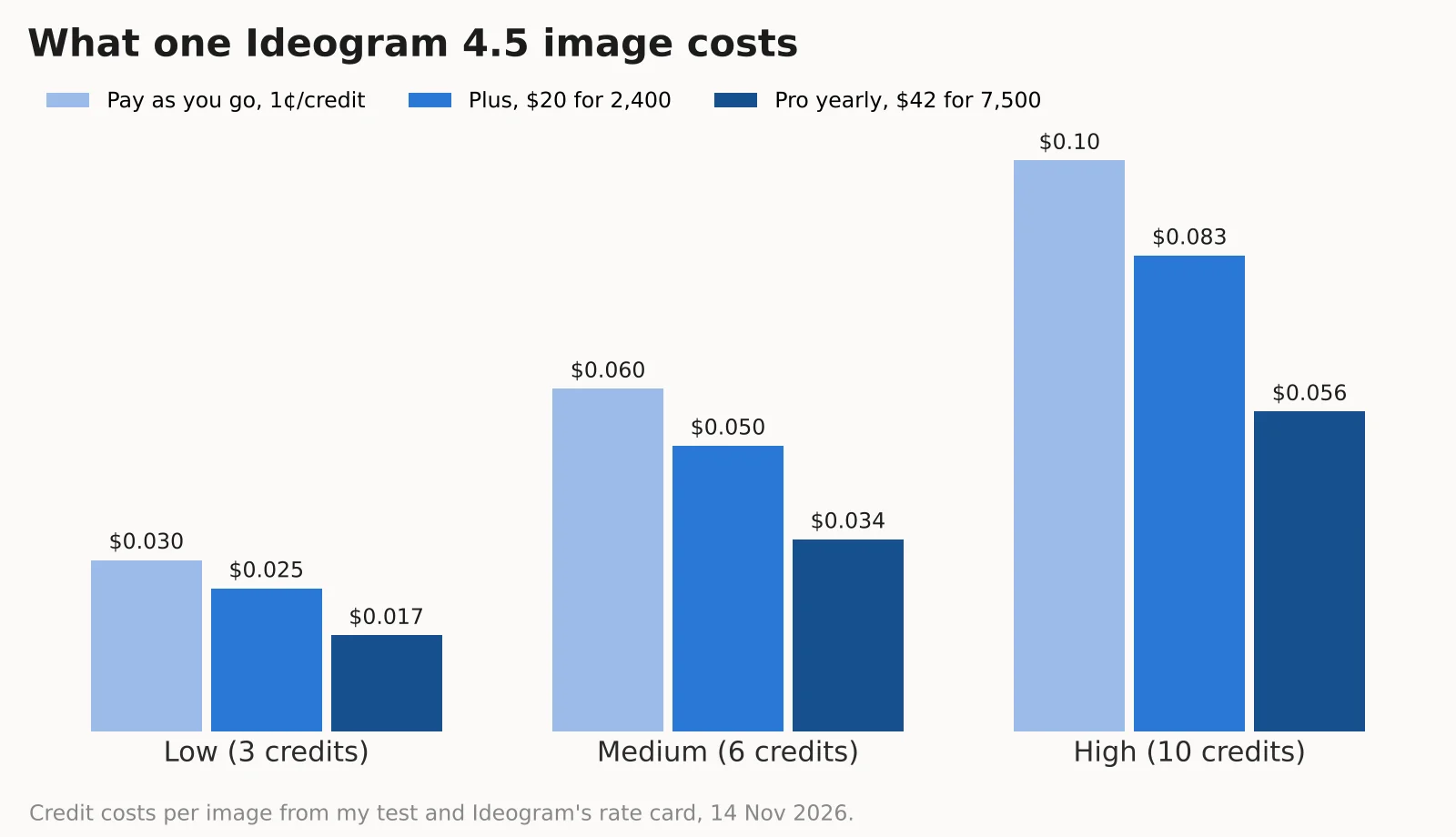 On the Plus plan, a Low quality image works out to about 2.5 cents, Medium to about 5 cents and High to about 8 cents. On Pro billed yearly, it drops to about 1.7 cents for Low. For most social media posts and YouTube thumbnails, Low quality was more than good enough in my test.
API access: Developers can use the Ideogram API, priced per image. Ideogram 4.5 costs $0.03 at Low, $0.06 at Medium and $0.10 at High.
Commercial use: Ideogram's FAQ says commercial use depends on its Terms of Service and tells you to read them before using images commercially, including for print-on-demand t-shirts and stickers. I would read those terms before selling anything you make with it.
Pros and Cons of Ideogram AI
Pros:
The best text rendering I have tested, with 91 of 92 words perfect
Strong at logos, posters, thumbnails, menus and t-shirt designs
Picks a sensible aspect ratio for you
Huge toolkit: Precise Edit, Remix, Reframe, Upscale, Background Remover, vectors and video
Other top models, like GPT Image and Nano Banana, inside the same app
Shows the credit cost before you generate
Low quality images cost under 3 cents on paid plans
Cons:
The free plan is small: my 30 credits made exactly 10 images
No slow queue for free users once credits run out
Free images are public
Free users wait in a queue after the first few images
Unused subscription credits expire each month
Small spacing slips can still happen, so check every image
Best Ideogram AI Alternatives
Ideogram is not the only good AI image generator. Here is how it compares to the main alternatives:
Tool | Best at | Text in images | Where you use it |
|---|---|---|---|
Ideogram | Text, logos, posters, graphic design | Excellent in my test | Web app, iPhone app, API |
Midjourney | Artistic, stylish images | Improved, but not its focus | Web app and Discord |
DALL-E / GPT Image | Following detailed prompts in chat | Good | Inside ChatGPT and the OpenAI API |
Leonardo AI | Many models and fine control | Depends on the model | Web app and API |
Ideogram AI vs Midjourney
Midjourney is still a favorite for artistic, cinematic and painterly images. If you want a moody fantasy scene or a fashion photo with no words, many people prefer its style. But if the image needs a headline, a brand name or a price, Ideogram is the safer pick. It is also easier for beginners, since it works in a simple web app with clear credit costs.
Ideogram AI vs DALL-E
DALL-E has been replaced by OpenAI's GPT Image models inside ChatGPT. They are good at following long, detailed prompts in a chat, and their text rendering has improved a lot. In fact, Ideogram now offers GPT Image 2.6 inside its own model list. For quick images while you chat, ChatGPT is convenient. For design work, Ideogram's editing apps, vector tools and aspect ratio controls give you more.
Other AI Image Generators Worth Trying
Adobe Firefly: best if you already use Photoshop and Illustrator, and want an AI graphic design tool built into them.
Canva AI: best for quick social media posts and presentation visuals with ready templates.
Recraft: strong for AI vector graphics, icons and brand-style illustrations.
Stable Diffusion and FLUX: open models you can run yourself, for full control and no credit limits.
Leonardo AI: a flexible AI image creation tool with many models and styles.
Is Ideogram AI Worth It?
Yes, if your images need words. In my test, Ideogram spelled 91 of 92 words perfectly across logos, posters, thumbnails, t-shirt designs and a menu. I have not seen another AI art generator do that so reliably.
Here is who I think should pay for it:
YouTubers and social media managers who make thumbnails and posts every week. The Plus plan's 2,400 credits make about 800 Low quality images a month.
Small business owners who need logo drafts, posters, menus, website graphics and marketing materials without hiring a designer for every small job.
Online sellers who want product photography ideas and e-commerce product images, using Colorways and Material Swap.
Print-on-demand sellers who make t-shirt designs, after checking the commercial terms.
Start with the free credits. If you like the results, the Plus plan on yearly billing is the best value for most people. Only go for the Pro plan if you make hundreds of images a week or need batch generation.
If you mainly want artistic images with no text, you may get more from Midjourney. And if you want images inside a chat, ChatGPT's GPT Image is easier.
Frequently Asked Questions
What is Ideogram AI?
Ideogram AI is an AI image generator that turns text prompts into images. It is best known for accurate text rendering, and it also has image editing, vector, video and design tools.
Is Ideogram AI free?
Yes, with limits. Free accounts that sign in with Google, Apple or Microsoft get weekly free credits. My account got 30 credits, which made 10 Low quality images. Free images are public.
How does Ideogram AI work?
Ideogram uses diffusion models trained to understand both images and typography. You type a prompt, put any words in quotation marks, and it generates images that match the description and spell the text.
Is Ideogram AI better than Midjourney?
For images with text, yes. Ideogram spelled 91 of 92 words correctly in my test. For artistic images without text, Midjourney is still a strong choice, and some people prefer its style.
Can Ideogram AI generate accurate text in images?
Yes. In my test, all 10 images spelled every word right, including a 14-word poster and a menu with prices. One image had an extra space inside a word, so it is still worth checking each result.
Can Ideogram AI create logos?
Yes. My logo test for a coffee shop came out clean, with the correct name and tagline. Its Generate Vector and Vectorizer apps can also give you SVG files, which are better for logos.
Does Ideogram AI support image editing?
Yes. It has Precise Edit, Remix, Object Remover, Reframe, Upscale, Background Remover, Colorways and Material Swap. AI editing features need priority credits.
Can Ideogram AI generate realistic photos?
Yes. My YouTube thumbnail test produced a realistic photo of a person, and Ideogram also offers photorealistic styles. For text-free photo realism, compare it with Midjourney and Nano Banana before you decide.
Is Ideogram AI safe to use?
Ideogram is a well-known, established tool. The main thing to know is that free plan images are public in the community gallery, so do not use it for private or confidential designs unless you are on a paid plan with private generation.
Can I use Ideogram AI images commercially?
Ideogram's FAQ says commercial use depends on its Terms of Service, and you should read them before using images commercially. You are also responsible for not breaking other people's rights, such as trademarks.
What are the best Ideogram AI alternatives?
The best Ideogram AI alternatives are Midjourney for artistic images, ChatGPT's GPT Image for chat-based creation, Adobe Firefly and Canva AI for design work, Recraft for vectors, and Leonardo AI, Stable Diffusion or FLUX for more control.
Does Ideogram AI have an API?
Yes. Ideogram has an API priced per image. Ideogram 4.5 costs $0.03 at Low, $0.06 at Medium and $0.10 at High quality.