Frosting AI Review 2026: I Tested 10 Prompts on the Free Plan
Frosting AI is a good free AI image generator for anime art and simple scenes, but not for text or exact layouts. In this Frosting AI review, I made 10 images on the free tier without making an account. Each one took about 4 to 6 seconds. Paid plans now cost $25, $55 or $120 a month. Premium models use a separate pay-as-you-go currency called Stardust. One heads-up first: Frosting is an adult-first site, so it is not a fit for work or family use.
Quick answer | |
|---|---|
Our score | 3.5 out of 5 |
Free? | Yes, 100 free generations, refreshable once every 24 hours |
Account needed? | No, not for free images in my test |
Speed | 3.9 to 5.6 seconds per image |
Best at | Anime, fantasy art, clean everyday scenes |
Weak at | Text in images, multi-object prompts, some photo looks |
Paid plans | Star $25, Nebula $55, Galaxy $120 per month |
Safe? | Private by default, but adult content and thin, dated policies |
Frosting AI Review: How I Tested It
Most pages ranking for this keyword never show a single image they made. Some list a $7 "Planet" plan that I could not find anywhere on the site today. So I went in and used it.
Here is what I did on 27 October 2026:
Opened frosting.ai in a normal browser, passed the 18+ check, and did not create an account
Used only the free tier and its free "Lite" models
Ran 10 prompts covering photos, anime, text, hands, object placement and negative prompts
Timed each image from the click to the finished file
Read the pricing, Stardust and policy pages inside the app, not from other blogs
That used 10 of my 100 free generations. Every image came out at 1024 x 1024 with no watermark.
What Is Frosting AI?
Frosting AI is a browser-based AI image generator. You type a text prompt, press a big button called DREAM, and it creates an image. There is no software to install. It all runs in your browser.
It is run by The Frosting Company, with a listed address in Wilmington, Delaware. The tagline on the site says you can "create and chat with anything you can imagine."
How Frosting AI works
Under the hood, Frosting runs a menu of image models. Many of the names, like Dreamshaper XL, Bluepencil XL and Fluffyrock, match well-known community Stable Diffusion models. The settings it offers, like Clip Skip and V-pred models, are Stable Diffusion terms too. So think of Frosting as a friendly, hosted front end for Stable Diffusion style models, plus some newer models of its own like Orion and Alpha Centauri.
When I opened the model picker, it listed 27 image models across four groups: All, Anime, Furry and Photo. Some are free. Some cost Stardust per image. Some need a paid plan.
Who Frosting AI is for
Frosting is built for fans of anime art, fantasy art, character art and furry art, and it openly allows adult content for verified adults. If that is you, it is one of the easiest ways to start.
If you want clean social media graphics, blog images or marketing visuals for a business, I would look elsewhere. The brand and the content on the site make it hard to use at work.
What Came Out of 10 Prompts
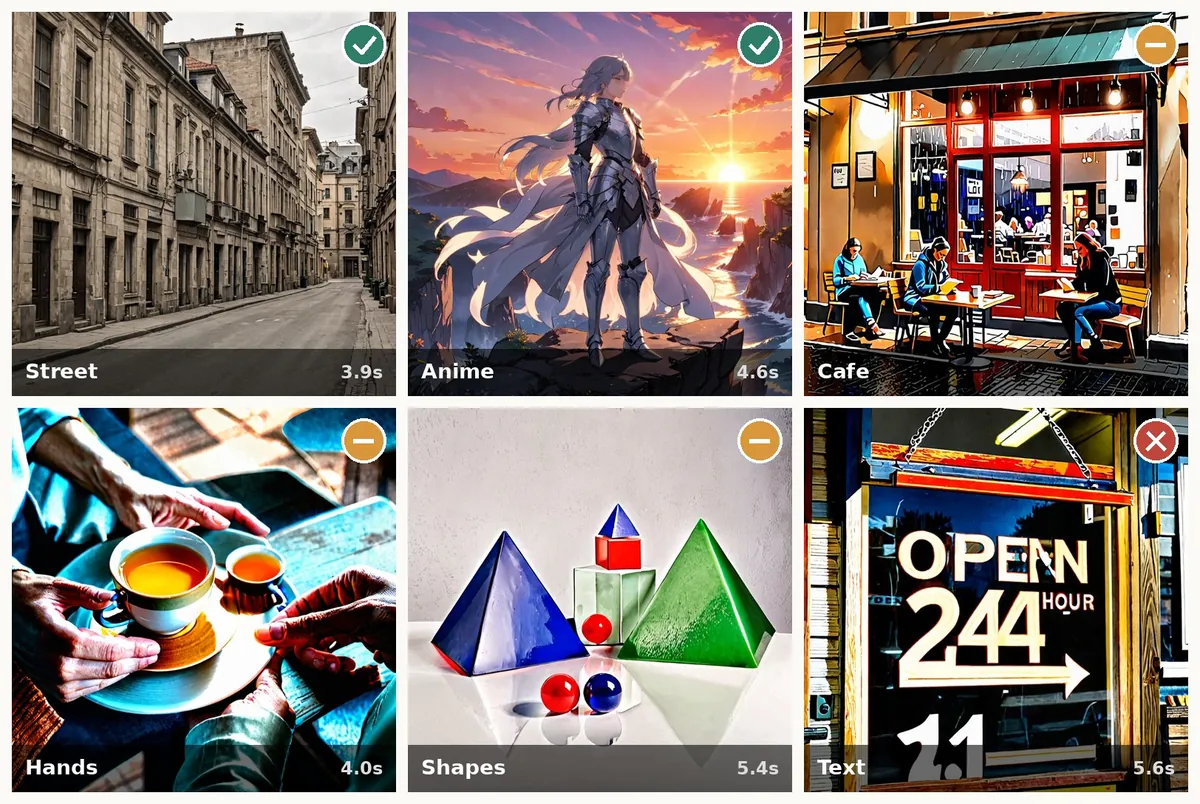 Here is how each test went.
Where it did well
The street scene was the best photo. I asked for "a quiet city street at noon, old buildings, photo." The result looked like a real travel photo. The light was soft, the buildings had believable detail, and nothing looked melted.
The anime knight was the best image overall. On the free Lite Bluepencil XL model, "anime style knight in silver armor standing on a cliff at sunset" gave me sharp armor, a glowing sky and good image composition. This is clearly what Frosting is tuned for.
The fruit bowl looked great too. A simple still life with a wooden table, berries and a striped cloth came out clean and appetizing. Simple, familiar scenes are a strong point.
Where it slipped
The cafe scene missed half the prompt. I asked for people reading "by the window" on "a rainy evening." I got three people sitting outside, with a wet street but no real rain, and an over-sharpened, painted look instead of a photo.
The hands test was mixed. "Two hands holding a white cup of tea" gave me four hands and two cups. The fingers themselves looked mostly fine, but the count was wrong and the colors were heavily oversaturated.
Object placement was unreliable. I asked for "a red cube on top of a blue ball, next to a green pyramid." I got a red cube, but on top of a pale block with a blue pyramid stacked on it, plus big blue and green pyramids and extra red balls. All the right parts, mostly in the wrong places. Prompt adherence on multi-object scenes is a weak spot.
Text in images
This was the only clear fail. I asked for a shop sign that says "OPEN 24 HOURS." The sign read "OPEN 244 HOUR" with a random "1.1" underneath. If you need readable words in your image, Frosting's free models are not the tool.
Image generation speed
Speed was a real highlight. I timed nine of the images. They took between 3.9 and 5.6 seconds each, about 4.5 seconds on average. That was on the free tier, on a weekday evening, with no queue.
Paid plans add "generation priority," which matters when the servers are busy. I did not hit any wait, but your mileage may vary at peak hours.
Do Frosting AI Negative Prompts Work?
A negative prompt is a list of words you want the model to avoid. Frosting puts one in by default: "worst quality, low quality, blurry."
To test it, I generated "a bowl of fresh fruit on a wooden kitchen table" once as normal, then twice more with "apples" added to the negative prompt.
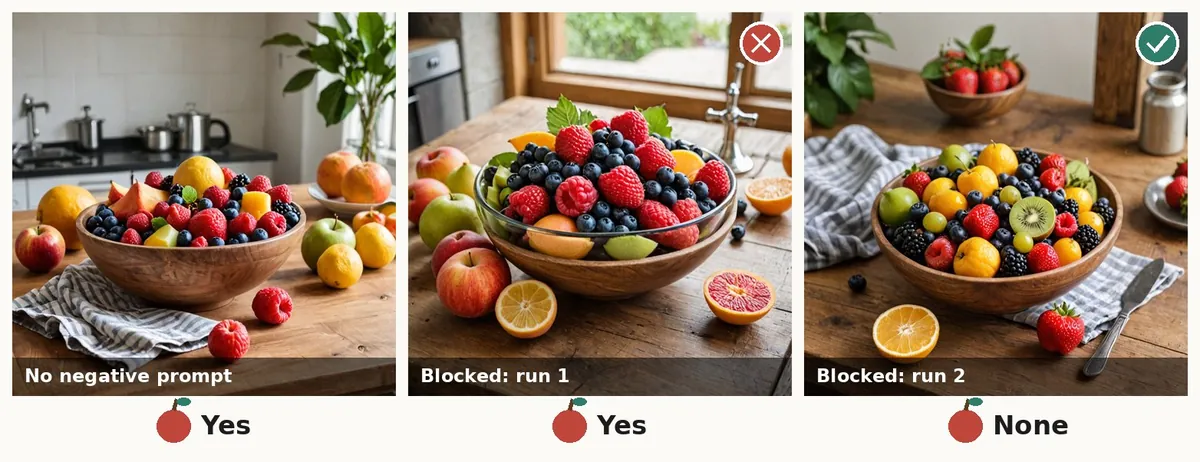 The first blocked run still had several big apples. The second had none. So negative prompts do something, but they are not a hard filter.
There is a catch that matters here. Setting a fixed seed, which lets you repeat the exact same image with one change, is a paid feature. On the free plan, every run is random, so you cannot do a clean before-and-after test. That makes negative prompts harder to learn on the free tier.
Frosting AI Features
Here is what I found in the app, split by what is free and what is paid.
Free tier features:
Text-to-image generation with free Lite models (photo and anime styles)
Prompt Enhance, a toggle that lets AI rewrite your prompt with more detail
Negative prompts
Three aspect ratio options: Portrait, Square and Landscape
One image at a time (batch size is locked at 1x)
Private generations that stay in your history after a reload
Paid features (Star plan and up):
Batch image generation of 4, 8 or 16 images at once
Image upscaling up to 4x
Inpainting, which re-generates just one part of an image
Set seed, prompt strength and Clip Skip controls
Prompt weighting and unlimited prompt length
Character roleplay chat
Monthly video tokens
More quality steps per image (40, 70 or 100)
The full XL models and V-pred models need the Nebula plan or higher. Galaxy adds personal prompt help from the Frosting team and early access to new features.
How to Use Frosting AI
It takes about a minute to make your first image.
Open frosting.ai. Confirm you are 18 or older on the welcome screen. In some US states the age is 21.
Pick an art type. It asks if you want anime, furry or photorealistic art. This just sets your starting model. You can change it any time.
Write your prompt. Describe the subject, the setting, the light and the style. "Photo" or "anime style" at the end helps a lot.
Add a negative prompt if needed. Open the settings with the arrow above the prompt box.
Choose an aspect ratio. Portrait for phone wallpapers, Landscape for blog images, Square for social posts.
Press DREAM. Your image appears in about 5 seconds. Icons under each image let you chat, make a video, edit it and more.
A tip from my test: keep prompts short and concrete. The free models handled "one subject, one setting" well. They struggled when I stacked several objects with exact positions.
Frosting AI Pricing: Free, Plans and Stardust
This is the part most reviews get wrong, so I checked every number inside the app.
Does Frosting AI have a free plan?
Yes. You get 100 free generations, and the app says you can refresh your free credits once every 24 hours. One image on a Lite model used one free generation. I did not need an account for this.
Free generations only cover the free Lite models, like Lite Dreamshaper XL and Lite Bluepencil XL. When I switched to the Orion photo model, the DREAM button went grey and showed a "Not Enough Stardust" message.
Paid plans
Frosting now has three monthly plans. The cheap $7 "Planet" plan that other reviews list was not on the pricing page when I checked.
Feature | Star | Nebula | Galaxy |
|---|---|---|---|
Price | $25/month | $55/month | $120/month |
Daily gems for Lite models | 1,000 | 2,000 | 5,000 |
Video tokens per month | 4,000 | 8,000 | 16,000 |
Batch size | 4x | 8x | 16x |
Quality steps | 40 | 70 | 100 |
Upscaling and inpainting | Yes | Yes | Yes |
Full XL and V-pred models | No | Yes | Yes |
Prompt help from the team | No | No | Yes |
The subscribe page also offered "30 free minutes of Nebula Tier" as a trial. You can see the current plans on the official Frosting pricing page.
Stardust: pay as you go
Stardust is a separate credit system for premium image models and video. It comes in three packs:
1,000 Stardust for $5
10,000 Stardust for $30
100,000 Stardust for $200
Each model has its own price per image, with higher numbers for higher quality settings.
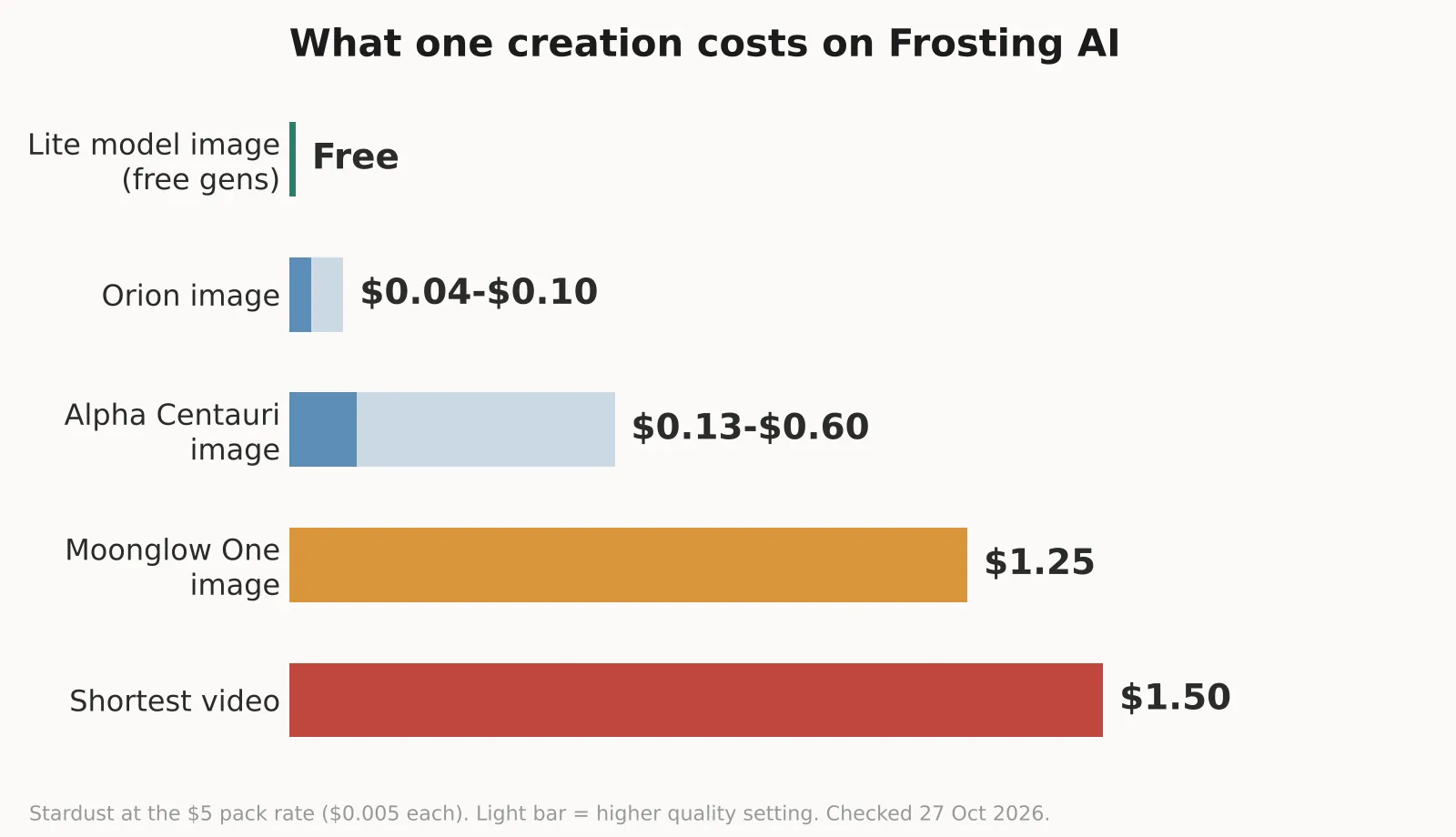 So an Orion photo costs 4 to 10 cents. One image from Moonglow One, a model marked safe for work, costs $1.25. The cheapest video starts at 300 Stardust, or $1.50, and the most expensive video model costs 8,800 Stardust per clip.
Is Frosting AI worth the price?
For most people, the free tier is the real deal. 100 images a day is generous for hobby use.
If you only want a few premium images, a $5 Stardust pack goes further than a $25 plan. A subscription makes sense if you generate a lot every day, want batch generation and inpainting, or want video.
Refunds are offered within 3 days of purchase, and only for unused credits. You can cancel any time at frosting.ai/unsubscribe.
Is Frosting AI Safe?
It depends on what you mean by safe. I read the privacy policy, terms and content rules before using it.
Privacy and your data
Generations are private by default. The policy says images and chats stay private unless you share or post them.
It collects normal account data: email, username, IP address, browser details and payment details.
Data is stored with US cloud partners, so EU users' data leaves the EEA.
The policies are old. The privacy policy was last updated on 8 June 2023 and the terms on 30 June 2023. That is a long time in AI.
Deleting your account means emailing them at privacy@frosting.ai. There is no delete button.
Content rules and your rights
You own what you create. But if you post an image publicly on Frosting, you give them a permanent, worldwide license to use it, including for promotion.
Adult content is allowed for verified adults. The terms describe the site as possibly containing sexually explicit material.
There is a clear banned list. It bans anything involving minors, non-consent, real people including celebrities, graphic violence and hate symbols. Breaking the rules can get your account terminated.
My take: it looks like a real business with real policies, and the free tier needs almost no personal data. But it is not safe for kids, not suited to a work laptop, and I would not upload photos of real people to it.
Frosting AI Pros and Cons
Pros
100 free images, refreshable every 24 hours, no sign-up needed
Fast, about 4.5 seconds per image in my test
Strong anime and fantasy art on free models
Clean results on simple everyday scenes
No watermark on free images
Cheap pay-as-you-go Stardust for a few premium images
Private by default
Cons
Cannot write readable text in images
Weak prompt accuracy with several objects in exact positions
Some photos come out over-sharpened and oversaturated
No seed control on the free plan, so results are hard to repeat
The cheapest plan is now $25 a month
Adult-first brand, not usable at work or around kids
Privacy policy and terms not updated since 2023
Best Frosting AI Alternatives
None of these is a perfect swap, because Frosting's mix of free access and open content rules is unusual. Pick based on what you are making.
Midjourney is the pick for top image quality and artistic style. It is mainly a paid tool and has stricter content rules.
Leonardo AI is the closest match for game art and character generation, with lots of model choices, image-to-image generation and a free daily allowance.
Stable Diffusion on your own computer gives you the most creative control and no content limits, but you need a decent graphics card and some setup.
Ideogram is what I would use instead for anything with text, like posters or signs. That is exactly where Frosting failed my test.
Adobe Firefly is the safe choice for business and marketing visuals, since Adobe says it trains on licensed content, and it fits a work setting.
If you want a cheap, general-purpose tool for quick photo fixes and simple AI images, see our Hotpot AI review. It is a very different, more work-friendly option.
Frosting AI vs Midjourney
Midjourney wins on image quality and consistency, especially for photorealistic images and complex scenes. Frosting wins on price and access. You can start for free in seconds, with no account needed.
Frosting AI vs Leonardo AI
Both suit character and fantasy art. Leonardo AI has a stronger editing toolset and fits work use better. Frosting is faster to start and more open about adult content.
Our Frosting AI Score
I scored Frosting AI on six things, based on my own test and the pricing I checked in the app.
What I scored | Score | Why |
|---|---|---|
Ease of use | 4.5 / 5 | No sign-up, one button, first image in under a minute |
Speed | 5 / 5 | About 4.5 seconds per image on the free plan |
Image quality | 3.5 / 5 | Great anime and simple scenes, some over-sharpened photos |
Prompt accuracy | 2.5 / 5 | Wrong object counts, wrong layouts, broken text |
Value for money | 3.5 / 5 | Generous free tier, but plans start at $25 a month |
Safety and privacy | 2.5 / 5 | Private by default, but adult-first and policies from 2023 |
Overall | 3.5 / 5 | A strong free toy, not a precise or work-friendly tool |
Is Frosting AI Worth Trying?
Yes, if you want free anime, fantasy or character art and you are an adult who is fine with the site's content. You lose nothing by trying the free tier, and it is genuinely fast.
No, if you need text in images, exact layouts, consistent results or anything for work. The free models are fun, but they are not precise, and the paid plans are expensive next to the competition.
My advice: use the free 100 generations for a few days before paying anything. If you hit the limits of the Lite models, try a $5 Stardust pack before you sign up for a $25 plan.
Frequently Asked Questions
Is Frosting AI free?
Yes. You get 100 free generations on the Lite models, and you can refresh them once every 24 hours. Premium models and video need Stardust or a paid plan.
Do I need an account to use Frosting AI?
Not for free images. In my test, I made 10 images without signing up. You do need to confirm you are 18 or older, and an account is needed for paid plans.
How much does Frosting AI cost?
Paid plans cost $25 (Star), $55 (Nebula) or $120 (Galaxy) per month. Stardust packs cost $5 for 1,000, $30 for 10,000 or $200 for 100,000.
Is Frosting AI safe to use?
It keeps your images private by default and needs little personal data for free use. But it hosts adult content, its policies date from 2023, and it is not suitable for minors or work devices.
Does Frosting AI support negative prompts?
Yes. It adds a default negative prompt, and you can add your own words. In my test, blocking "apples" worked on one of two runs, so treat it as a strong hint, not a hard rule.
Can Frosting AI put text in images?
Not reliably. My "OPEN 24 HOURS" sign came out as "OPEN 244 HOUR." For text, use a tool like Ideogram instead.
What models does Frosting AI use?
It offers 27 image models, many based on community Stable Diffusion models like Dreamshaper XL and Bluepencil XL, plus its own models like Orion, Altair and Alpha Centauri. Free users get the Lite versions.