ChatGOT Login 2026: It Now Opens HeyTop AI, Here Is How to Sign In
The ChatGOT login now lives at heytop.ai. ChatGOT has rebranded as HeyTop AI. Every ChatGOT link I tried, including start.chatgot.io, now sends you to HeyTop. You sign in there with the same email and password you used on ChatGOT, or with "Continue with Google" if you signed up that way. Your old chats, images, PDFs and slides move over, and your paid plan keeps its price.
I tested all of this myself on 30 October 2026. Below is exactly what I clicked, what I saw, and one surprise about the free plan that the HeyTop page does not mention.
What Happened to the ChatGOT Login?
I went to chatgot.io expecting a login button. There was none. The homepage still says "No Sign-up," and it has just two buttons: "Start AI Chatting Now" and "Add to Chrome."
When I clicked "Start AI Chatting Now," a new tab opened on start.heytop.ai. The page title said it plainly: "ChatGOT is upgrading to HeyTop AI."
Then I typed start.chatgot.io, the address most people search for. It went to the same HeyTop page.
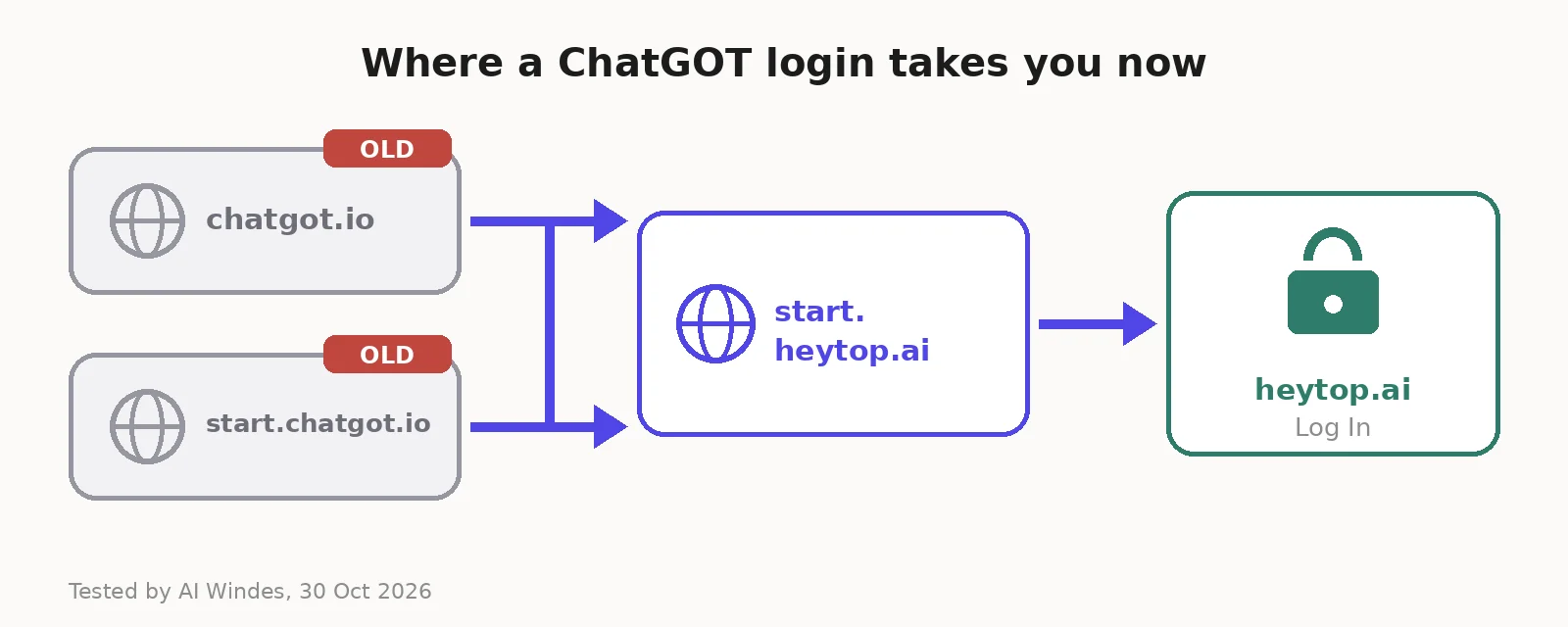 Both old ChatGOT addresses now send you to HeyTop AI's upgrade page, and from there to the HeyTop login.
So in short:
chatgot.io still loads, but its chat buttons send you to HeyTop
start.chatgot.io redirects straight to start.heytop.ai
start.heytop.ai is the "We've upgraded!" page with a "Go to HeyTop" button
heytop.ai is where the real login box now lives
HeyTop describes itself as an all-in-one AI platform for chat, AI writing, ChatPDF, image generation, video and AI slides. That is the same toolkit ChatGOT had, with a new name and more AI models.
If you want my full take on how good the tool itself is, read my ChatGOT review. This guide sticks to getting you signed in and using it.
ChatGOT Login Step by Step
Here is the sign-in flow I went through on the new site.
Go to heytop.ai. You can also go through start.chatgot.io and click "Go to HeyTop." Both end in the same place.
Click "Log In" in the top right corner.
Pick how you sign in. The box shows "Continue with Google" at the top, and email and password fields below.
Sign in the same way you did on ChatGOT. This part matters. I explain why just below.
You land in the app. It opens on a "New Chat" screen with a sidebar for Chat, Image, Video, Document, Assets and Effects.
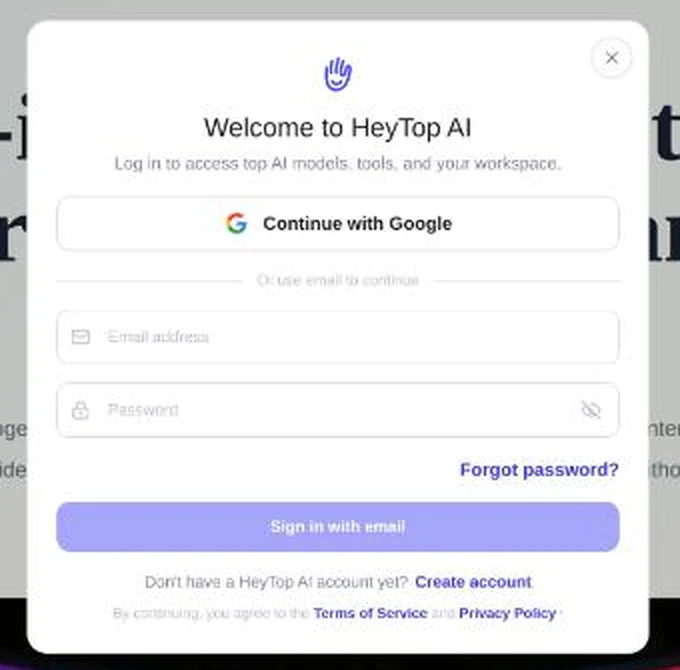 The login box you see today: Google sign-in or email and password.
There is no Apple sign-in and no phone number option. It is Google or email only.
If you used Google on ChatGOT
Click Continue with Google and pick the same Google account. HeyTop's upgrade page says this directly: "If you used Google sign-in, choose Google again."
Do not try to type your Gmail address into the email box instead. An account made with Google may not have a password at all, so the email box may not let you in.
If you used email and password on ChatGOT
Type the same email and the same password into the HeyTop login box, then click Sign in with email. Your ChatGOT details carry over, so you do not need a new account.
If you already had a HeyTop account too
This catches people out. HeyTop says that if the same email already has a HeyTop account, you must use your HeyTop password, not your old ChatGOT one. If your ChatGOT password fails, try the HeyTop one before you reset anything.
Forgot Your ChatGOT Password?
Below the password box there is a Forgot password? link. I clicked it to see the flow, without sending anything.
It opens a "Reset password" screen that says: "Confirm your identity with an email code, then set a new password." So the steps are:
Click Forgot password?
Enter the email you used on ChatGOT
Pass a quick Cloudflare check. Mine passed on its own with a green tick.
Click Send verification code
Type the code from your inbox, then set a new password
If no code arrives, check your spam folder. If you originally signed up with Google, skip all of this and use "Continue with Google."
Can You Still Use ChatGOT Without Logging In?
No, not anymore, at least in my test.
The old ChatGOT homepage still says "No Sign-up." But when I opened the HeyTop app at heytop.ai/app without an account, it threw me straight back to the login box. You need an account to chat now.
The free plan surprise
HeyTop's upgrade page and pricing page both promise 10 free AI uses per day. The pricing page lists one free text model, GPT 5.4 Free, and one free image model.
Here is what actually happened on a brand-new account:
The chat box showed "Today's free quota 0/0"
When I sent a simple question with the free model selected, I got no answer. An upgrade window with the paid plans popped up instead.
The Image page showed "Today's free quota Unavailable"
My credit balance in the account menu was 0
I tested a couple of hours before midnight UTC, so the daily quota might start after a reset, or it might depend on your country. I could not confirm which. But I would not count on getting free answers on your first day. If you hit the same wall, you can earn credits through the invite page (more on that below) or wait a day and check again.
How to Use ChatGOT After You Log In
Once you are in, this is the layout.
The sidebar on the left has six tools:
Chat for normal AI chat with a model picker
Image for AI image generation from text or a reference image
Video for short AI videos
Document for working with PDFs and slides
Assets for your saved creations
Effects for AI photo effects
The model picker sits above the chat box. I counted 22 chat models, and each one shows how many credits one message costs. A few examples from my account:
Model | Credits per message |
|---|---|
GPT 5.4 Free | 0 |
DeepSeek V4 Flash | 1 |
Claude Haiku 5.5 | 2 |
GPT 6 Luna | 2 |
DeepSeek V4 Pro | 6 |
Gemini 3.8 Flash | 10 |
Claude Sonnet 5.5 | 25 |
Claude Opus 5.5 | 50 |
GPT 6 Astra | 100 |
Claude Fable 5.1 | 100 |
That spread is huge. One message to Claude Fable 5.1 costs as much as 100 messages to DeepSeek V4 Flash. My advice: start every chat on a cheap model and only switch up when the answer is not good enough.
The account menu opens from your initials at the bottom left. It shows your plan, your credit balance, Contact Us, Language and Log Out.
The gift icon opens the invite page. If a friend signs up with your link, you both get 30 credits. On a free account, that was the only quick way to get credits that I found.
What Happens to Your Old ChatGOT Plan and Credits
If you paid for ChatGOT, this is the part to read slowly. Here is what HeyTop's upgrade page says, in plain words:
ChatGOT Pro becomes "ChatGOT-exclusive Max" with 4,600 credits a month
ChatGOT Max becomes "ChatGOT-exclusive Ultra" with 7,200 credits a month
Your price and billing date stay the same, using the same payment method
Your first transfer gives you a full month of credits, without taking off what you already used this month
Old leftover credits are not converted separately
Two plans add up. Pro plus Max gives you 11,800 credits a month
Each valid referral you made on ChatGOT turns into a one-time 50 credits
Cancelled renewals stay cancelled. They will not restart on their own
You can read every line on HeyTop's official upgrade page too.
Should you keep your old plan?
I did the math, and yes, most people should keep it.
The old ChatGOT prices are still shown on chatgot.io/pricing: Pro at $9.90 a month and Max at $15.90. Compare what each dollar buys:
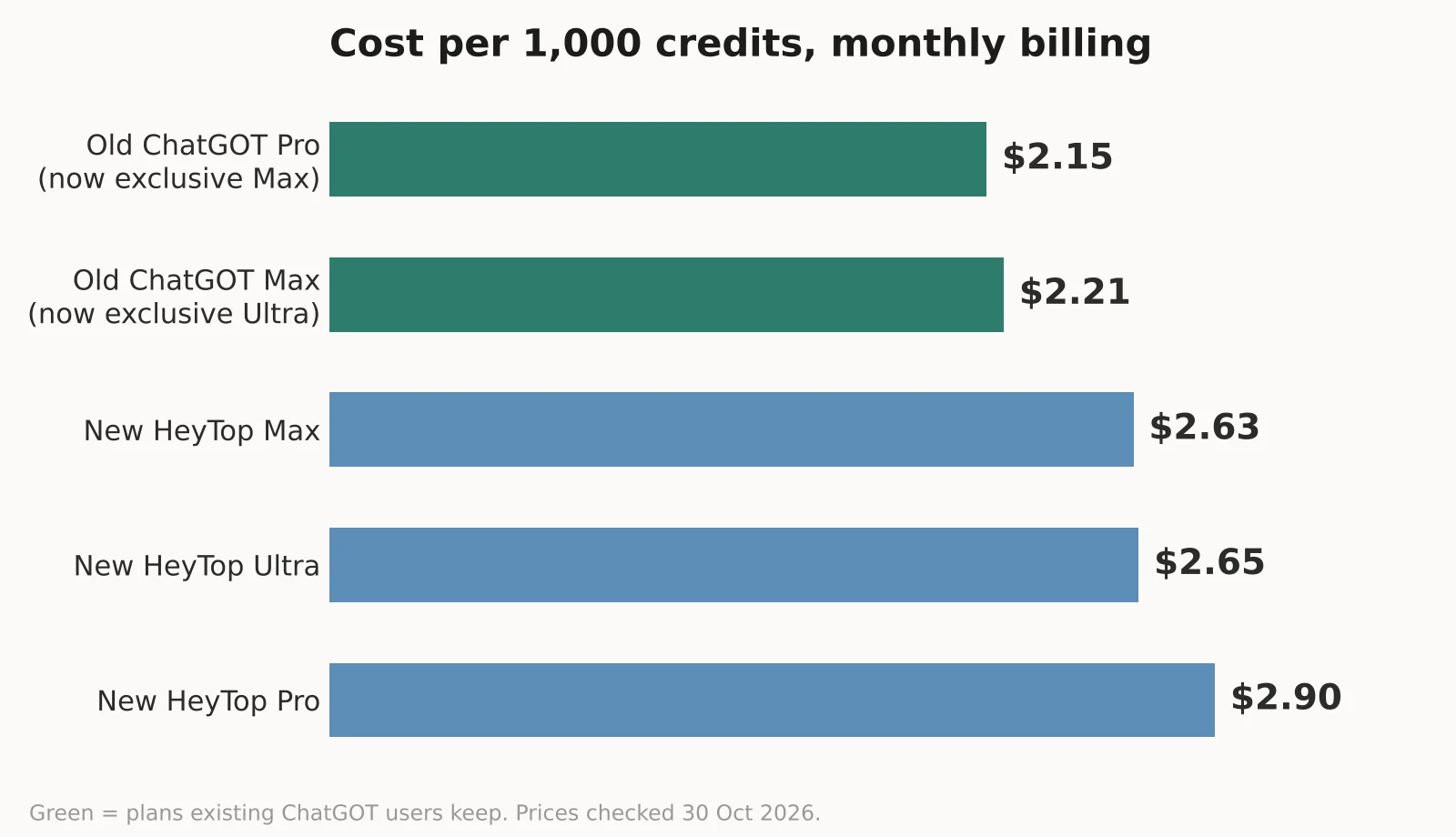 Old ChatGOT plans get more credits per dollar than new HeyTop plans.
Old ChatGOT Pro: $9.90 for 4,600 credits, about $2.15 per 1,000 credits
Old ChatGOT Max: $15.90 for 7,200 credits, about $2.21 per 1,000
New HeyTop Max: $7.90 for 3,000 credits, about $2.63 per 1,000
New HeyTop Ultra: $15.90 for 6,000 credits, about $2.65 per 1,000
New HeyTop Pro: $2.90 for 1,000 credits, $2.90 per 1,000
If you cancel your ChatGOT plan and later sign up for HeyTop fresh, you pay more for the same credits. The only reason to drop it is if you barely use it. In that case, HeyTop Pro at $2.90 a month is a much smaller bill.
A price mismatch I spotted
On HeyTop's public pricing page, the yearly Pro plan is $30 a year ($2.50 a month). But inside the app, when the upgrade window popped up for me, yearly Pro showed $46.80 a year ($3.90 a month). The Max and Ultra yearly prices matched on both: $80 and $160.
So check the final price at checkout, and screenshot it before you pay.
The ChatGOT Chrome Extension: Old vs New
The "Add to Chrome" button on chatgot.io still points to the old extension. It is called "Chatgot - Free DeepSeek R1 AI Assistant." When I checked the Chrome Web Store listing, it had about 5,000 users and a 4.6 rating from 17 reviews. It was last updated on 16 September 2025, and it says nothing about HeyTop.
Inside the HeyTop app, the Extension icon opens a different listing called "HeyTop AI - AI Assistant." That one was updated on 15 September 2026, has about 1,000 users, and opens a HeyTop side panel for reading pages, AI search, writing and images.
If you want the extension, I would install the new HeyTop one, since it gets updates and matches the new login. One small trust note: both listings give a personal Gmail address as the developer contact, not a company email.
Fixing Common ChatGOT Login Problems
Here are the problems I would expect, and what to do about each.
"My password does not work." You may have signed up with Google. Use "Continue with Google." If the same email also has a HeyTop account, use your HeyTop password.
"I cannot find the login button on chatgot.io." There is none. Go to heytop.ai and click "Log In" in the top right.
"I logged in but I see no old chats." HeyTop says your chats, images, PDFs and slides transfer, and that you can view them "after the transfer." If they are not there yet, the transfer may still be pending. Contact support.
"It keeps asking me to upgrade." Your free daily quota may show 0, like mine did. Wait for the next daily reset, earn invite credits, or use a paid plan.
"I want a refund for an old ChatGOT payment." HeyTop says to contact support for past orders. You can email contact@heytop.ai or use the live chat bubble on start.heytop.ai.
"I want to cancel." Note that a cancelled ChatGOT renewal will not come back on its own. Your paid benefits stay active until the end of the period you already paid for.
Stay Safe: Type the Right Address
When I looked at what people type into Google, the suggestions included misspelled versions like "start.chatgot.oi," with "oi" instead of "io." I did not open that address. But typo domains like this are a common trick for stealing passwords.
Before you type your password anywhere, check the address bar. The real addresses today are:
heytop.ai (login and app)
start.heytop.ai (the upgrade page)
chatgot.io and start.chatgot.io (old addresses that forward you to HeyTop)
The real login also has a Cloudflare check on the password reset screen and links to HeyTop's Terms of Service and Privacy Policy at the bottom of the box. If a "ChatGOT login" page looks different, close it.
Frequently Asked Questions
What is the ChatGOT login page now?
It is heytop.ai. Click "Log In" in the top right. Old links like start.chatgot.io now forward you there through HeyTop's upgrade page.
Is ChatGOT the same as HeyTop AI?
Yes. ChatGOT is "upgrading to HeyTop AI," in HeyTop's own words. Your ChatGOT account, chats and paid plan move over to HeyTop.
Can I use my old ChatGOT password on HeyTop?
Yes. Use your ChatGOT email and password. If you signed up with Google, choose "Continue with Google." If the same email already has a HeyTop account, use your HeyTop password instead.
Is ChatGOT still free?
HeyTop advertises 10 free uses a day with a free GPT 5.4 model. In my test, a new account showed a free quota of 0, and the first message opened the upgrade window instead of an answer.
How do I reset my ChatGOT password?
On the HeyTop login box, click "Forgot password?" Enter your email, pass the quick check, click "Send verification code," then type the code and set a new password.
Will my ChatGOT subscription price change?
No. HeyTop says your price and billing cycle stay the same. ChatGOT Pro becomes a ChatGOT-exclusive Max plan with 4,600 credits a month, and Max becomes ChatGOT-exclusive Ultra with 7,200.
Does the ChatGOT Chrome extension still work?
The old listing is still up, but it was last updated in September 2025. HeyTop now has its own "HeyTop AI - AI Assistant" extension, updated in September 2026, which matches the new login.