OpenClaw Skills and ClawHub: Installing, Publishing, and the Four Places Things Land
The command you want: openclaw skills install <slug> to add a skill, and openclaw plugins install clawhub:<package> to add a plugin. Search first with openclaw skills search or openclaw plugins search.
That covers most people. But there are three distinctions underneath those commands that the documentation states clearly and almost nobody repeats, and getting them wrong is why things end up in folders you did not expect.
A skill is not a plugin. The openclaw CLI is not the clawhub CLI. And where a skill lands depends entirely on how you installed it.
I went through the whole registry documentation and untangled all three.
A Skill Is Text, a Plugin Is Code
This is the distinction everything else depends on, so it is worth getting straight before you install anything.
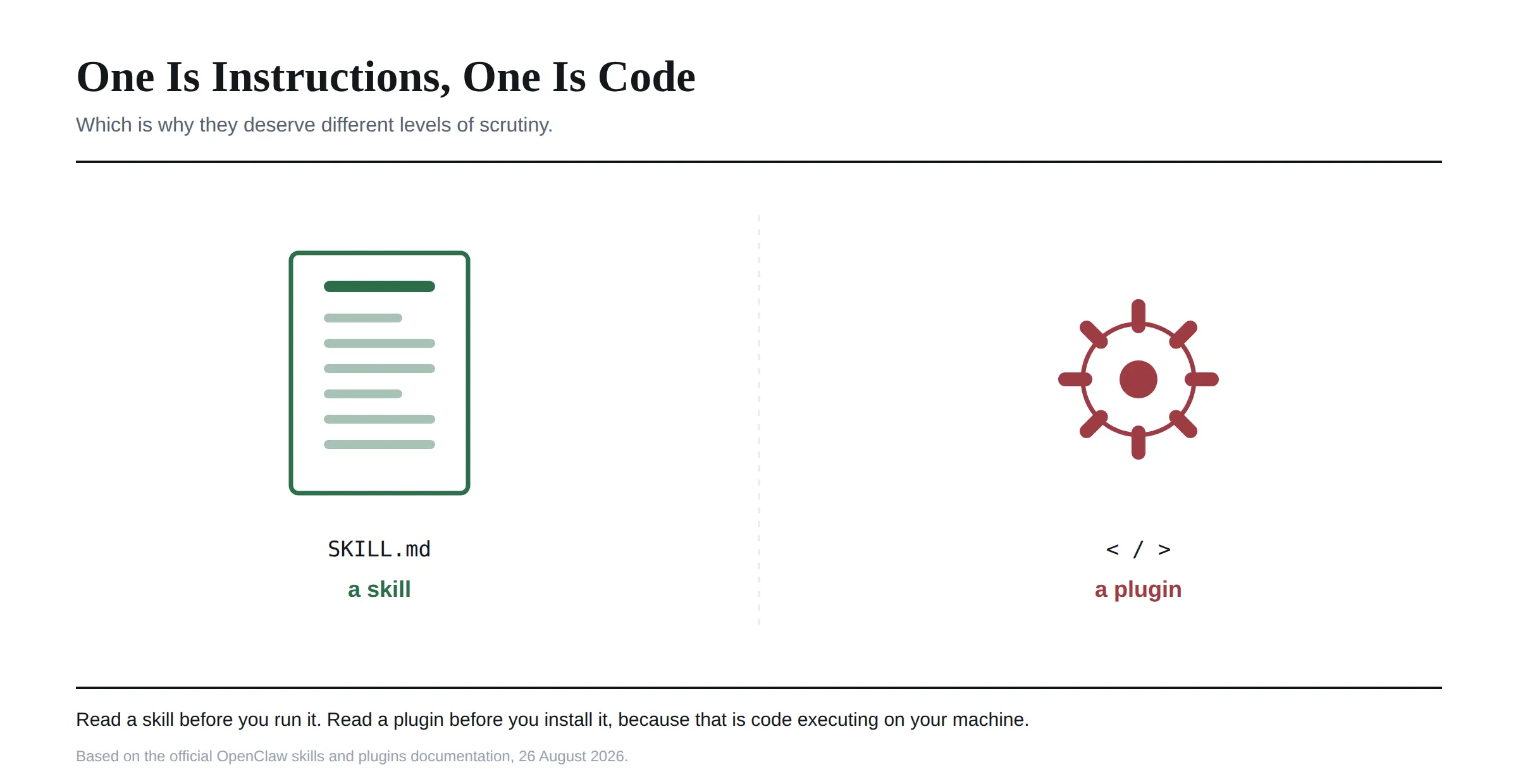 A skill is a folder containing a required
 SKILL.md file and optional supporting files, as defined in the ClawHub registry itself. References, scripts, assets. It is instructions for the agent, written in text, telling it how to do something.
A plugin is code that extends what OpenClaw can do at runtime. Channels, model providers, agent harnesses, tools, speech, transcription, voice, media understanding, generation, web fetch, web search. When you add a messaging channel, you are installing a plugin.
The official documentation puts the risk difference plainly and I would repeat it word for word: treat plugin installs like running code.
A skill can still be dangerous, and I will come back to that, but a plugin is unambiguously executing on your machine. They deserve different levels of scrutiny.
Part One: Installing OpenClaw Skills and Plugins
Most readers are here to consume rather than publish, so this half first.
The Search Is Better Than You Expect
openclaw skills search "calendar" and openclaw plugins search "calendar" both query ClawHub.
Worth knowing that ClawHub searches using embeddings and a vector index rather than brittle keyword matching. In practice that means describing what you want in plain language works better than guessing at the exact name, which is the opposite of how most package registries behave.
Public listing pages show the current registry state before you install: semver versions, tags such as latest, changelogs, file lists, download counts, stars and security scan summaries.
I would read the scan summary every time. That is not paranoia, and the reason is in the security section below.
Where Things Actually Land
Here is the part that trips people up, and I have not seen it laid out anywhere outside the official docs.
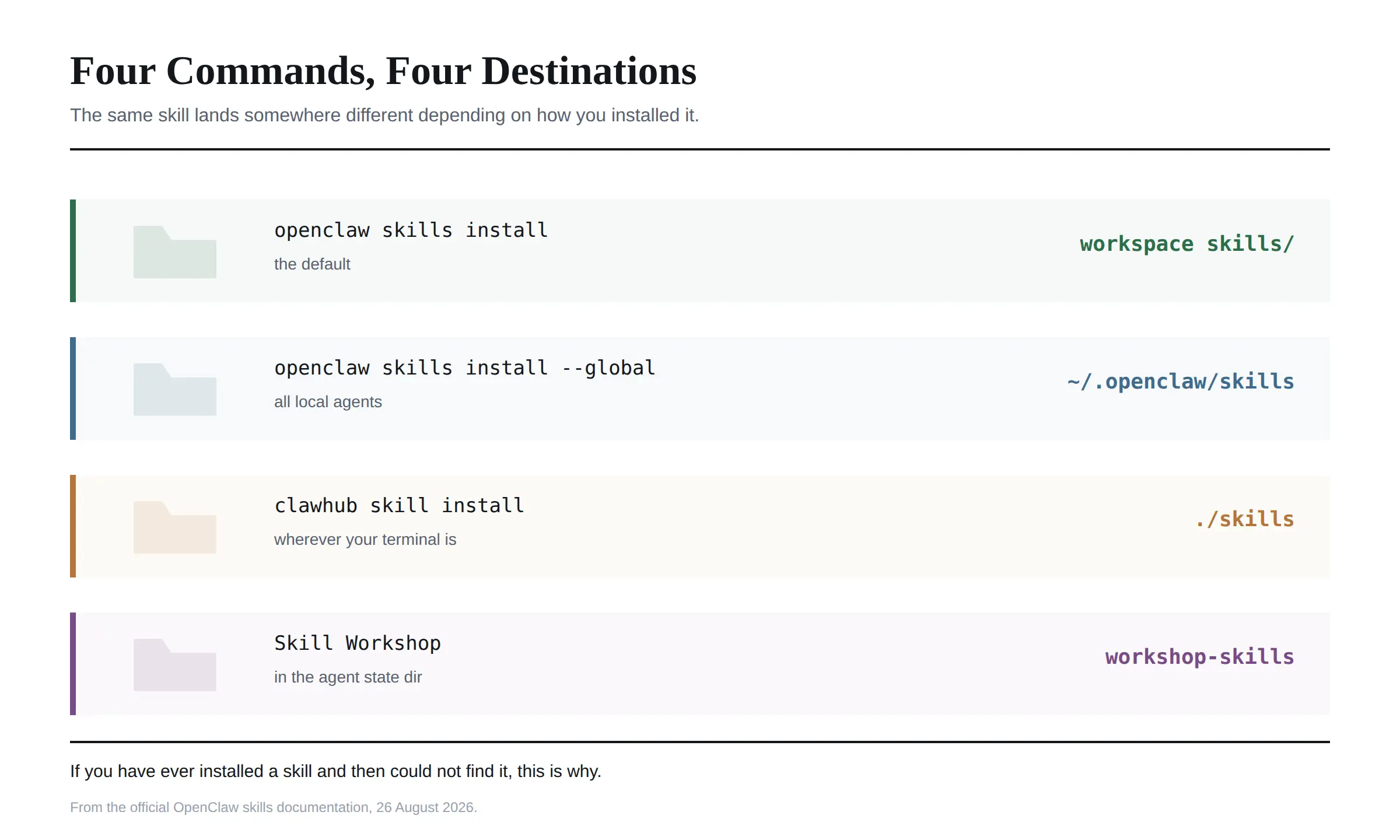
openclaw skills install puts the skill in the active workspace skills/ directory. This is the default and it is what most people get.
Adding --global puts it in ~/.openclaw/skills instead, where it is visible to every local agent unless an agent allowlist narrows it. Use this for skills you want everywhere.
The clawhub CLI has its own install commands, and those put skills into ./skills under whatever your current working directory happens to be. That is a different place again, and it depends on where your terminal was sitting when you ran it.
Skill Workshop, the in-app generation tool, installs into neither. Generated skills live under the selected agent's state directory, in agents/<agentId>/agent/workshop-skills.
Four locations. If you have ever installed a skill and then been unable to find it, that is why. I would use openclaw skills install and stay in one place unless you have a reason not to.
Where a Plugin Can Come From
Plugins accept more sources than skills do, and the prefix decides which.
clawhub:<package> resolves through ClawHub. npm:<package> pulls from npm. git:github.com/<owner>/<repo>@<ref> installs from a Git reference. A bare path like ./my-plugin installs a local development checkout, and --link ./my-plugin links it instead of copying.
Use the clawhub: prefix explicitly when you want ClawHub rather than npm, because the resolution is not always obvious from the package name alone.
For anything running in production I would pin versions. The documentation recommends it and the reasoning is the same as any other dependency: an unpinned install is a promise that someone else's future change will not break you.
The Install Gate Most People Never See
OpenClaw runs compatibility and policy checks before an install completes, and the detail here is more thoughtful than I expected.
Plugin installs validate the advertised pluginApi and minGatewayVersion against your actual Gateway before the archive install runs. When a package version publishes a ClawPack artifact, OpenClaw prefers the exact uploaded npm-pack archive, verifies the ClawHub digest header against the downloaded bytes, and records the artifact metadata so later updates can check the same thing.
There is also an install policy, configured at security.installPolicy, which can block installs that have no operator confirmation flow.
One line in the documentation deserves highlighting, because it closes the loophole people usually reach for. Neither --force nor the deprecated --dangerously-force-unsafe-install flag approves a policy warning. If the policy blocks something, you change the policy deliberately after reviewing the request. You do not shout at it with a flag.
That is good design. It means a blocked install is a decision someone made rather than an obstacle to route around.
Inspecting Before You Commit
One command I would build a habit around: clawhub inspect. It shows you a skill's contents without installing anything.
That matters more here than in an ordinary package registry. A skill is instructions the agent will follow, so reading it is not a code review exercise requiring expertise. It is reading English and deciding whether you are comfortable with what it tells the agent to do.
clawhub list shows what you already have installed locally, which is worth running occasionally. I would expect most people to accumulate skills they installed once, tried, and forgot about.
Pinning, and Why You Might Want It
clawhub pin <skill> freezes a local skill install so that updates and forced reinstalls cannot overwrite it. clawhub unpin releases it.
I would pin anything you have modified locally or anything a workflow depends on behaving exactly as it does today. Updates are good until the morning one of them changes behaviour you were relying on.
openclaw skills update --all and openclaw plugins update --all update everything else.
Part Two: Publishing Things
Different audience, different CLI, and this is the second distinction I saw people get wrong.
Use the Other CLI
The openclaw commands install into OpenClaw. The separate clawhub CLI handles registry authenticated work: signing in, publishing, deleting and restoring, and sync workflows.
Install it separately with npm i -g clawhub or the pnpm equivalent. Sign in with clawhub login, which uses GitHub, and confirm with clawhub whoami. Headless environments can authenticate with an API token from the ClawHub web interface instead, using clawhub login --token.
The rule of thumb from the docs is clean: use OpenClaw when you are installing things into OpenClaw, and use the ClawHub CLI when you are signing in, publishing, or managing your own listings.
Publishing a Skill
A skill is a folder with SKILL.md and optional supporting files, so publishing is mostly about metadata.
clawhub skill publish ./my-skill with a slug, a name and a changelog is the whole command. New skills start at 1.0.0, and later changes automatically publish the next patch version unless you set one explicitly. The command skips unchanged content, and --dry-run previews without publishing.
Before you publish, the documentation asks you to declare required environment variables, tools and permissions in the skill metadata, so people can see what a skill needs before installing it. I would treat that as a courtesy that costs you five minutes and saves someone else an hour.
Two pieces of advice in the authoring guide are worth repeating. Be concise, and instruct the model on what to do rather than on how to be an AI. And if your skill uses exec, make sure prompts cannot allow arbitrary command injection from untrusted input.
That second one is the whole security story in a sentence.
Owners, Organisations and Tidying Up
An owner is a ClawHub publisher handle, either personal such as @alice or an organisation such as @your-org. Organisations support owner, admin and publisher roles, and all three can publish.
Two maintenance commands are unusually civilised. clawhub skill rename renames a skill you own without breaking old links or existing installs. clawhub skill merge folds duplicate skills you own into one canonical slug.
Deletion is soft by default. clawhub delete and clawhub undelete are available to the skill or package owner, publisher owners and admins, moderators and admins. Hard deletion is admin only, through management and ban flows. Packages use clawhub package delete and clawhub package undelete.
I find the soft delete choice reassuring. A registry where a maintainer can permanently vanish a package that other people depend on is a registry with a known failure mode.
Personal Libraries on a Shared Gateway
This one is genuinely well thought through and I had not seen it discussed anywhere.
On a shared Gateway, an identified operator can keep a personal skill library without getting permission to change everybody's workspace skills or the Gateway configuration. You reach it through Plugins, then Skills, then My skills, where you can create a skill, import a SKILL.md or ZIP bundle, or add one from ClawHub.
The identity requirement is the important part. Personal library operations require an authenticated Gateway profile, and the documentation is explicit that a shared token does not identify a person. Linked and merged login identities count as one profile.
So on a team Gateway, personal skills stay personal without anyone needing admin rights, and the ordinary single admin setup is unchanged.
Keeping Things Current
openclaw skills update --all and openclaw plugins update --all bring everything forward at once.
Updates resolve back through wherever the thing came from, because OpenClaw records the source when it installs. A skill that came from ClawHub keeps updating from ClawHub rather than losing track of its origin, which is a small design decision that saves a lot of confusion later.
The exception is anything you pinned. Pinned installs stay frozen, which is the entire point of pinning them.
The Safety Rule That Covers Both Halves
I would not write about this registry without connecting it to what happened earlier in the year.
In April 2026, researchers confirmed more than 1,400 malicious skills active on ClawHub, some stealing cryptocurrency credentials, which I covered in our OpenClaw security guide. The registry has since added screening for marketplace submissions before download rather than after, which was part of the July hardening release, and public listings now surface security scan summaries.
That is a real improvement. It is not a reason to stop reading source code.
The rule I would apply is simple. A skill is instructions, so read them, and pay particular attention to anything invoking exec. A plugin is code, so treat installing one exactly as you would treat running an unfamiliar script on your machine, because that is what it is.
Neither of those takes long, and both are the difference between using a registry and trusting one.
Frequently Asked Questions
What is the difference between OpenClaw skills and plugins?
A skill is a folder of text instructions built around a SKILL.md file. A plugin is code that extends the runtime with channels, model providers, tools and similar capabilities. Plugins execute on your machine, so they warrant more scrutiny.
How do I install an OpenClaw skill?
Run openclaw skills install <slug>. It installs into the active workspace skills/ directory by default, or into ~/.openclaw/skills if you add --global.
What is ClawHub?
The public registry for OpenClaw skills and plugins, at clawhub.ai. It tracks versions, changelogs, downloads, stars and security scan summaries, and it searches using embeddings rather than keyword matching.
Where do OpenClaw skills get installed?
One of four places depending on the command. The workspace skills/ folder by default, ~/.openclaw/skills with --global, ./skills under your working directory if you used the ClawHub CLI, or the agent state directory if the skill came from Skill Workshop.
How do I publish a skill to ClawHub?
Install the separate clawhub CLI, sign in with clawhub login, then run clawhub skill publish with a slug, name and changelog. New skills start at version 1.0.0 and later changes publish the next patch automatically.
Can I install OpenClaw plugins from npm or GitHub?
Yes. Use npm:<package> for npm, git:github.com/<owner>/<repo>@<ref> for a Git reference, clawhub:<package> for the registry, or a local path for development checkouts.
Are ClawHub skills safe to install?
Treat them as code from strangers. More than 1,400 malicious skills were confirmed on the registry in April 2026. Screening has improved since, and listings now show security scan summaries, but reading the source before installing remains the only reliable check.
How do I stop a skill being overwritten by an update?
Use clawhub pin <skill> to freeze the local install so updates and forced reinstalls cannot overwrite it. clawhub unpin releases it again.
Can I delete a skill I published?
Yes, as a soft delete, using clawhub delete with clawhub undelete to restore. Hard deletion is restricted to administrators through management and ban flows.
Can team members have their own skills on a shared Gateway?
Yes. Identified operators get a personal skill library without needing permission to change shared workspace skills or Gateway settings. It requires an authenticated Gateway profile, since a shared token does not identify a person.
Four Habits Worth Forming
Search before you build. I underestimated how large the registry is, and vector search means a plain description usually finds something close to what you wanted.
Install with openclaw skills install and leave the other three locations alone until you have a specific reason. Consistency beats cleverness here, and future you will know where to look.
Read the SKILL.md before running anything, and read a plugin's source before installing it. That single habit is worth more than every other precaution in this article combined.
And if you write something good, publish it. The registry has rename, merge and soft delete, which means the cost of publishing something imperfect is genuinely low, and the ecosystem is better for having more skills written by people who checked their work.
Registry behaviour, commands and install paths were checked against the official OpenClaw documentation and the ClawHub registry repository on 26 August 2026. This registry is developing quickly, so confirm command syntax against the current docs before relying on any of it.