What Is OpenClaw? The AI Assistant That Does Things Instead of Describing Them
OpenClaw is a free, open-source AI agent that runs on your own computer, connects to the messaging apps you already use, and carries out real tasks on your files, your shell and your accounts rather than just writing about them.
The difference from a chatbot is not intelligence. It is consequence.
When I ask ChatGPT to clean up my inbox, I get instructions. Ask OpenClaw and your inbox gets cleaned up, because it has your credentials, a shell and permission to act.
That one distinction explains everything else I found about the project, including why people are excited about it and why the sensible advice comes with warnings attached.
The Sentence It Replaces
Most AI tools follow the same shape. I type, a model generates text, I read it, then I do the work myself.
OpenClaw removes the last step. The model's output is not the deliverable. The action is.
The project describes itself as a personal AI assistant that actually does things rather than answering questions. In practice it is a long-running service on a machine you own, sitting between your messaging apps and a language model, with the ability to reach your filesystem, browser and connected services.
It was built by Austrian developer Peter Steinberger in November 2025, originally as a weekend project. It is MIT licensed, held by a non-profit foundation, and has grown into one of the fastest-starred repositories in GitHub's history. If you want the code itself rather than the concept, I went through the OpenClaw repository in detail separately.
Follow One Message Through It
The clearest way I found to understand OpenClaw is to trace a single instruction from your phone through to the thing it changes.
Say I message it: summarise the three PDFs in my downloads folder and send the summary to my work email.
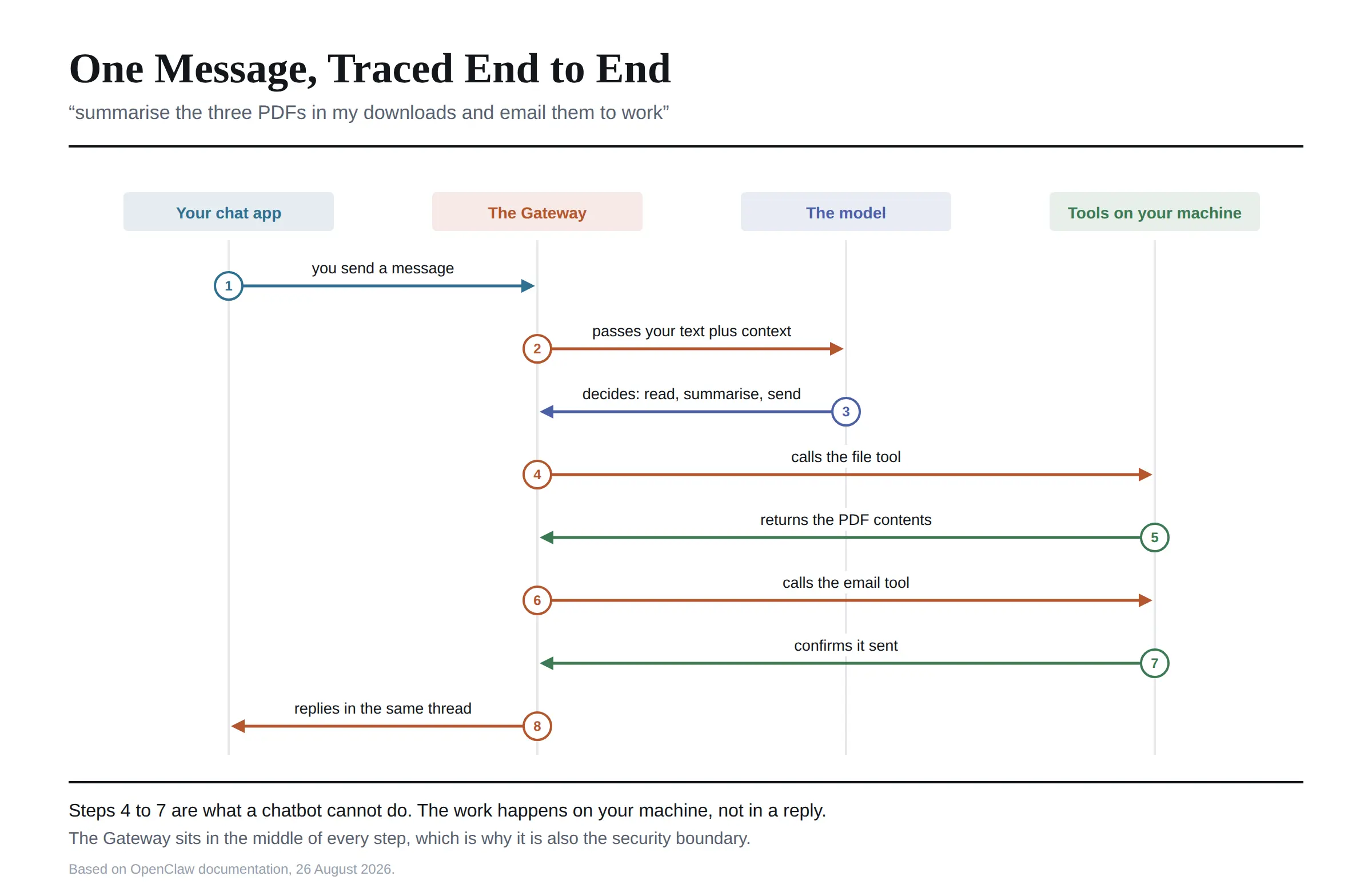 One. The message arrives. You send it through WhatsApp, Telegram, Discord, Slack, Signal or iMessage. These are called channels, and they are just doors into the system. There is no OpenClaw app to open.
Two. The Gateway receives it. The Gateway is the always-on service running on your hardware. It is the centre of everything, and it is also the security boundary, which matters later.
Three. A model reads it. The Gateway passes your message to whichever language model you configured. This is model-agnostic by design, so Claude, GPT, Gemini, Grok, DeepSeek or a fully local model all work. You supply the key, or you supply the hardware.
Four. The model plans, then calls tools. It works out that this needs three steps: read files, summarise, send email. Each step is a tool call. Tools are the actual capabilities, reading a filesystem, running a shell command, driving a browser, hitting an API.
Five. The work happens on your machine. The PDFs are read locally. The email goes out from your account.
Six. The reply comes back the way it came. You get a message in the same WhatsApp thread saying it is done.
That loop is the whole product. Everything else I read about is a variation on it.
What People Actually Use It For
Reading through the published use cases, I found they cluster into five groups, and all of them involve something happening rather than something being written.
Inbox and calendar work. Sorting mail, filtering, drafting replies, scheduling, sending reminders on rules you set.
Document handling. Reading long reports and returning summaries, or pulling specific figures out of a pile of files.
Developer tasks. Reviewing pull requests, running tests, managing repositories, and scheduled jobs that keep something ticking overnight.
Cross-app orchestration. Moving information between Notion, Obsidian, Trello, Apple Notes and similar, all driven from one chat thread.
Web and device automation. Logging into sites, extracting data, filling forms, and in some setups controlling smart home devices.
The recurring theme I saw in user reports is that simple, well-defined jobs work reliably and elaborate multi-step automations disappoint more often than they impress. That is worth knowing before you plan your first project.
The Thing That Makes It Different, Stated Precisely
Vague answers to this question are everywhere, so here is how I would put it precisely.
A chatbot's output is text. If it is wrong, you have read something wrong. The cost of an error is your time.
An agent's output is a change in the world. If it is wrong, a file is deleted, an email is sent, or a command runs. The cost of an error is the error.
That is why the Gateway is described as the trust boundary. Everything routes through it, and whatever it can reach, your assistant can reach. Compromise the Gateway host and you have not lost a chatbot, you have handed someone an automation engine pointed at your own accounts.
I do not mean that as a criticism. The project is unusually direct about the risk in its own documentation. It is the defining property of the category, and the reason a personal AI agent is a genuinely different decision from a chat subscription.
What It Costs to Run
Nearly every explainer I read says token costs surprise people, and then gives no number. So I worked one out.
OpenClaw itself is free. What you pay for is the model behind it, billed per token by whichever provider you choose.
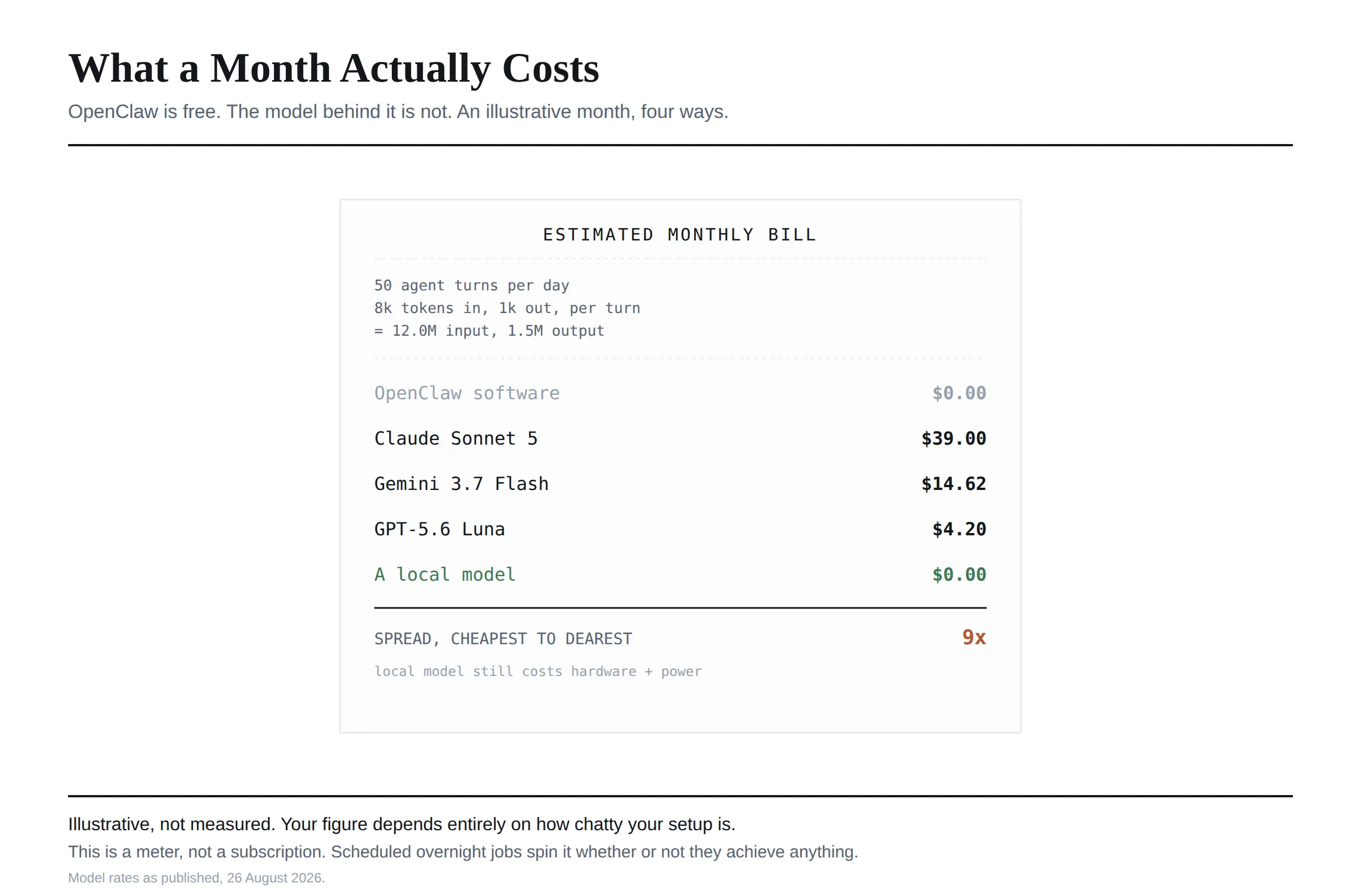 I priced a modest personal setup: fifty agent turns a day, each sending roughly eight thousand tokens of context and receiving one thousand back. Over a month that is around twelve million input tokens and 1.5 million output.
At mid-tier hosted rates that lands near forty dollars a month. On a cheap fast model it drops to under five. On a self-hosted local model the token cost is zero, and you pay in hardware and electricity instead.
I want to be clear that those figures are illustrative rather than measured, and your real number depends entirely on how chatty your setup is. The point is the range. This is not a fixed subscription, it is a meter, and an agent left running scheduled jobs overnight spins that meter whether or not it accomplished anything.
If you want to think properly about which model to point it at, model pricing varies more than most people expect, and I worked through an example of that in our piece on Inkling pricing.
Where the Real Risk Lives
Not in the software, as far as I can tell. In the skills.
OpenClaw is extended through community-built skills, distributed through a registry called ClawHub, and there are well over a hundred of them. They are what make it powerful, and they are also code from strangers, running on a machine that has your credentials.
The practice experienced users repeat consistently, and the one I would follow, is to read the source of any skill before installing it, and not to run community skills at all on a machine holding real credentials until you have.
The second risk is one the project names itself, and I would put it near the top of any guide: treat inbound messages as untrusted. Anyone who can message you can put text in front of an agent that has shell access. Channels that accept direct messages pair unknown senders by default for exactly this reason.
Who It Is For, and Who Should Wait
I would say it is a good fit if you are comfortable with a terminal, understand file permissions and API keys, and want an assistant that runs on hardware you control rather than someone else's servers. Also a good fit if data residency genuinely matters to you, since nothing has to leave your environment.
DataCamp's guide puts the counter-case well, and I agree with it. Wait if you are not comfortable with terminal commands and key management, because the setup is not beginner-friendly. Wait if you handle sensitive files and have not set up sandboxing. And if you work somewhere with compliance requirements, a managed agent platform is probably the more sensible route.
My honest summary is that OpenClaw is a power tool. The access that makes an overnight workflow possible is the same access that makes a mistake expensive.
Frequently Asked Questions
What is OpenClaw?
A free, open-source AI agent that runs on your own machine, connects language models to your files, shell, browser and messaging apps, and performs tasks rather than only describing them.
What does OpenClaw do?
It receives instructions through a chat app, works out the steps, calls tools to carry them out on your machine or your accounts, and reports back in the same conversation.
How does OpenClaw work?
An always-on service called the Gateway sits on your hardware. It takes messages from your chat apps, passes them to a language model, executes the tool calls the model decides on, and sends the result back through the same channel.
Is OpenClaw an AI agent or a chatbot?
An agent. A chatbot produces text for you to act on. OpenClaw acts, which is why its permissions matter far more than a chatbot's.
Is OpenClaw open source?
Yes, MIT licensed and held by a non-profit foundation. The software costs nothing. You pay whichever model provider you connect it to, unless you run a local model.
What is OpenClaw used for?
Email and calendar management, document summarising, developer workflows such as reviews and scheduled jobs, moving information between productivity apps, and web or smart-home automation.
What makes OpenClaw different from a normal AI chatbot?
Consequence. Its output is an action rather than a paragraph, so it needs access to your systems, and that access is both the benefit and the risk.
Who is OpenClaw for?
People comfortable with terminals, file permissions and API keys who want a local, private assistant. It is not currently a beginner tool.
Does OpenClaw work with different AI models?
Yes. It is model-agnostic and works with Claude, GPT, Gemini, Grok, DeepSeek and locally hosted models. You choose, and you supply the key or the hardware.
Can OpenClaw run entirely offline?
Close to it. With a local model and no external integrations configured, conversations and execution history stay on your infrastructure.
Putting It Simply
The way I would explain OpenClaw to someone in one line: it is what happens when you give a language model hands.
That is the appeal and the whole of the caution. It runs on your hardware, works through apps you already use, and closes the gap between deciding something should happen and it happening.
If you are technical, curious and willing to sandbox it properly, I think it is one of the more interesting things to come out of 2026. If you are looking for a friendlier ChatGPT, this is not that, and the setup will tell you so within an hour.
I verified these details on 26 August 2026 against OpenClaw's documentation and 2026 coverage of the project. Star counts and integration numbers on a project moving this fast go stale quickly, so check current figures before quoting them.