OpenClaw GitHub: What Is Actually in the Repo, and the Install Command Most Guides Get Wrong
The link you came for: the official repository is github.com/openclaw/openclaw. It is MIT licensed, owned by the OpenClaw Foundation, written mostly in TypeScript, and it had 387,800 stars when I checked on 26 August 2026.
If you're new to the project, we've covered what OpenClaw actually is separately.
Anything else claiming to be the official repo is not. The project has changed names three times, which has left a trail of forks and mirrors under the old ones.
I spent an afternoon in this repository rather than reading other people's summaries of it. Three things surprised me, and one of them will stop your install from working.
Reading the Repository by Its Numbers
The counters across the top of a GitHub page tell you more than the README does, if you read them together rather than one at a time.
387,800 stars. 81,400 forks. 83,462 commits. Those are the numbers everyone quotes, and they are genuinely extraordinary for a project that did not exist in November 2025.
Now the ones nobody quotes. 3,500 open issues. 2,100 open pull requests. 647 open security and quality alerts.
That ratio is the real story. Roughly one open pull request for every forty commits ever made, and a backlog of issues that would take a small team a year to clear. This is not a criticism of the maintainers, who are dealing with the fastest-growing repository in GitHub's recent history. It is a warning against reading a star count as a maturity signal.
Stars measure attention. Open issues measure how much of that attention turned into something that needs fixing.
If you are considering this for anything load-bearing, browse the issues before you browse the README.
The Name Trail
This matters practically, because search results still point at the old names.
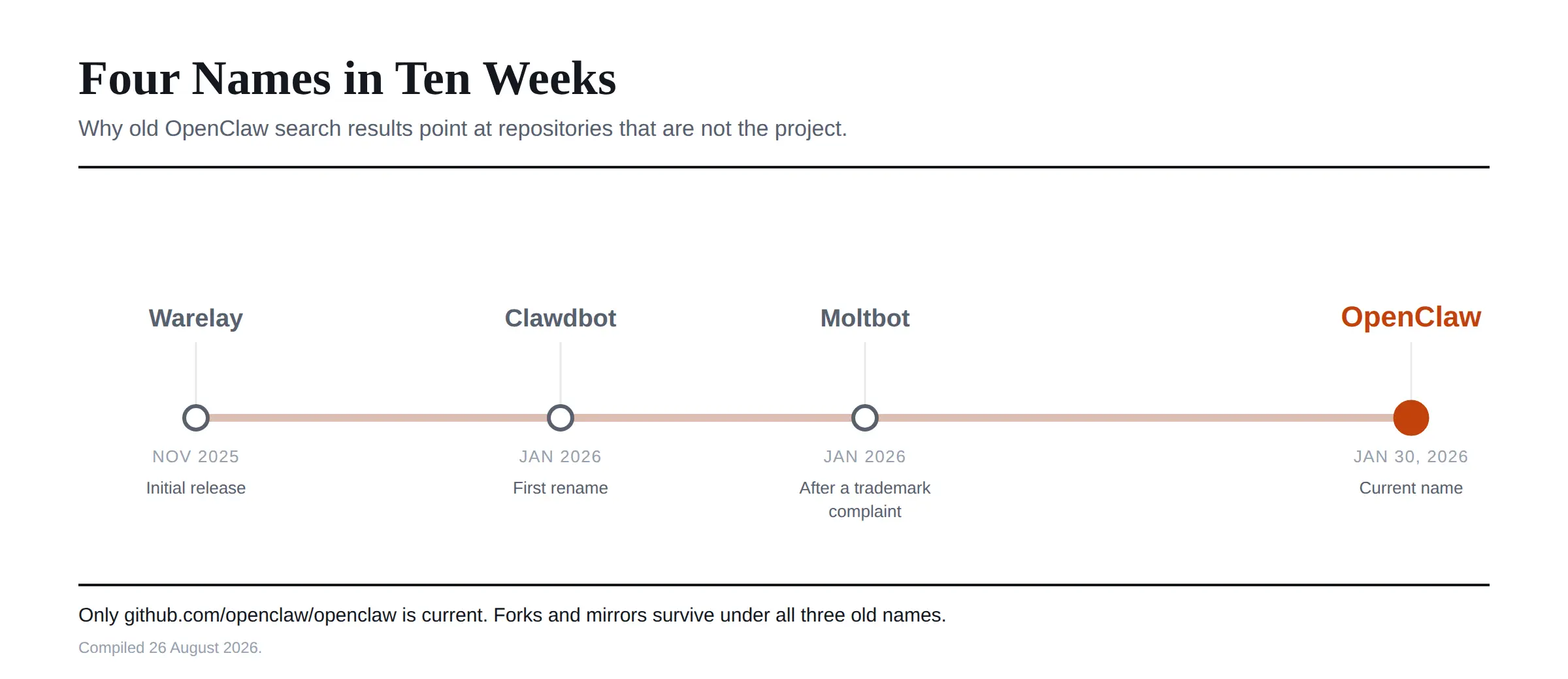 The project launched as Warelay in late November 2025. It became Clawdbot, then Moltbot following a trademark complaint from Anthropic, and settled on OpenClaw at the end of January 2026.
In February 2026, creator Peter Steinberger joined OpenAI to work on personal agents, with the project continuing as open source under independent foundation governance. OpenAI now appears in the repository's sponsor list alongside GitHub, NVIDIA, Vercel, Blacksmith and Convex.
I am noting that rather than editorialising about it. It is simply useful to know who funds a thing you are about to give access to your messages.
Installing It, and the Line Most Tutorials Drop
Here is the surprise I mentioned.
Most guides tell you to run a plain npm install. The README's own instructions are more specific than that, and the specificity is not decoration.
The installer script is the path the project actually recommends. On macOS, Linux or WSL2 it is a curl command piped to bash from openclaw.ai. On Windows it is the PowerShell equivalent using iwr piped to iex. The installer provisions a supported Node runtime if you do not have one.
If you manage Node yourself, the package install is where people come unstuck. The documented command is npm install -g openclaw@latest --allow-scripts=openclaw, and it requires Node 22.22.3 or later, 24.15 or later, or 25.9 or later.
That --allow-scripts flag is the part tutorials drop. It is required on npm 12 and npm 11.16 or later. On npm 11.15 and earlier you must leave it off entirely. So the same command copied from a blog post will fail on one npm version and fail differently on the other, and the error will not tell you why.
We've walked through the full installation process step by step, including this exact gotcha.
Check your npm version before you copy anything, including from here.
After installing, onboarding runs automatically from the installer scripts. If you installed the package directly, you run openclaw onboard --install-daemon yourself, then openclaw gateway status and openclaw dashboard to confirm it is alive.
What Is Actually in the Repository
The root is a pnpm workspace, and the directory names are unusually honest about what the project is.
src and packages hold the core TypeScript. ui is the Control UI. apps covers companion applications. extensions and skills are where capability lives, with a separate custodian-skills directory. deploy holds deployment tooling, and there are Docker, Fly and Render configurations sitting at the root alongside the Dockerfile.
Two files at the root are worth opening before anything else. VISION.md tells you where the project thinks it is going, which is rare enough to be useful. SECURITY.md tells you how to report a vulnerability, which given what this software does, you may end up needing.
There is also a security directory and a qa directory, which is more security scaffolding than most projects at this stage bother with.
How the Pieces Fit Together
The architecture is simpler than the file count suggests, and understanding it makes the documentation navigable.
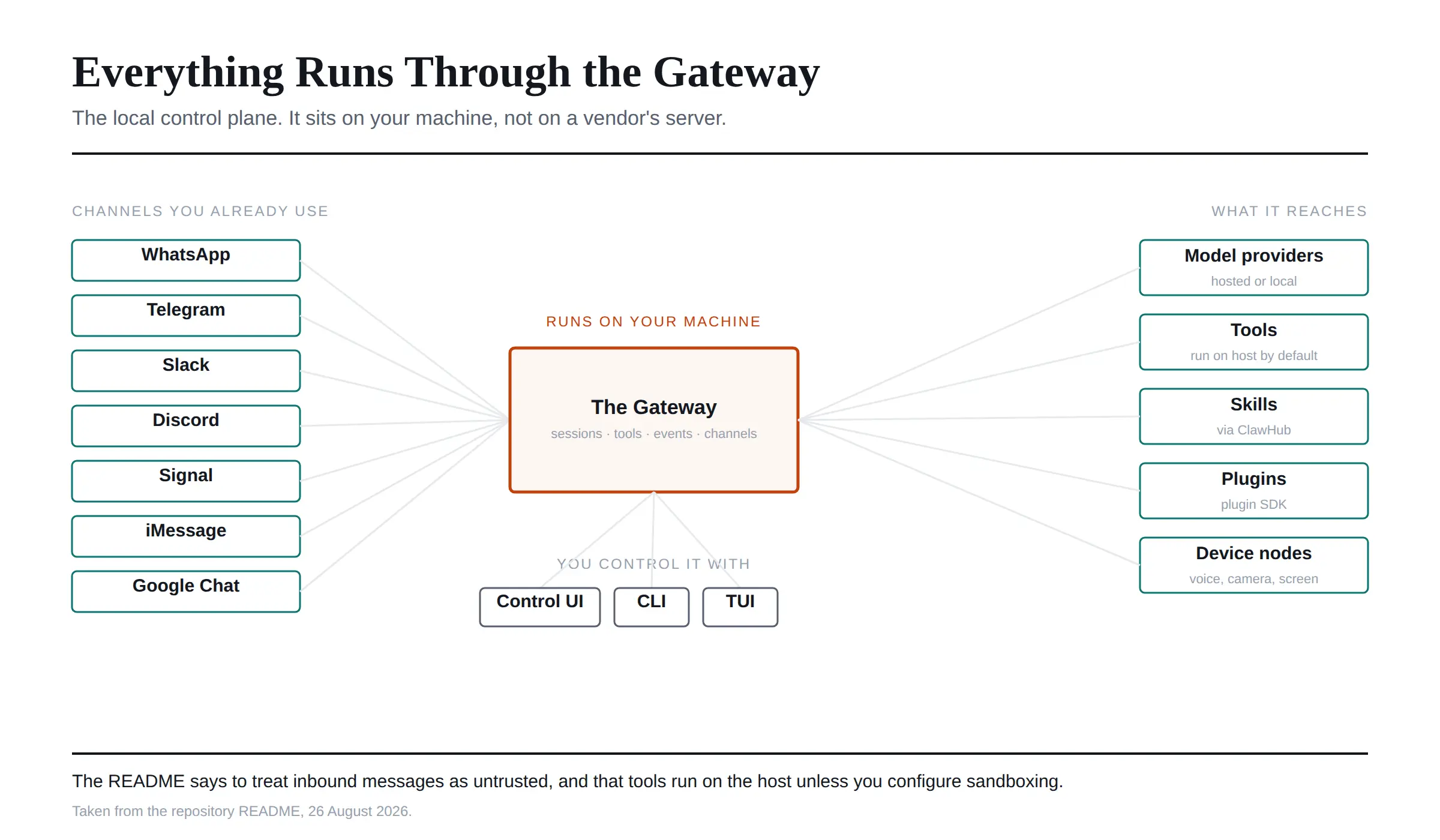
Everything routes through the Gateway, which is the local control plane for sessions, tools, events and channel connections. It runs on your machine.
Three things talk to the Gateway: the Control UI in a browser, the CLI, and a terminal interface. Channels connect the assistant to WhatsApp, Telegram, Slack, Discord, Google Chat, Signal and iMessage. Companion apps and device nodes add voice, camera, screen and Canvas on supported platforms.
Out the other side, the Gateway connects to model providers, both hosted and local, plus the tools, skills and plugins that extend what the assistant can do.
 The Section of the README People Skip
This is the part I would put in bold on every tutorial, and almost nobody repeats it.
The README tells you to treat inbound messages as untrusted input. It also tells you that tools run on the host for the main session unless you configure sandboxing.
Read those two sentences together and the implication is clear. You are installing software that reads your messages and executes tools on your machine, and by default those tools are not sandboxed. Anyone who can message you can put text in front of an agent that has shell access.
The project handles this sensibly. Channels that accept direct messages pair unknown senders by default, and you approve a pairing request explicitly with openclaw pairing approve followed by the channel and code. There are dedicated guides for security, sandboxing and an exposure runbook for remote access.
Use them. A personal AI agent with your WhatsApp and your filesystem is a genuinely different risk category from a chatbot, and the number of installation tutorials that mention sandboxing at all is close to zero.
Building From Source and Contributing
If you want to run it from a clone rather than a package, there is one gotcha the README states outright.
Plain npm install at the repository root is not supported. It is a pnpm workspace. The documented sequence is to clone, then pnpm install, pnpm build, and pnpm ui:build.
Contribution guidelines live in CONTRIBUTING.md, and the project explicitly welcomes AI-assisted pull requests, which is a more relaxed position than most repositories of this size take. New capabilities are generally expected to arrive as plugins built on the plugin SDK and shared through ClawHub rather than as core changes.
Given the 2,100 open pull requests, I would read CONTRIBUTING.md properly before starting, and I would check whether your idea belongs in a plugin first.
The Organisation Is Much Bigger Than One Repo
This is where most guides are simply out of date.
Several widely shared articles state that the OpenClaw organisation contains 18 repositories. When I checked, the organisation listed 89.
Alongside the main repository there are hardware nodes, filesystem primitives for Node, and an agent benchmark that scores the whole stack rather than just the model. There is also a large third-party ecosystem, including community collections of agent configuration templates.
If a guide tells you the org has 18 repos, it was written in early 2026 and its other details are probably stale too.
Where the Real Documentation Lives
The repository is not the best place to learn the tool, which is worth saying plainly.
Documentation sits at docs.openclaw.ai, with separate sections for installation, channels, models and model providers, tools, skills, plugins, the CLI reference, gateway configuration and architecture. The project also maintains a DeepWiki instance for the codebase, and support questions go to Discord rather than the issue tracker.
Use the issue chooser on GitHub for bugs and features. Use Discord for setup problems. Filing a setup question as an issue in a repository with 3,500 open ones is not going to get you an answer.
Frequently Asked Questions
What is OpenClaw?
A personal AI assistant that runs on your own devices and connects to the messaging apps you already use. It is designed for a single operator, and it links models, tools, channels and companion apps through one local Gateway.
Where is the official OpenClaw GitHub repository?
At github.com/openclaw/openclaw, under the OpenClaw organisation. Repositories under Warelay, Clawdbot or Moltbot are the project's former names and are not current.
Is OpenClaw open source and free?
Yes. It is MIT licensed and owned by the OpenClaw Foundation, a non-profit. You will still pay whichever model provider you connect it to.
How do I install OpenClaw from GitHub?
Most people should use the installer script from openclaw.ai rather than the repository. If you manage Node yourself, install the npm package globally, checking your npm version first because the required flags differ between npm 11.15 and later releases.
What programming language is OpenClaw written in?
Mostly TypeScript, with Swift for Apple companion apps. The repository is a pnpm workspace.
Can I run OpenClaw locally?
That is the entire point. It runs on your own machine on macOS, Linux or Windows, and it works with local model providers as well as hosted ones.
Does OpenClaw support different AI models?
Yes. It works with hosted and local model providers, configured through the models and model providers documentation.
How do I contribute to OpenClaw?
Read CONTRIBUTING.md first. New capabilities usually belong in plugins built on the plugin SDK and published through ClawHub rather than in the core repository. AI-assisted pull requests are welcome.
Is OpenClaw safe to install?
It is legitimate software with an active security process. The risk is inherent to what it does. It reads your messages and runs tools on your host, unsandboxed by default. Read the security and sandboxing guides before connecting any channel.
What I Would Do First
If you are here for the link, you have it, and the installer script is the fastest route from here to a working assistant.
If you are evaluating rather than installing, do this in order. Open the issues tab and sort by most recent. Read SECURITY.md and the sandboxing guide. Then check your Node and npm versions before you copy a single command.
The project is genuinely impressive and moving faster than its documentation ecosystem can keep up with. That is exactly why the third-party tutorials are unreliable and the repository itself is not.
I verified everything above directly against the OpenClaw repository on 26 August 2026. Star counts, issue counts and install requirements on a project moving this quickly will drift, so check the source before you rely on a number.