GPT-SoVITS: Which Version to Pick, and What the Guides Leave Out
GPT-SoVITS is a free, open source voice cloning and text to speech tool. Five seconds of audio gets you a rough zero-shot clone. One minute of clean audio, fine-tuned, gets you something convincing. It handles English, Chinese, Japanese, Korean and Cantonese, and it runs on your own machine under an MIT licence.
The part that confuses everyone is the versions. There are six of them, and they do not run in a straight line.
Most guides tell you to pick v2Pro and move on. That is probably right, but nobody explains why, and the reason is sitting in the project's own README in a sentence that changes how you should think about the whole thing.
I read the live repository and worked through it properly.
The GPT-SoVITS Version Maze
The repository lists v1, v2, v3, v4, v2Pro and v2ProPlus. Numerically that looks like a sequence. It is not.
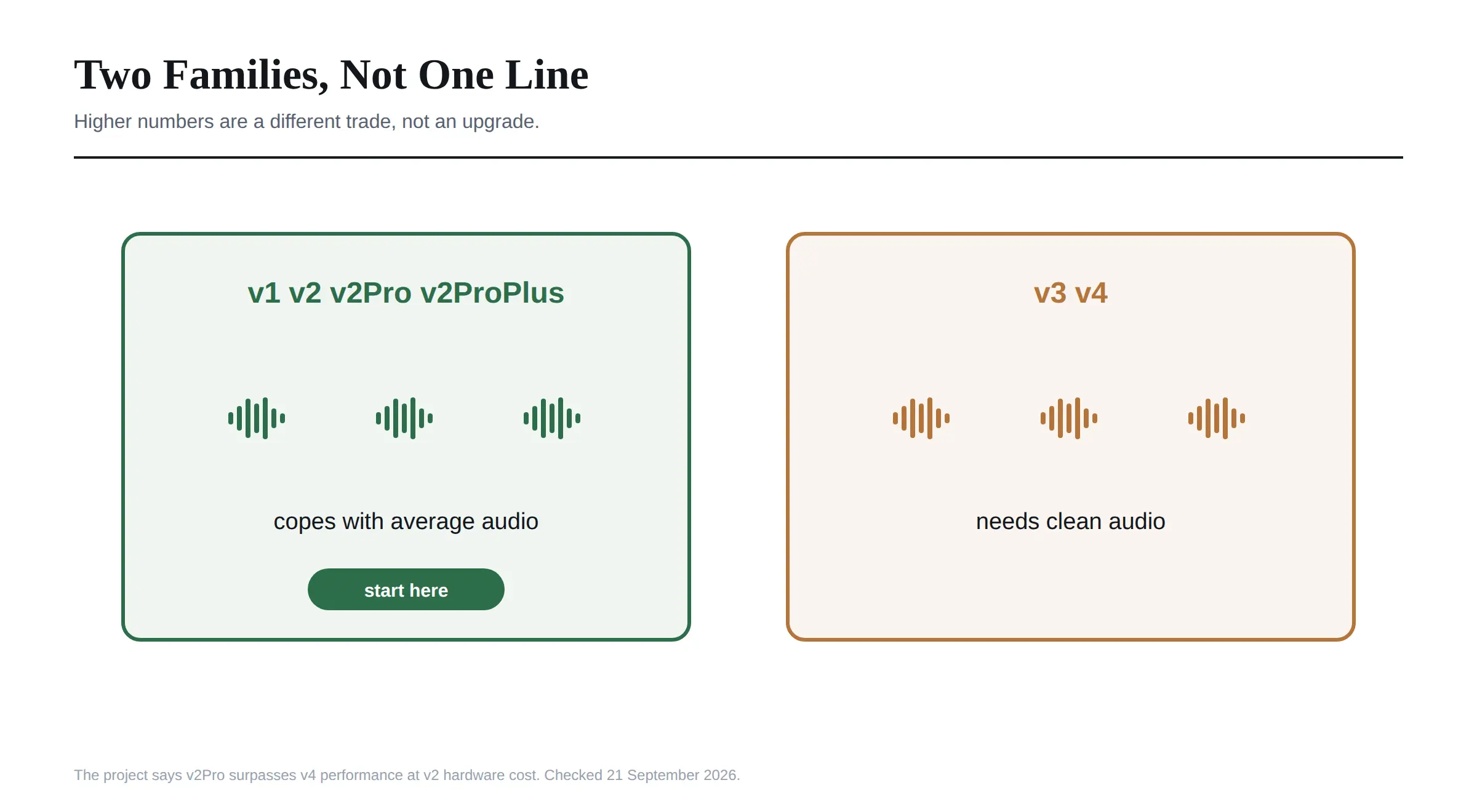 Reading the README, I found it says so plainly. The v1, v2 and v2Pro line share one set of characteristics, while v3 and v4 share a different set. And then the sentence that matters most:
For training sets with average audio quality, v1, v2 and v2Pro deliver decent results, and v3 and v4 do not.
So the newer numbers are not an upgrade for most people. They are a different trade. The project also notes that v3 and v4 lean more toward the reference audio than the overall training set, which means they copy the specific clip you gave them rather than generalising across everything you trained on.
That is good if your clip is studio clean. It is bad if you are working from a podcast recording with room noise in it, which describes most people's source material.
What each one actually is. V2 added Korean and Cantonese and extended the pretrained model from 2,000 to 5,000 hours. V3 improved timbre similarity and made the GPT side more stable with fewer repetitions. V4 fixed a metallic artifact in v3 caused by non-integer upsampling, and outputs 48kHz natively where v3 only managed 24kHz.
And then v2Pro, which is the interesting one. The README describes it as using slightly more VRAM than v2 while surpassing v4's performance, at v2's hardware cost and speed.
Read that again. The project is saying its Pro branch of the older family beats the newer family, on cheaper hardware.
Several guides soften this to v2Pro being close to v4 in quality. The README does not say close. It says surpassing. That is a meaningful difference when you are deciding whether to bother with the newer branch at all.
My read: start on v2Pro. Only try v3 or v4 if your source audio is genuinely clean and you have tested that v2Pro is not good enough.
What You Need to Run It
Less than I expected, and the project publishes real speed numbers rather than vague claims.
For v2ProPlus, the real-time factor is 0.028 on an RTX 4060 Ti and 0.014 on a 4090. In plain terms, roughly 1,400 words of speech, about four minutes of audio, takes 3.36 seconds to generate on a 4090.
On CPU it is far slower but not unusable. An M4 chip comes in at 0.526, so about half of real time. You would not batch a podcast that way, but a sentence at a time is fine.
On VRAM, the bar is lower than people expect. Reports put inference within reach of a 4GB card, with training wanting more headroom. This is not a tool that demands a 4090, and the 4090 figure above is about speed rather than feasibility.
One download detail worth catching. If you have an RTX 50 series card, take the 50-series build from the releases page rather than the standard NVIDIA one. The filename says so. Grabbing the wrong package is a common and entirely avoidable first mistake.
Tested environments run Python 3.10 or 3.11 with PyTorch 2.5.1 or 2.7.0, on CUDA 12.4 or 12.8. There is a ROCm path for AMD, an MPS path for Apple silicon, and a CPU path.
One warning worth repeating because it is buried in the README and will waste your weekend. Models trained with GPUs on Macs come out significantly lower quality than on other devices, so the project recommends using CPU on Mac instead. Mac users can run inference happily. Training is where it falls down.
Installing It, Including the Step Guides Miss
Windows users can skip all of this. There is an integrated package you download and start with go-webui.bat, and for a first try I would do exactly that.
The WebUI opens in Chinese by default, which surprises people and sends them looking for an English fork. There is a language selector in the interface, so switch it there rather than hunting for a different download.
For everyone else, the current install is a script rather than a pile of pip commands.
Create a Conda environment on Python 3.10, then run install.sh on Linux or macOS, or install.ps1 on Windows. Both take a device flag of CU126, CU128, ROCM, MPS or CPU, and a source flag of HF, HF-Mirror or ModelScope. Add --download-uvr5 if you want the vocal separation tools.
If you install manually, here is the detail several guides get wrong. You install two requirements files, in this order:
pip install -r extra-req.txt --no-deps
pip install -r requirements.txt
The extra-req.txt step comes first and uses --no-deps. Guides that tell you to run pip install -r requirements.txt on its own are describing an older layout, and skipping the first line is a known way to end up with a broken dependency tree.
You will also need FFmpeg, plus libsox-dev on Ubuntu or Debian. Docker images exist in full and Lite variants, where Lite omits the ASR and vocal separation models.
From One Minute of Audio to a Cloned Voice
The pipeline is more hands-on than a hosted service, though I found the WebUI walks you through it properly.
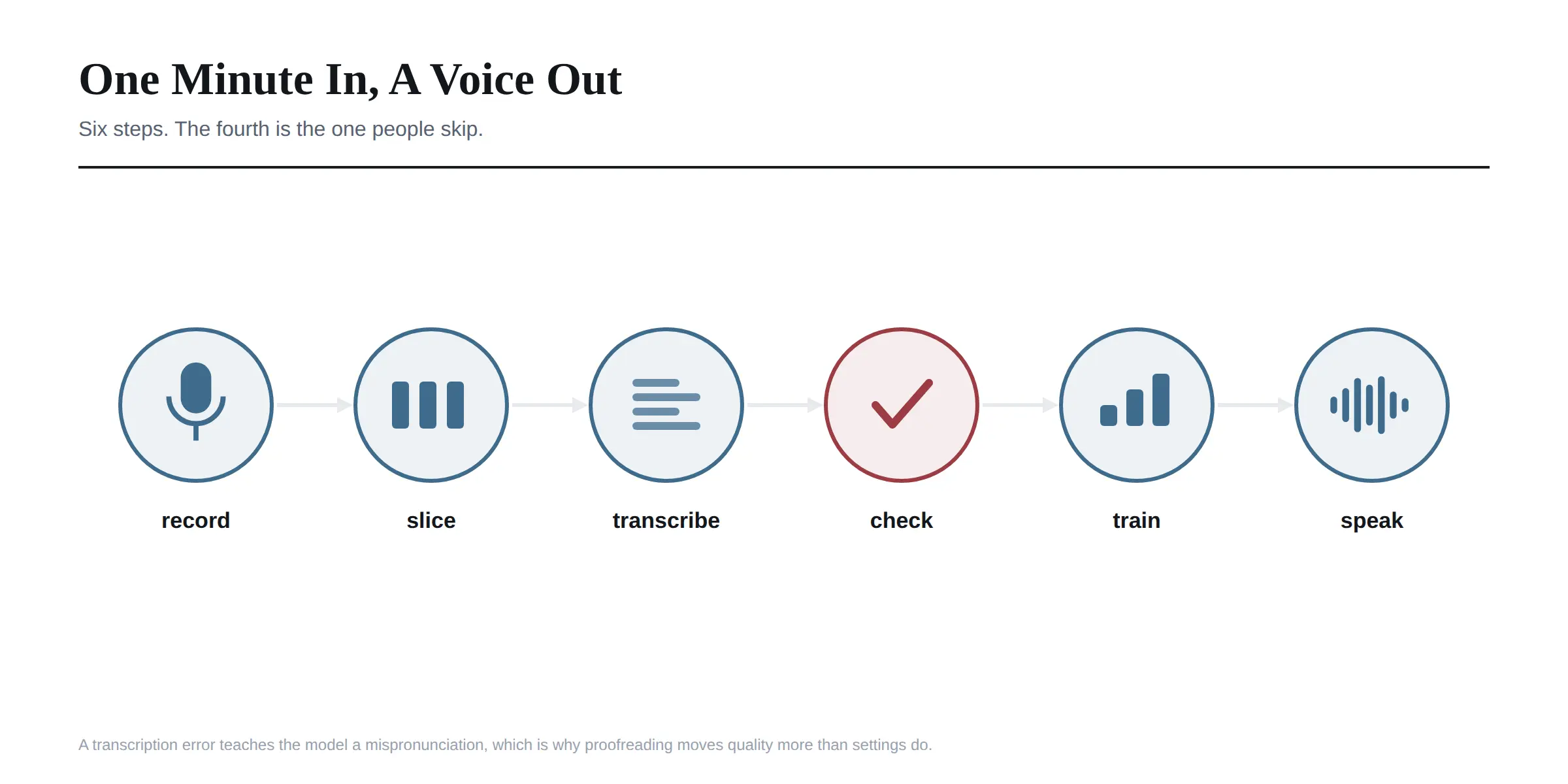 Try zero-shot first. Before training anything, feed it three to ten seconds of your reference audio with a matching transcript and listen. It takes a minute and it tells you whether the voice is going to work at all. If the zero-shot result is poor, more training data rarely rescues it.
Collect the audio. One minute minimum for fine-tuning, five seconds for a zero-shot attempt. Clean matters more than long. Background music, room echo and overlapping speakers all degrade the result, which is why the toolkit ships vocal separation.
Slice it. The WebUI chops long recordings into training-sized chunks automatically, with thresholds you can tune.
Denoise, optionally. Worth doing if the source is noisy.
Transcribe it. Built-in ASR handles this. The current default for Chinese, English, Japanese, Korean and automatic language detection is Fun-ASR-Nano, with SenseVoice for faster transcription and Faster Whisper available as an alternative.
Proofread the transcription. Do not skip this. The model learns the mapping between your text and your audio, so a transcription error teaches it a mispronunciation.
Train. Then move to the inference tab and generate.
The dataset format is a simple pipe-delimited list: path, speaker name, language code, text. Language codes are zh, ja, en, ko and yue.
The cross-lingual part is the feature that surprises people. You can train on Chinese audio and generate English speech in that voice, keeping the timbre across a language the speaker never recorded.
Where It Falls Short
Three honest limits.
It is a project, not a product. The repository shows 791 open issues and 96 open pull requests against 1,050 commits. That is an active project carrying a real backlog, and version-specific bugs are common enough that the community guide is practically required reading.
Emotion control is unfinished. The project's own task list still has enhanced emotion control unchecked, with a note about maybe using fine-tuned preset models instead. If you need a specific emotional read, expect to get there by choosing reference clips carefully rather than by setting a parameter.
Quality depends on your audio more than your settings. This is the thing people learn last. A clean minute beats a noisy ten, and most disappointing results trace back to the source material rather than the version or the hyperparameters.
If you are already running local models through a web interface, the setup will feel familiar, and the same hardware generally serves both. I went through that side of things in our guide to oobabooga and TextGen.
The Question the README Does Not Ask
Here is what struck me reading the repository. It is a thorough document, with install instructions in five languages and credits to a dozen upstream projects. There is no consent statement anywhere in it.
The licence is MIT, which permits essentially anything. The tool clones a recognisable human voice from five seconds of audio. Those two facts sit next to each other with nothing in between.
That is not a criticism of the maintainers, who built an excellent piece of open source. It does mean the responsibility lands entirely on you, so it is worth being clear about where the lines are.
Cloning your own voice is uncomplicated. Narration, dubbing your own videos, accessibility, language learning. This is the main legitimate use and it is a genuinely good one.
Cloning someone else's voice with their permission is fine, and I would get that permission in writing if money is involved, specifying what the voice may be used for and for how long.
Cloning someone else's voice without permission is where it goes wrong, and the law has moved quickly here. Several US states now protect voice as a personal likeness, the EU AI Act carries disclosure obligations for synthetic media, and voice cloning fraud has become common enough that banks have changed their verification procedures because of it.
Publishing synthetic speech also usually requires disclosure. Platforms increasingly demand AI content labelling, and passing off a cloned voice as a real recording is the kind of thing that ends badly regardless of what the licence permits.
I ran into the same gap writing about AI face swapping and consent. The tool is never the thing that decides whether you had permission.
How It Compares
The honest positioning, as I see it.
Against commercial services such as ElevenLabs, GPT-SoVITS is free and private but requires setup, a GPU and your own troubleshooting. The commercial tools are more polished, have consent checks built in, and charge per character.
Against other open source options, GPT-SoVITS is strongest on the few-shot case specifically. One minute of audio producing a usable clone is the headline, and the cross-lingual transfer is unusually good.
There is also a licensing point that matters commercially and rarely gets mentioned. GPT-SoVITS is plain MIT. XTTS, its closest open rival, ships weights under a licence carrying a non-commercial restriction. XTTS covers far more languages, seventeen against five, and has the more mature ecosystem. But if you intend to sell anything built on the output, the licence difference may decide it before the quality comparison does.
The reason to choose it is a combination of three things: your audio never leaves your machine, it costs nothing per generation, and it needs very little source material. If any one of those is not a requirement for you, a hosted service is less work.
Frequently Asked Questions
What is GPT-SoVITS?
A free, open source voice cloning and text to speech tool that can clone a voice from five seconds of audio for a rough result, or one minute for a fine-tuned one. It runs locally and supports English, Chinese, Japanese, Korean and Cantonese.
Which GPT-SoVITS version should I use?
V2Pro for most people. The project describes it as surpassing v4's performance at v2's hardware cost, and the v1, v2 and v2Pro family tolerates average quality training audio where v3 and v4 do not.
Is GPT-SoVITS free?
Yes, and MIT licensed. You pay only in hardware and electricity, and the Windows integrated package means you do not need to buy anything to try it.
How much audio does GPT-SoVITS need?
Five seconds for a zero-shot clone and one minute for fine-tuning. Audio quality matters more than quantity, so a clean minute beats a noisy ten.
What hardware do I need for GPT-SoVITS?
A CUDA GPU is ideal, with real-time factors of 0.028 on a 4060 Ti and 0.014 on a 4090. ROCm, Apple silicon and CPU paths exist, though the project warns that training on Mac GPUs produces significantly lower quality and recommends CPU there instead.
Can GPT-SoVITS clone a voice in another language?
Yes. Cross-lingual inference is one of its strongest features, so you can train on audio in one language and generate speech in another while keeping the voice.
Why does my GPT-SoVITS install fail?
The most common cause is missing the first requirements step. Install extra-req.txt with --no-deps before requirements.txt, and make sure FFmpeg is present.
Does GPT-SoVITS support emotion control?
Not directly. Enhanced emotion control remains an open item on the project's task list, so you shape delivery by choosing reference audio rather than setting a parameter.
Is it legal to clone someone's voice with GPT-SoVITS?
Your own voice, yes. Someone else's requires their permission, and several jurisdictions now treat voice as a protected likeness. Published synthetic speech also generally has to be disclosed.
How much VRAM does GPT-SoVITS need?
Less than people assume. Inference is reported within reach of a 4GB card, with training wanting more headroom. The 4090 figures quoted above are about speed rather than whether it will run.
Can I use GPT-SoVITS output commercially?
The project is MIT licensed, which permits commercial use. That is a real advantage over XTTS, whose weights carry a non-commercial restriction. Permission from the voice owner is a separate question the licence does not address.
Why is the GPT-SoVITS interface in Chinese?
The WebUI defaults to Chinese. There is a language selector inside the interface, so change it there rather than looking for an English fork.
Is GPT-SoVITS better than ElevenLabs?
Different trade. GPT-SoVITS is free, private and local but needs setup and a GPU. ElevenLabs is more polished with consent controls built in, and charges per use.
Start With Your Own Voice
I would take the Windows integrated package if I could, pick v2Pro, and clone my own voice with one clean minute of audio before trying anything else.
Doing it on yourself first teaches you what good source material sounds like, and it costs nothing if the result is poor. Record in a quiet room, read naturally rather than performing, and spend your effort on the recording rather than the settings.
Then proofread the transcription properly, because that single step moves quality more than any version choice.
And before you clone anyone else, get their permission. The licence will not ask you for it, and that is precisely why it is worth remembering.
Version notes, install commands and performance figures were checked against the GPT-SoVITS repository on 21 September 2026. This project ships often, so treat the README as authoritative over any guide, this one included.