Oobabooga in 2026: It Is Called TextGen Now, and 5 Things Guides Still Get Wrong
Oobabooga is the developer, not the product. The project is text-generation-webui, and in April 2026 it renamed itself TextGen and moved to github.com/oobabooga/textgen. The old URL redirects.
It also stopped being a thing you install from a terminal. There is now a portable desktop app. You download it, unzip it, double-click, and a window opens.
That is a very different product from the one most tutorials describe, and I found that almost every guide ranking for this term is working from the old version. Some of them will give you commands that fail.
I went through the live repository and checked everything. Here are the five corrections that matter.
Correction One: The Name
The project launched in December 2022 and spent three years known by its creator's handle. In April 2026, at version 4.5.2, it became TextGen and moved repositories.
Both names still work. Searching oobabooga finds it, the old GitHub URL redirects, and the Reddit community is still r/Oobabooga. The developer's handle has not changed.
So nothing is broken. But if you are reading a guide that never mentions TextGen, you are reading something written before April 2026, and the install instructions in it are probably stale. That one check will save you a lot of time.
What Changed, and When
The rename was the start of a fast run of releases, and the details matter if you are deciding whether your knowledge is current.
Version 4.5.2 in April carried the rename and the repository move. The releases that followed added tool call confirmation and MCP server support, then the Electron desktop app, then a redesigned chat composer, then speculative decoding and a live tokens per second readout.
So the project did not simply change its name. It changed what it is, from a browser tool into a desktop application, inside about six weeks.
The Backends That Disappeared
This is the correction I would put in front of anyone with an older setup.
AutoGPTQ, AutoAWQ and the original ExLlama and ExLlamaV2 loaders are no longer in the current lineup. The supported list is llama.cpp, ik_llama.cpp, Transformers, ExLlamaV3 and TensorRT-LLM.
If your model library is full of GPTQ or AWQ quantisations from 2023 and 2024, those are not going to load any more. I would check what format your files are in before updating, because that is an unpleasant surprise to have halfway through a migration.
Correction Two: It Is Not Hard to Install Any More
This was the standard criticism for years, and I made it myself. Ollama and LM Studio were one-click, while oobabooga meant Python environments, CUDA versions and dependency conflicts.
That is no longer the fastest route. The repository now leads with portable builds, and the instruction is literally to download, unzip and double-click textgen.
Portable builds exist for Linux, Windows and macOS, with CUDA, Vulkan, ROCm and CPU-only options. All dependencies are included.
There is one real limitation, and the README is upfront about it. Portable builds run GGUF models through llama.cpp only. If you want the other backends, LoRA training, image generation or extensions, you need the full installation.
So the old complaint has become a trade-off rather than a barrier. One minute for the common case, a longer setup for the advanced one.
Correction Three: It Is Not Just a Gradio Web UI
 The project now describes itself as a desktop app, and the portable builds ship an Electron window rather than only opening a browser tab.
If you prefer the browser, the --no-electron flag skips the desktop window and gives you the web UI at the usual address, port 7860.
The privacy claim is stronger than I expected too. The README states it is 100 percent offline and private, with zero telemetry, no external resources and no remote update requests. For a tool whose entire point is keeping models on your own machine, that last item matters, because a tool that phones home for update checks is not fully offline.
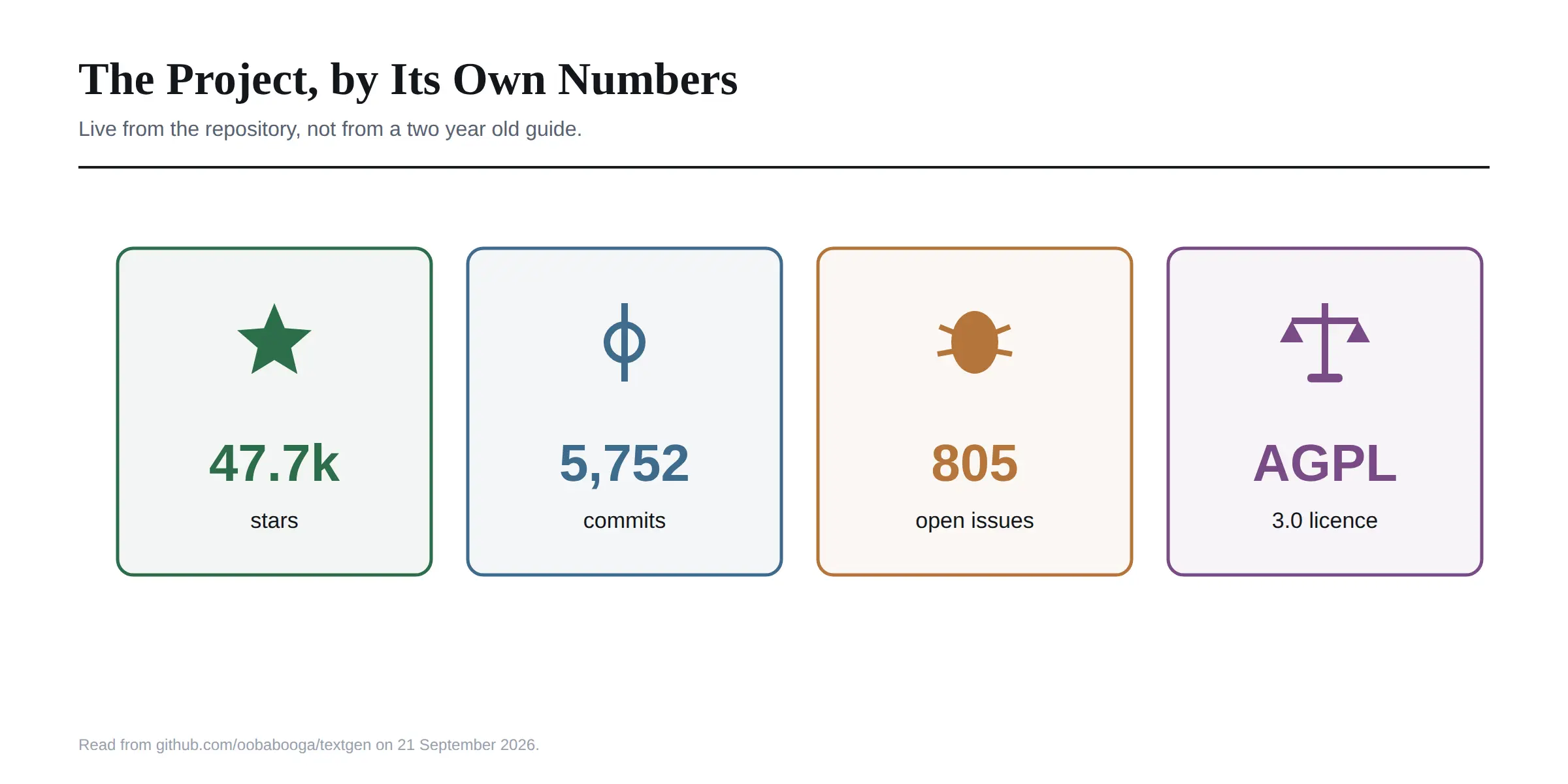
Licensing is AGPL 3.0, which is worth knowing if you plan to build something commercial on top of it.
Correction Four: The Install Commands in Most Guides Are Wrong
This is the practical one, and it is where I would expect people to lose an evening.
Several widely shared guides tell you to clone the repository and run pip install -r requirements.txt from the root. There is no requirements.txt at the root any more. Requirements now live in two folders, requirements/portable/ and requirements/full/, with a different file depending on your hardware.
Guides also still reference ExLlamaV2. The current backend list is llama.cpp, ik_llama.cpp, Transformers, ExLlamaV3 and TensorRT-LLM.
And the PyTorch instructions are out of date nearly everywhere. The repository currently specifies torch 2.9.1 with the cu128 index for NVIDIA on Linux, WSL and Windows, and a Conda environment on Python 3.13. Guides quoting cu121 and Python 3.11 are describing last year's setup.
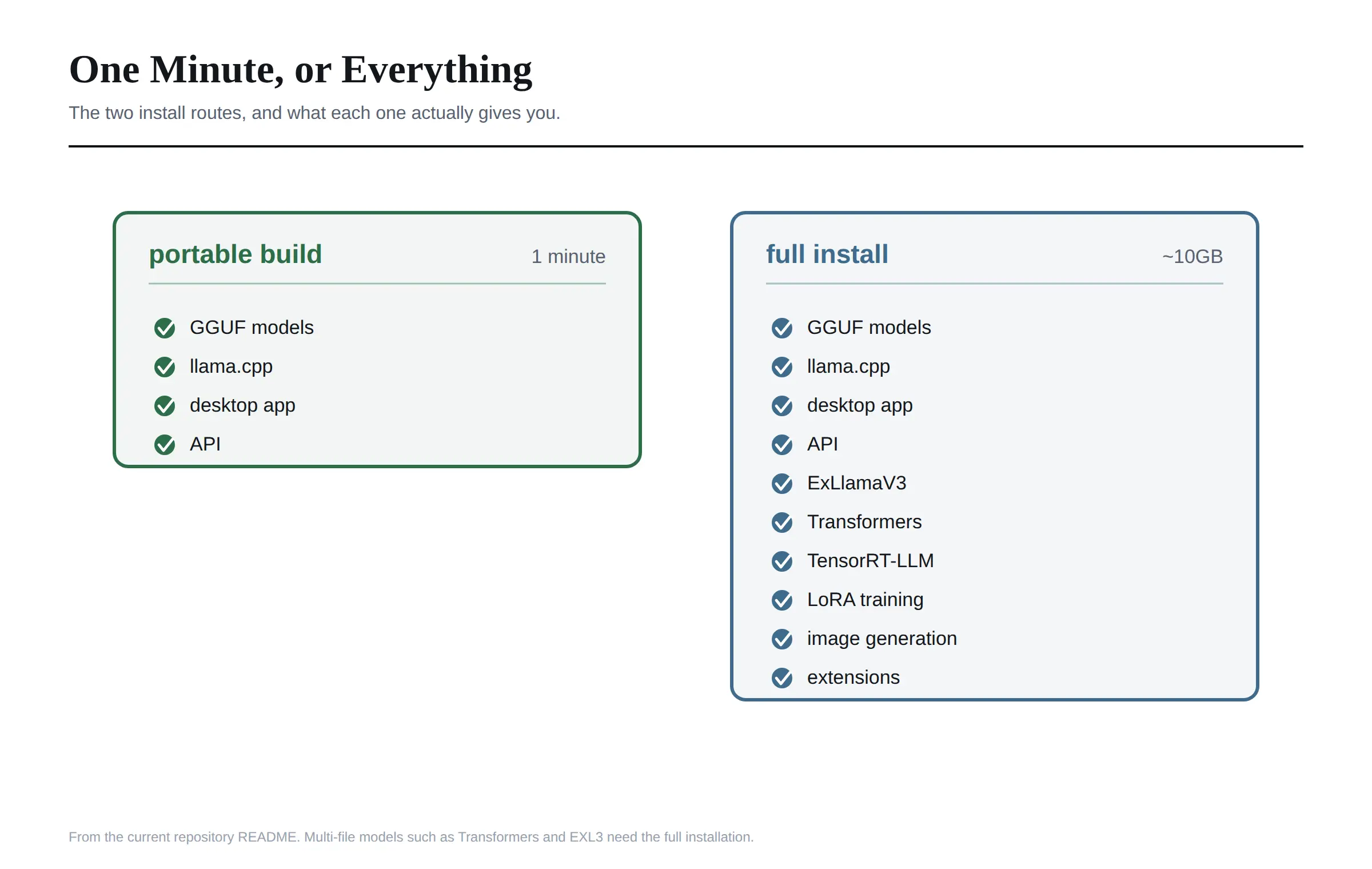 Here is what the routes actually are, as of the current repository.
Portable build. Download from the releases page, unzip, double-click. GGUF models only.
Manual portable with venv. Clone, create a virtual environment, install from requirements/portable/, then run python server.py --portable --api --auto-launch. Works on Python 3.9 or newer.
One-click installer. Clone or download the source, run start_windows.bat, start_linux.sh or start_macos.sh, pick your GPU vendor when prompted, then open 127.0.0.1:7860. This uses Miniforge to build a Conda environment under installer_files/.
Full Conda install. Create an environment on Python 3.13, install the matching PyTorch build, then install from requirements/full/ using the file for your GPU. Around 10GB of disk.
Docker. Symlink the Dockerfile for your GPU vendor from the docker/ folder, copy the example environment file, then docker compose up --build. Needs Compose v2.17 or newer.
Two details that save time later. Command line flags can be made permanent by putting them in user_data/CMD_FLAGS.txt, one per line. And if an install goes badly wrong, deleting the installer_files folder and rerunning the start script reinstalls cleanly.
Correction Five: It Is Not Abandoned
I see this claim fairly often, usually from people who moved to Ollama and assumed the older project had stalled.
The live repository shows 47,700 stars, 6,000 forks and 5,752 commits. It renamed itself, shipped a desktop app and added image generation this year. That is not a dormant project.
What the numbers also show is a real maintenance load. There are 805 open issues and 34 open pull requests, plus a handful of open security and quality alerts. That is normal for a project this size and this old, and it is worth a look before you depend on it for anything serious.
For context on funding, Andreessen Horowitz gave the developer a grant in August 2023 to support independent work on the project. It remains a solo-led open source effort rather than a company product.
What Oobabooga Actually Does Now
Having corrected the record, here is the current feature set, because it has grown well beyond a chat box.
Chat and generation. Instruct mode for assistant-style use, plus chat and chat-instruct modes for character cards. Prompts are formatted automatically with Jinja2 templates. You can edit messages, move between versions of a reply and branch a conversation at any point. There is a Notebook tab for free-form generation outside chat turns.
Vision and files. Attach images for visual understanding, or upload text files, PDFs and .docx documents to discuss their contents.
Backends. Five of them, and you can switch between backends and models without restarting, which is the single feature I would miss most coming from a simpler tool.
API. OpenAI and Anthropic compatible, covering Chat, Completions and Messages endpoints, with tool calling. It works as a local drop-in replacement for either API, which means you can point existing code at your own machine.
Tool calling. Models can call custom functions during a chat, including web search, page fetching and maths. Each tool is a single Python file, and MCP servers are supported.
Training. LoRA fine-tuning on multi-turn chat or raw text datasets, with support for resuming interrupted runs.
Image generation. A dedicated tab for diffusers models, with 4-bit and 8-bit quantisation and a gallery that keeps image metadata.
Extensions. Text to speech, voice input and translation, with a separate community extensions directory.
Getting a Model In
Simpler than most guides make it sound.
Download a GGUF file from Hugging Face and drop it in user_data/models. The interface detects it automatically. There is no import step.
Note that path carefully. Several guides, including one of the better reviews I read, still tell you to use a models/ folder at the root. The current layout puts it under user_data/, along with your settings and command line flags. Drop a file in the old location and the interface will simply not see it.
Models made of several files, such as 16-bit Transformers models or EXL3 models, go in a subfolder inside that same directory, and they need the full installation rather than a portable build.
The project also maintains a GGUF memory calculator on Hugging Face for estimating how much VRAM a model will need, which is more reliable than guessing from the file size.
Against Ollama and LM Studio
The honest comparison, now that the install gap has narrowed.
Ollama is still simpler for pure command line use and has a cleaner model pull workflow. If you want one command and a local endpoint, it remains the lighter choice.
LM Studio has the more polished interface and a friendlier model browser. It is closed source, which matters to some people and not to others.
TextGen wins on range. Five backends, LoRA training, image generation, vision, tool calling, MCP, an Anthropic-compatible API and a real extension ecosystem. Nothing else in this category covers that much ground in one application.
The way I would frame the choice: Ollama and LM Studio are appliances, TextGen is a workshop. If you only ever want to chat with a model, the appliances are less to think about. The moment you want to train a LoRA, swap backends mid-session or run an OpenAI-compatible endpoint with custom tools, the workshop is the only option.
If you would rather not run anything locally at all, the hosted free tiers have moved a long way too, and I went through what you get for nothing in our guide to whether ChatGPT is free.
The Limits Worth Knowing
Three things I would weigh before committing.
The learning curve is still real. The command line flag list runs to several hundred options covering samplers, speculative decoding, tensor splitting and cache types. That depth is the point, and it is also intimidating.
It is one developer's project. Backed by a grant, actively maintained, and still fundamentally solo-led. That is true of a great deal of excellent open source, and it is a different risk profile from a company-backed product.
AGPL 3.0 has obligations. If you are embedding this in something you distribute or offer as a service, read the licence properly rather than assuming open source means unrestricted.
There are no user accounts. This is a single user application with no login system and no role based access. If several people need separate, controlled access, you want something built for that instead.
One nuance there, because I have seen it stated too absolutely. There is a --multi-user flag, which the project describes as suited to small trusted teams. It does not add accounts or permissions, and chat histories are not saved or loaded automatically in that mode. So shared use is possible in a limited way, but it is not multi-tenancy and I would not treat it as such.
No character cards or lorebooks. It has chat and chat-instruct modes for talking to custom characters, but it is not roleplay-first software. People who want that usually run a dedicated roleplay frontend with this as the engine behind it.
Frequently Asked Questions
What is oobabooga?
Oobabooga is the developer handle behind text-generation-webui, an open source application for running large language models locally. The project renamed itself TextGen in April 2026.
Is oobabooga the same as TextGen?
Yes. TextGen is the current name for the same project, at github.com/oobabooga/textgen. The old repository URL redirects there and both names still find it.
Is oobabooga free?
Yes, and open source under AGPL 3.0. There is no paid tier. You supply the hardware and the models.
How do I install oobabooga?
The fastest route is a portable build from the releases page: download, unzip and double-click. For additional backends, training, image generation or extensions, use the one-click installer script or the full Conda installation.
What models does oobabooga support?
GGUF through llama.cpp and ik_llama.cpp, plus Transformers, ExLlamaV3 and TensorRT-LLM models in the full installation. Portable builds handle GGUF only.
Does oobabooga have an API?
Yes, OpenAI and Anthropic compatible, with Chat, Completions and Messages endpoints and tool calling. Enable it with the --api flag, and run it without the interface using --nowebui.
Is oobabooga still maintained?
Yes. The repository shows 5,752 commits and nearly 48,000 stars, and the project renamed itself and shipped a desktop app in 2026. There are also 805 open issues, which is worth factoring in.
Does oobabooga work offline?
Yes. The project states it is fully offline and private, with no telemetry, no external resources and no remote update requests.
Is oobabooga better than Ollama or LM Studio?
It is more capable and more complex. Ollama and LM Studio are simpler for chatting with a model. TextGen is the one that also trains LoRAs, generates images, switches backends and exposes a tool-calling API.
Where do I put models in oobabooga?
In user_data/models. Single-file GGUF models go straight in, and multi-file models such as Transformers or EXL3 go in their own subfolder.
What I Would Do
If you have never tried it, take the portable build. One minute, no Python, no CUDA decisions, and you will know within an hour whether the interface suits you.
If you already know you want LoRA training or the other backends, skip the portable build and go straight to the one-click installer, because you will only end up reinstalling.
And whatever guide you follow next, check whether it mentions the rename. That single detail tells you whether its commands are from this year or from 2024, and in a project that has changed its requirements layout, its PyTorch version and its default install route in the last twelve months, that difference is the whole evening.
Everything here was checked against the live TextGen repository on 21 September 2026. This project ships frequently, so treat the README as authoritative over any article, including this one.