Gemini API Pricing in 2026: One Workload, Priced Eight Ways
Gemini API pricing runs from 0.10 dollars per million input tokens on Gemini 2.5 Flash-Lite up to 2 dollars on Gemini 3.1 Pro, with output costing several times more than input on every model. There is a free tier in Google AI Studio, a paid tier billed per token, and an enterprise tier through Google Cloud.
That is the headline, and it is also where most guides stop.
The trouble is that the same model sells at four different prices depending on which service tier you pick, the three newest Flash models are on a temporary price that doubles on 1 January 2027, and several of the costs that decide your real bill never appear in the per token rate at all.
So I did something different. I took one ordinary workload, 50 million input tokens and 10 million output tokens a month, and priced it eight ways. Every number below comes from Google's own pricing page, checked on 21 September 2026.
How Gemini API Pricing Is Built
Before the numbers, I want to explain the structure, because it is why every roundup seems to quote a different price.
There are three account tiers. Free, which gives you limited access to certain models through Google AI Studio. Paid, which is prepaid and then pay as you go, with higher rate limits, context caching and batch processing. And Enterprise, sold through Google Cloud with dedicated support, provisioned throughput and volume discounts.
On top of that, most models sell at four service tiers.
Standard is the normal price. Batch takes 50 percent off for jobs that can wait. Flex also takes 50 percent off, for traffic that can tolerate lower priority. Priority charges extra, roughly 75 to 100 percent more, for business critical traffic that needs the lowest latency.
That last one is why you will sometimes see Gemini 3.6 Flash quoted at 2.70 dollars per million input tokens. It is real. It is just the Priority rate from January onwards, not the price most people will pay.
When a quoted price looks strange, the first question is always which tier it belongs to.
The Full Price List, Checked Against Google
Here is the paid Standard rate for the main text models, per million tokens, taken from Google's official Gemini API pricing page.
Model | Input | Output |
|---|---|---|
Gemini 3.1 Pro (prompts up to 200k) | 2.00 | 12.00 |
Gemini 3.8 Flash | 0.75 | 3.75 |
Gemini 3.7 Flash | 0.75 | 3.75 |
Gemini 3.6 Flash | 0.75 | 3.75 |
Gemini 3.5 Flash | 1.50 | 9.00 |
Gemini 3 Flash Preview | 0.50 | 3.00 |
Gemini 3.5 Flash-Lite | 0.30 | 2.50 |
Gemini 3.1 Flash-Lite | 0.25 | 1.50 |
Gemini 2.5 Pro (prompts up to 200k) | 1.25 | 10.00 |
Gemini 2.5 Flash | 0.30 | 2.50 |
Gemini 2.5 Flash-Lite | 0.10 | 0.40 |
All figures in US dollars. The three newest Flash rates are introductory and double on 1 January 2027, which I come back to below.
Two things in that table are easy to miss. Gemini 3.1 Pro is still labelled a preview model on Google's page. And both Pro models charge more once a single prompt passes 200,000 tokens, which I have written about before, so I will not labour it here.
The Workload I Priced
To make the comparisons fair, I used one workload throughout.
Fifty million input tokens and ten million output tokens a month. That is roughly what a small customer support assistant or a steady internal tool might send. Not huge, not trivial.
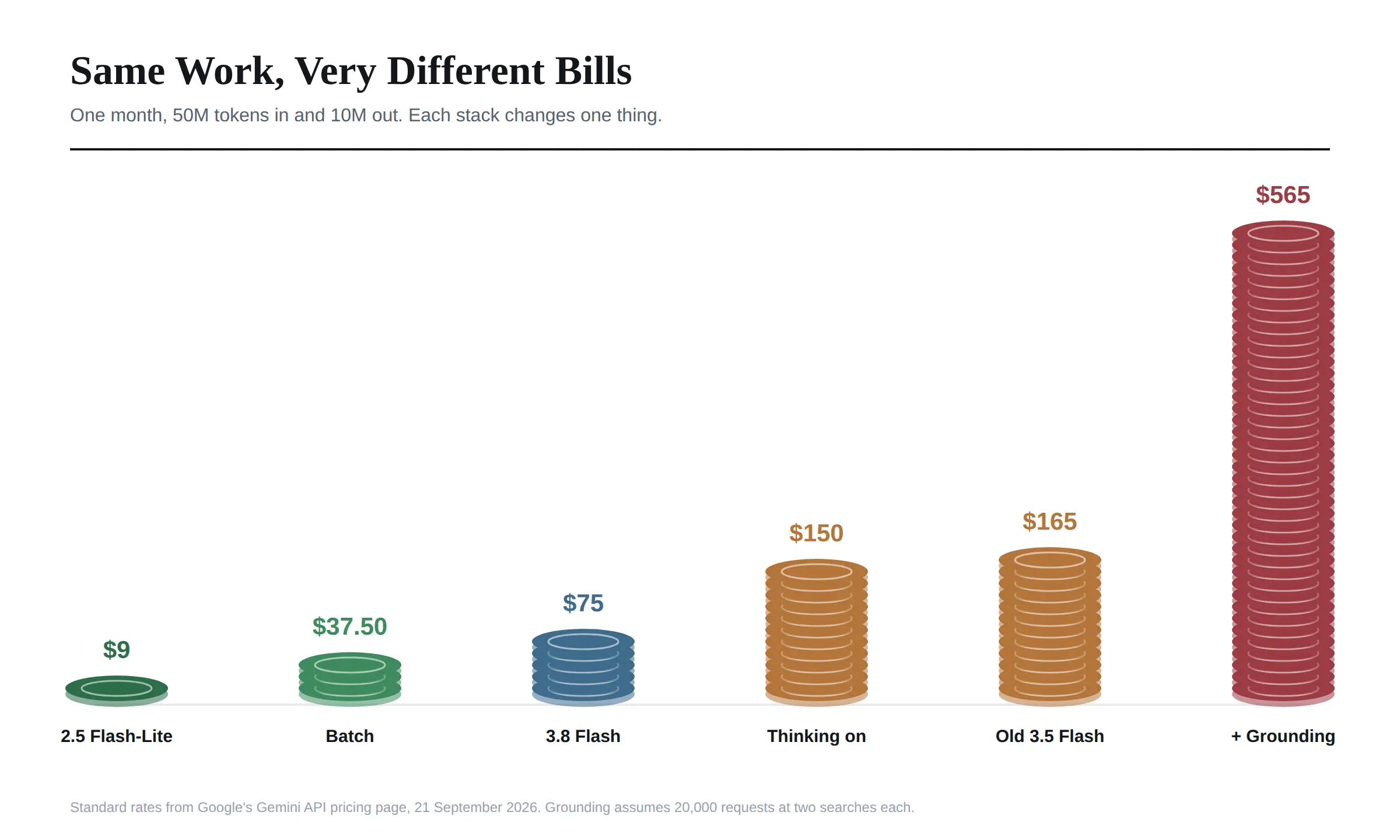
On Gemini 3.8 Flash at the Standard rate, that month costs 75 dollars. Every section below changes one thing and shows what happens to that number.
 Dial One: The Newer Flash Is the Cheaper Flash
This is the finding that surprised me most, and I have not seen a single pricing guide lead with it.
Gemini 3.8 Flash is Google's newest and most capable Flash model. Gemini 3.5 Flash is an older one. You would expect the newer model to cost more.
It costs less. On my workload, 3.8 Flash comes to 75 dollars and 3.5 Flash comes to 165 dollars, more than twice as much for the older, weaker model.
The reason is that 3.8, 3.7 and 3.6 Flash are on introductory pricing, while 3.5 Flash launched at 1.50 input and 9 dollars output and never got the discount.
And it does not flip back in January. When the introductory price ends, 3.8 Flash moves to 1.50 input and 7.50 output. That still undercuts 3.5 Flash on output, so the newer model stays the cheaper one.
If you built something on 3.5 Flash earlier this year and never revisited it, switching model names is the single easiest saving in this entire article.
Dial Two: Thinking Tokens Can Double the Bill
Google's pricing table labels the output column "including thinking tokens", and I think that short phrase matters more than anything else on the page.
When a Gemini model reasons through a problem before answering, those internal tokens are billed at the output rate, even though you never see them.
On my workload, if the model spends twice as many tokens thinking as it does writing the visible answer, the output side goes from 10 million tokens to 30 million. The bill goes from 75 dollars to 150 dollars.
That is why your real invoice so often comes in higher than a calculator predicted. The calculator counted the words you saw.
The fix is not to avoid reasoning models. It is to use thinking budgets where the model supports them, and to save heavy reasoning for tasks that actually need it.
Dial Three: Batch and Flex Cut It in Half
If your job does not need an answer immediately, this is free money.
Batch and Flex both run at 50 percent of the Standard rate. My 75 dollar workload becomes 37.50 dollars.
Batch suits work that can sit in a queue, such as overnight document processing, bulk classification, or generating embeddings for a large archive. Flex suits traffic that can tolerate being deprioritised when the system is busy.
I would move anything that is not user facing onto one of these first, before touching any other setting.
Dial Four: Caching, and the Point Where It Stops Paying
Context caching comes in two forms, and the difference decides whether it can ever cost you money.
Implicit caching happens automatically on Gemini 2.5 and newer models. When a request reuses a beginning you have sent before, Google passes on the discount with no storage fee and nothing to manage. I cannot see a way to lose money on it, so I would leave it doing its work.
Explicit caching is the version you create on purpose, to guarantee the discount on a long system prompt or document you know you will reuse. That is where the maths gets interesting.
When you cache a prompt explicitly, repeat reads cost about a tenth of the normal input rate. That is the saving everyone quotes.
What gets left out is the storage charge. Google bills an explicit cache by the hour, per million tokens stored, whether anyone reads it or not.
So there is a break-even point. Your cache has to be read often enough that the per read savings outweigh the hourly storage fee.
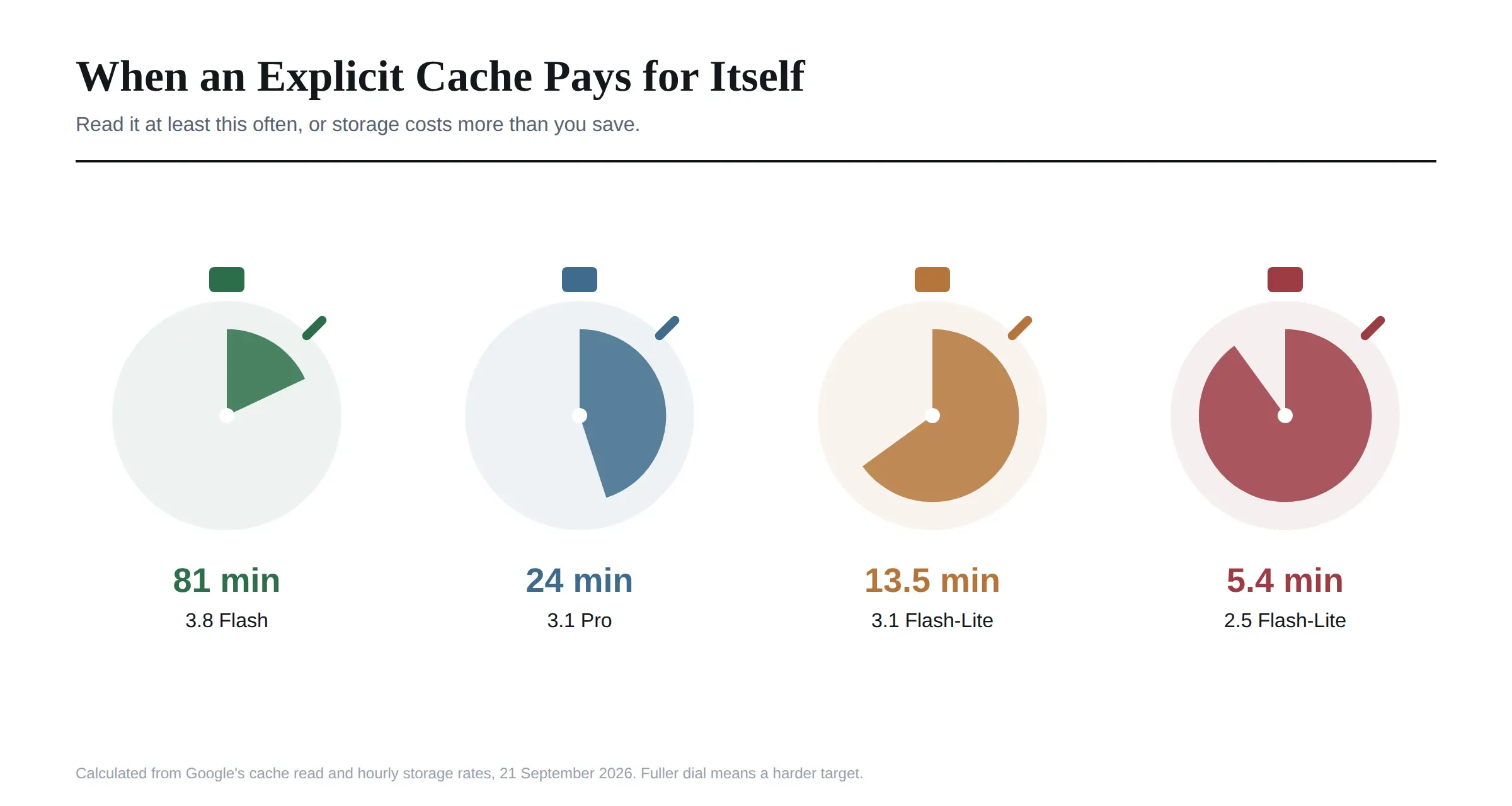 Other guides have worked this out for Pro. I worked it out for every model, and the cheap end is where it gets surprising. On Gemini 3.8 Flash, a cache needs to be read at least once every 81 minutes to pay for itself. On Gemini 3.1 Pro, once every 24 minutes. On Gemini 3.1 Flash-Lite, once every 13 and a half minutes.
On Gemini 2.5 Flash-Lite it needs a read every five and a half minutes, because the model is already so cheap that there is almost nothing left to save, while storage still costs a full dollar per million tokens an hour.
The practical rule I would take from this: rely on implicit caching by default. Use explicit caching on Pro and on busy Flash deployments, and think twice on the cheapest models unless your traffic is genuinely constant. Set short expiry times, and never leave a large explicit cache sitting idle overnight.
Dial Five: Priority Nearly Doubles It
Priority inference is for traffic where latency is money, such as a live assistant inside a paid product.
On Gemini 3.8 Flash, Priority runs at 1.35 input and 6.75 output. My workload becomes 135 dollars, 1.8 times the Standard price.
That can be worth it. I would just make the decision per request rather than per application, sending only the traffic that genuinely needs speed through Priority and leaving everything else on Standard or Flex.
Dial Six: The First of January
This one is not a setting you choose. It is a date, and I would put it in your calendar.
Gemini 3.8, 3.7 and 3.6 Flash are all on introductory pricing that runs through 31 December 2026. From 1 January 2027 the rates double, to 1.50 input and 7.50 output on Standard.
My 75 dollar workload becomes 150 dollars overnight, with no change to your code.
If you are building a budget, a pricing page, or a margin model on current Gemini Flash rates, build it on the January numbers. Anyone quoting you the lower figure without mentioning the date is quoting a price with an expiry on it.
Dial Seven: Grounding Can Outspend Everything Else
This is the cost I think catches the most people, because it is not a token charge at all.
Grounding lets Gemini search Google before answering, so replies reflect current information. On Gemini 3 models you get 5,000 free search requests a month, shared across all Gemini 3 models, and then pay 14 dollars per 1,000.
Here is the detail in the small print. Google says a single request to Gemini may produce one or more search queries, and each query is charged separately.
Say my workload includes 20,000 grounded requests a month. At one search each, grounding adds 210 dollars. If the model averages two searches per request, it adds 490 dollars. Either way, grounding costs more than the entire 75 dollar token bill.
There is an odd twist. The older Gemini 2.5 models use a different allowance, 1,500 free grounded prompts per day rather than 5,000 per month. Twenty thousand requests a month is about 667 a day, which fits inside that daily allowance completely. For moderate, steady grounding traffic, the older model can be dramatically cheaper purely because of how the free allowance is counted.
If you use grounding, track search queries as their own line item. It is the one that grows fastest.
Dial Eight: The Free Tier Has a Price Too
The Gemini API free tier is real and genuinely useful. You can prototype in Google AI Studio with the Flash and Flash-Lite models at no cost, with rate limits shown live in AI Studio rather than published as a fixed table.
But the free tier is not free of conditions, and one of them matters more than the rate limits.
Google's pricing page states plainly that on the free tier, your content is used to improve its products. On the paid tier, it is not.
So the free tier is fine for testing with made up data. I would not send customer information, internal documents or anything confidential through it. The moment real data is involved, the paid tier is not an upgrade, it is a requirement.
The free tier also does not include Gemini 3.1 Pro at all. Reports from earlier in the year said Pro models left the free tier on 1 April 2026, though Google's current table still shows Gemini 2.5 Pro as free of charge on the free tier, so I would test it rather than assume either way.
Images, Video, Audio and Embeddings
Text is only part of the Gemini API, and I found the other media are priced very differently.
Image generation. Gemini 3.1 Flash Image, which Google calls Nano Banana 2, works out to about 0.067 dollars per 1K image. The Lite version is about 0.034. The Pro image model is about 0.134 per image up to 2K and 0.24 at 4K. Batch halves all of these.
Video generation. Veo 3.1 bills per second. The Standard model is 0.40 dollars a second at 720p or 1080p. Fast drops to 0.10 at 720p, and Lite to 0.05. A ten second clip on Standard is four dollars, which adds up quickly if you are iterating.
Audio input. Audio usually costs more than text for the same model. On Gemini 3.1 Flash-Lite, audio input is 0.50 dollars per million tokens against 0.25 for text, so twice as much.
Embeddings. Gemini Embedding 2 costs 0.20 dollars per million tokens for text, and halves on batch.
How Billing Actually Works, and the Caps That Stop a Runaway Bill
This is the part that decides whether a mistake costs you 20 dollars or 2,000, so I checked it against Google's billing page rather than trusting other guides. One widely read guide gives the minimum prepayment as 10 dollars. Google's page says 5.
New accounts start on the free tier. To move to paid, you link a billing account and prepay credits, with a minimum of 5 dollars and a maximum balance of 5,000. Your usage is then deducted from that balance in close to real time.
From there you climb through usage tiers automatically as you spend.
Tier | How you reach it | Monthly spend cap |
|---|---|---|
Tier 1 | Link a billing account | 250 |
Tier 2 | 100 dollars paid, plus 3 days | 2,000 |
Tier 3 | 1,000 dollars paid, plus 30 days | 20,000 to 100,000 |
Figures in US dollars. Higher tiers also raise your rate limits.
A few rules on that page matter more than people realise, and I would read them before going live.
When your prepaid balance hits zero, every API key in every project on that billing account stops at once. Requests fail with a payment required error until you top up. For a live product, that is an outage, so I would set up auto reload, and the monthly auto charge limit alongside it so a runaway loop cannot keep reloading.
Prepaid credits expire after 12 months and are not refundable. I would buy in small amounts rather than loading a year of budget up front.
Billing runs about ten minutes behind real usage. Spend caps are real, but a batch job or an agent can overshoot them in that window, so I would not treat a cap as a hard wall.
The 300 dollar Google Cloud welcome credit does not cover the Gemini API for accounts opened after 2 March 2026. That catches out a lot of new developers who assume their free cloud credit pays for testing.
Failed requests are not charged. A request that fails with a 400 or 500 error costs nothing in tokens, though it still counts against your rate limit.
A missed payment elsewhere can switch Gemini off. If the same billing account has an overdue bill for another Google Cloud service, your Gemini API access can be suspended even with credits sitting in your balance.
What Is Shutting Down, and One Date That Is Wrong
Pricing a project on a model that is about to disappear is an expensive mistake, so I checked Google's deprecation page directly. It was updated on 17 September.
Three deadlines are close. Gemini Omni Flash Preview, the video model's preview version, shuts down on 30 September 2026. Gemini 2.5 Flash Image, the original image model, shuts down on 2 October 2026. And the older Antigravity agent preview shuts down on 5 October.
Now the date that is wrong. At least one popular pricing guide says the entire Gemini 2.5 series, Pro, Flash and Flash-Lite, retires on 16 October 2026. Google's own deprecation page lists no shutdown date announced for any of those three models. I would not migrate a working 2.5 project on the strength of that claim.
There is also a migration trap worth knowing. Gemini 3.1 Flash-Lite has an earliest shutdown date of 7 May 2027, and Google's recommended replacement is Gemini 3.5 Flash-Lite. But 3.1 Flash-Lite costs 0.25 input and 1.50 output, while its replacement costs 0.30 and 2.50. On my workload, that forced move takes the bill from 27.50 dollars to 40, a rise of nearly half, for a change you did not choose.
Google notes that the dates on that page are the earliest possible shutdowns, and exact dates are confirmed with notice. Even so, I would put every model you depend on into a calendar with its date beside it.
Developer API or Vertex AI
As far as I can tell, you can reach Gemini two ways. The Gemini Developer API, set up through Google AI Studio with an API key. Or Google Cloud, through what is now called the Gemini Enterprise Agent Platform, the successor to Vertex AI.
Google notes that prices may differ between the two, and the Cloud route adds enterprise features: provisioned throughput, advanced security and compliance, and volume based discounts.
One useful detail from Google Cloud's pricing page. You are only charged for requests that return successfully. Errors, whether yours or Google's, cost nothing.
For a solo developer or a small team, the Developer API is simpler. For a company that needs contracts, compliance and committed spend, the Cloud route is the one procurement will ask for. And if what you actually want is to give a whole team access to Gemini alongside other models, without handing out API keys at all, a governed workspace such as Haime is a third route worth knowing about.
How Gemini API Pricing Compares
On my workload, using the rates I verified in late August for the other providers, here is roughly where Gemini sits.
GPT-5.6 Luna comes to about 22 dollars. DeepSeek V4-Flash, at off peak rates, about 17.60. Gemini 3.8 Flash, 75 dollars. Claude Haiku 4.5, 100 dollars. Claude Sonnet 5, 200 dollars.
So Gemini's mid tier Flash models are not the cheapest option on raw token price. Where Gemini genuinely leads is at the very bottom, since Gemini 2.5 Flash-Lite at 9 dollars undercuts almost everything, and in how much context you get for the money, with a million token window even on the cheapest models.
Part of the reason Google can price its smallest models this aggressively, I suspect, is that it runs them on its own TPU chips rather than renting capacity, something I covered in our look at the companies that make AI chips.
Two Numbers I Would Not Budget On
I want to flag two things I could not settle, rather than paper over them.
Gemini 3.1 Pro's context window. Some guides describe it as two million tokens. Google's pricing page does not state the window at all, and I could not confirm the larger figure from an official source. I would treat one million as the safe planning number until Google says otherwise.
Pro on the free tier. As above, reports say Pro models left the free tier in April, while the current pricing table still lists Gemini 2.5 Pro as free of charge. Check AI Studio for your own project before relying on it.
Frequently Asked Questions
How much does the Gemini API cost?
From 0.10 dollars per million input tokens on Gemini 2.5 Flash-Lite up to 2 dollars on Gemini 3.1 Pro, with output priced several times higher. A realistic small workload of 50 million input and 10 million output tokens costs 75 dollars a month on Gemini 3.8 Flash.
Is the Gemini API free?
There is a genuine free tier through Google AI Studio for the Flash and Flash-Lite models, with rate limits shown in AI Studio. On the free tier your content is used to improve Google's products, so it suits testing rather than real customer data.
What is the cheapest Gemini model?
Gemini 2.5 Flash-Lite, at 0.10 dollars per million input tokens and 0.40 output. Batch and Flex halve that again.
How much is Gemini 3.1 Pro per million tokens?
2 dollars input and 12 dollars output for prompts up to 200,000 tokens, rising to 4 and 18 dollars above that. It is not available on the free tier.
Does Gemini charge for thinking tokens?
Yes. Thinking tokens are billed at the output rate, even though you never see them. A model that thinks twice as much as it writes can double your bill.
How does Gemini batch pricing work?
Batch and Flex both cost 50 percent of the Standard rate. Batch suits jobs that can wait in a queue, and Flex suits traffic that can tolerate lower priority.
When does Gemini introductory pricing end?
On 31 December 2026. From 1 January 2027, Gemini 3.8, 3.7 and 3.6 Flash rise from 0.75 and 3.75 to 1.50 and 7.50 dollars per million tokens.
Is Vertex AI more expensive than the Gemini API?
Google says prices can differ between the Developer API and its Cloud platform. The Cloud route adds enterprise features and volume discounts, and only charges for successful requests.
Is Gemini cheaper than OpenAI or Claude?
At the very bottom, yes. Gemini 2.5 Flash-Lite undercuts most rivals. At the mid tier, GPT-5.6 Luna and DeepSeek V4-Flash were cheaper per token when I checked, while Gemini Flash was cheaper than Claude Haiku and Sonnet.
Do Gemini API prepaid credits expire?
Yes. Prepaid credits expire 12 months after purchase and are not refundable. The minimum purchase is 5 dollars and the maximum balance is 5,000.
Is Gemini 2.5 being shut down?
Not according to Google's own deprecation page, which as of 17 September lists no shutdown date for Gemini 2.5 Pro, Flash or Flash-Lite. Only Gemini 2.5 Flash Image has a date, 2 October 2026.
How can I reduce my Gemini API bill?
Move to Gemini 3.8 Flash if you are on 3.5 Flash, send non-urgent work through Batch or Flex, set thinking budgets, only cache on models and traffic where it pays, and track grounding searches as their own cost.
If I Were Setting Up Gemini Today
I would start on Gemini 3.8 Flash at the Standard rate, and budget as if it already cost the January price.
I would push everything that is not user facing through Batch from day one. I would set a thinking budget rather than leaving reasoning unlimited. And I would only switch on caching after checking that my traffic clears the break-even rate for the model I chose.
If I needed grounding, I would watch search queries weekly, because that is the line most likely to surprise me.
And before sending a single piece of real customer data, I would make sure I was on the paid tier, not the free one.
Every figure here was checked against Google's own pricing page on 21 September 2026. Google changes these rates often, and the introductory Flash pricing has a fixed end date, so confirm the current numbers before you commit a budget.